12
Using the Handset Menu
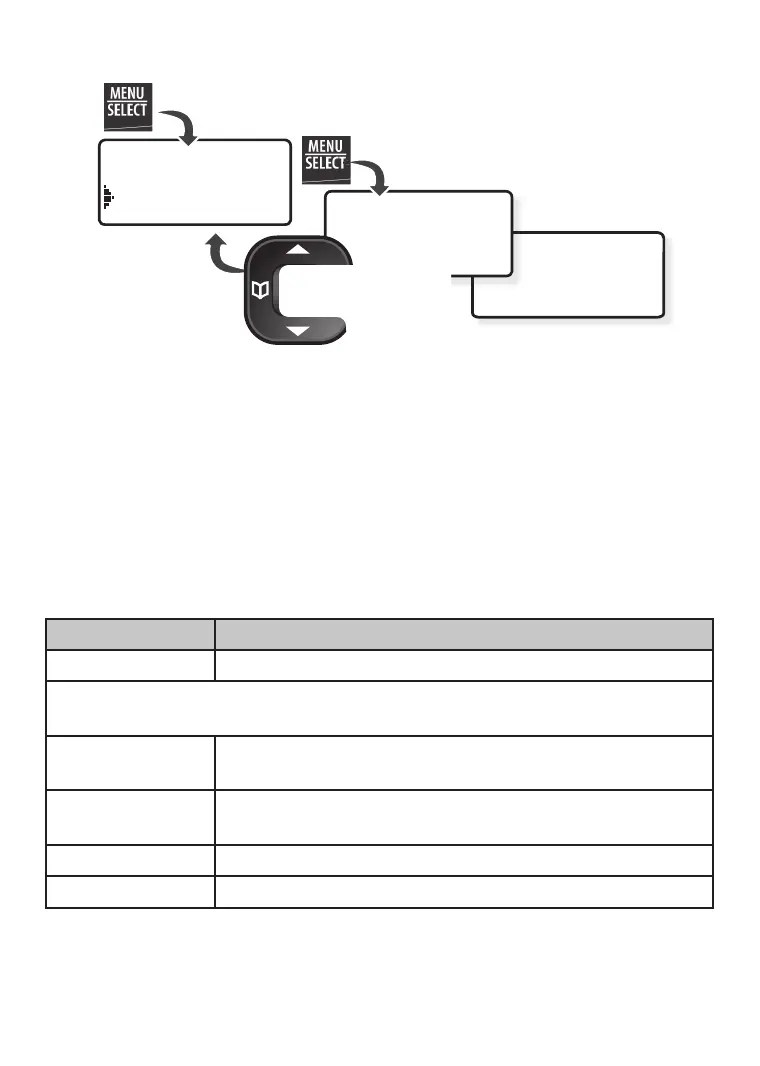
If you don’t press any keys for about 30 seconds, the handset exits the
menu. During a call, use PHONEBOOK to back out of the menu without hanging
up.
AddMobile
Intercom
BluetoothSetup
Search&Select
fromMobile
Use
UP
and
DOWN
to
rotate through the
options.
Press
MENU/SELECT
to
open the menu.
Press
MENU/SELECT
to choose
the current option.
Press
PHONEBOOK
to
go back a screen
OR
press
END
to exit
the menu.
Intercom Menu
The Intercom menu lets you connect 2 handsets without using the phone
line. Any handset can connect to an intercom call, but only two handsets
can be in the call at one time.
Bluetooth Setup Menu
The Bluetooth Setup menu provides the following operations:
Menu Option What it does
Add Mobile Pairs mobile phone with base.
Once a mobile has been paired with the DECT 3236, the following
options are available.
Make Call Use this option to make a call from the mobile phone
line through the handset.
Privacy Setup Determines which handsets will ring when a mobile
call comes in (default = off).
Download PB Downloads the mobile phonebook to the base.
Remove Mobile Un-pairs a mobile phone from the base.


 To Next Page