EasyManua.ls Logo

Uniden TRU9460 - User Manual

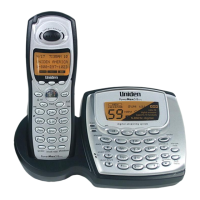
Uniden TRU9460
68 pages
Print Icon
To Next Page IconTo Next Page
Loading...

Table of Contents

Questions and Answers

  • A
    Andre GallowayAug 14, 2025
    What to do if my Uniden Cordless Telephone handset doesn’t ring or receive a page?
    • J
      Joshua CoxAug 14, 2025
      If your Uniden Cordless Telephone handset isn’t ringing or receiving pages, first ensure that you are not too far from the base. Then, charge the handset's battery for at least 15-20 hours by placing it on the base or charging cradle. You can also try changing the Digital Security Code.
  • M
    Michele SantosAug 17, 2025
    What to do if my Uniden TRU9460 Cordless Telephone can't make or receive calls?
    • D
      David MayAug 17, 2025
      If your Uniden Cordless Telephone can't make or receive calls, ensure you're not too far from the base. Check that the line isn't already in use for an outside call. Examine both ends of the telephone line cord connected to the base. Also, verify the AC adapter is properly plugged into both the base and the wall outlet. As a troubleshooting step, disconnect and reconnect both the AC adapter and the backup battery. Additionally, try changing the Digital Security Code.
  • D
    Dawn BeckAug 20, 2025
    How to fix Uniden TRU9460 when charge/in use LED won’t illuminate?
    • N
      Nicole NewtonAug 20, 2025
      If the charge/in use LED on your Uniden Cordless Telephone does not light up when the handset is in the cradle, ensure that the AC adapter is properly plugged into both the base or the charger (if you're using more than one handset) and the wall outlet. Also, make sure the handset is correctly seated in the cradle and that the charging contacts on the handset are clean.
  • J
    Julie VargasAug 25, 2025
    How to fix severe noise interference on Uniden TRU9460?
    • S
      suttonericaAug 25, 2025
      To resolve severe noise interference on your Uniden Cordless Telephone, keep the handset away from potential sources of interference such as microwave ovens, computers, remote control toys, wireless microphones, alarm systems, intercoms, room monitors, fluorescent lights, and other electrical appliances. Alternatively, move to a different location or try turning off the source of the interference.
  • A
    Amy KnightAug 27, 2025
    Why is my Uniden TRU9460 Cordless Telephone audio sounding weak?
    • M
      Matthew Bell DDSAug 27, 2025
      If the audio on your Uniden Cordless Telephone sounds weak, try moving the handset and/or the base away from metal objects or appliances. Also, ensure that you are not too far from the base.
  • L
    Lauren TaylorAug 30, 2025
    What to do if the Caller ID does not display on my Uniden TRU9460 Cordless Telephone?
    • M
      Morgan ElliottAug 30, 2025
      If the Caller ID is not displaying on your Uniden Cordless Telephone, it might be because the call was placed through a switchboard. Alternatively, contact your telephone provider to confirm that your Caller ID service is active and that there are no issues with your service.
  • N
    nathan64Sep 2, 2025
    What to do if Uniden TRU9460 Cordless Telephone handset doesn’t communicate with other handsets?
    • J
      Jeffrey JonesSep 2, 2025
      If your Uniden Cordless Telephone handset isn’t communicating with other handsets, try changing the Digital Security Code. Also, make sure that you have registered all handsets.
  • C
    Christopher ShawSep 6, 2025
    Why can’t an extra handset join the conversation on my Uniden TRU9460 Cordless Telephone?
    • A
      Alexandra VegaSep 6, 2025
      If an extra handset can’t join the conversation on your Uniden Cordless Telephone, ensure that there are not already two handsets using the conference feature. Also, check that another station is not in privacy mode.
  • J
    Jessica BakerSep 9, 2025
    Why the Room Monitor feature does not work on my Uniden Cordless Telephone?
    • S
      solisjeffreySep 9, 2025
      If the Room Monitor feature is not working on your Uniden Cordless Telephone, make sure to place the handsets within range of the base. Also, verify that the Room Monitor feature is turned on.

Summary

Welcome

Accessibility

Information on Uniden's customer service hotline for accessibility questions.

Terminology used in this Manual

Product Overview

TRU9460 Features

Lists the key features of the TRU9460 cordless phone system.

TRU9460 - Parts of the Phone

Handset

Identifies the parts of the cordless phone handset.

Base

Identifies the parts of the phone base unit.

Using the Interface

Reading the Handset Display

Explains the icons used on the handset display and their meanings.

Using the Four-way Function Key

Explains the function and operation of the four-way navigation key.

Using the Handset Menus

Details how to navigate and use the phone's menu system.

Entering Text from your Phone

Provides instructions on how to input text using the phone's keypad.

Installing the Phone

Choosing the Best Location

Guidelines for selecting an optimal location for the phone base and handset.

Installing the Rechargeable Battery

Step-by-step guide to install the rechargeable battery pack in the handset.

Connecting the Base and Charging the Handset

Instructions for connecting the base unit and charging the handset.

Installing the Belt Clip

Steps to attach and remove the belt clip accessory.

Connecting to the Phone Line

Procedure for connecting the phone to the telephone line.

Testing the connection

Steps to verify the phone connection and troubleshoot issues.

Basic Setup

Selecting a Language

How to select the display language for the phone menus.

Setting the Date and Time

Instructions for setting the current date and time on the phone.

Activating Caller ID on Call Waiting and Call Waiting Deluxe

How to enable Caller ID and Call Waiting Deluxe features.

Activating Personal Ring

Guide to assigning custom ring tones to contacts.

Activating the Key Touch Tone

How to turn the keypad sound effects on or off.

Adjusting the LCD Contrast

Instructions for adjusting the brightness of the handset's LCD screen.

Setting up Voice Mail

Setting the Voice Mail Signaling Tone

How to configure the phone to receive voice mail notifications.

Programming One-Touch Voice Mail Access

How to set up quick access to voice mail from the phone.

Resetting the Voice Message Waiting Indicator

Procedure to reset the voice message waiting indicator light.

Adding Accessory Handsets

Compatible Handsets

Lists Uniden handsets compatible with the TRU9460 system.

Charge the Accessory Handset

Instructions for charging a new accessory handset.

Registering TCX805;TCX905 Accessory or Extra Handsets

Steps to register specific Uniden accessory handset models.

Registering Other Compatible Handsets

Procedure for registering other compatible accessory handsets.

Resetting the Handsets

Base Unavailable (Handset Only)

How to clear base registration data from a handset.

Setting up the Phonebook

Creating Phonebook Entries

Step-by-step guide to add new contacts to the phonebook.

Finding a Phonebook Entry

Instructions on how to search and locate entries in the phonebook.

Editing Phonebook Entries

How to modify existing phonebook entries.

Storing Caller ID or Redial Numbers in the Phonebook

Guide to saving numbers from Caller ID or redial lists into the phonebook.

Erasing Phonebook Entries

How to delete individual phonebook entries.

Deleting All Phonebook Entries

Procedure to erase all entries from the phonebook.

Copying Phonebook Entries to another Station

How to transfer phonebook entries between handsets.

Copying all the phonebook entries at once

Instructions to transfer all phonebook entries to another handset.

Customizing Your Phone

Changing the Handset Banner

How to change the name displayed on the handset.

Selecting a Ring Tone

Instructions for choosing a ring tone for incoming calls.

Activating AutoTalk

How to enable answering calls by simply picking up the handset.

Activating Any Key Answer

How to enable answering calls by pressing any key.

Using your Phone

Making a call

Steps for making a phone call from the handset or speakerphone.

Answering a call

How to answer an incoming call.

Hanging up

Procedure to end a phone call.

Making a call from the Phonebook

How to dial a number stored in the phonebook.

Making a call with Speed Dial

Instructions for making calls using speed dial numbers.

Switching to the Handset Speakerphone during a Call

How to switch between the handset and speakerphone during a call.

Using Caller ID, Call Waiting and Redial Lists

Using the Caller ID List

How to view and manage incoming caller information.

Making a call from a Caller ID Record

How to dial a number directly from the Caller ID list.

Deleting Caller ID Numbers

Procedure to remove Caller ID entries from the list.

Using Call Waiting and Call Waiting Deluxe

Redialing a Number

How to quickly redial the last three numbers called.

Deleting a Redial Record

Procedure to remove entries from the redial list.

Adjusting the Ringer, Earpiece and Speaker Volume

Adjusting the Ringer Volume

How to set the volume for incoming call ringers.

Adjusting the Speaker Volume

How to adjust the earpiece and speaker volume levels.

T-coil (Handset only)

Explains the T-coil feature for hearing aid users.

Finding a Lost Handset

Using Hold, Conference and Transfer

Placing a Call on Hold

Instructions for putting an ongoing call on hold.

Conferencing

How to set up and participate in a conference call.

Transferring a Call

How to transfer a call from one handset to another.

Answering a Transferred Call

Procedure to accept a call transferred from another handset.

Using Special Features

Muting the Ringer (One Call Only)

How to temporarily mute the ringer for a single incoming call.

Muting the Microphone

How to mute the microphone during a call.

Privacy Mode

How to prevent other handsets from joining an active call.

Using the DirectLink Feature

How to use handsets as two-way radios.

Making a DirectLink Call

Steps to initiate a call using the DirectLink feature.

Exiting a DirectLink Call

How to end a DirectLink communication session.

Intercom

How to make internal calls between handsets without using the phone line.

Answering an Intercom Page

How to respond to an intercom request from another handset.

Room;Baby Monitor

How to use a handset to monitor sounds in another room.

Tone Dialing Switch Over

How to switch to tone dialing for specific calls.

Installing the Optional Headset

Seven-Digit Dialing

Maintenance

Specifications

Lists technical specifications of the phone.

Battery Replacement and Handling

Guidelines for replacing and handling the handset battery.

Cleaning the Battery Contacts

How to clean the charging contacts for optimal battery function.

Low Battery Alert

Explains the low battery warning and its effects.

Talk and Standby Times

Information on expected battery life for talk and standby.

Troubleshooting

Resetting the Handset

Steps to reset the handset to resolve issues or re-register.

Resetting the Handset without the Base

How to reset a handset if the original base is unavailable.

Changing the Digital Security Code

Procedure to change the security code for handset-base connection.

Traveling Out of Range

What happens when the handset moves out of the base's range.

Common Issues

A table listing common problems and their suggested solutions.

Liquid Damage

Precautions!

Rechargeable Nickel-Metal-Hydride Battery Warning

Warnings related to the rechargeable battery and its disposal.

Important Safety Instructions

General safety precautions for using the telephone equipment.

The FCC Wants You To Know

Radio Interference

Explains causes and solutions for radio interference.

Cordless Telephone Privacy

Notes on the privacy of cordless phone communications.

I.C. Notice

Terminal Equipment

Industry Canada technical specifications and registration.

RADIO EQUIPMENT

Radio certification and operational conditions.

One Year Limited Warranty

Uniden TRU9460 Specifications

General IconGeneral
BrandUniden
ModelTRU9460
TypeCordless Telephone
Number of Handsets1
RangeUp to 1000 feet
Talk TimeUp to 10 hours
Caller IDYes
Answering MachineYes
SpeakerphoneYes
Call WaitingYes
IntercomYes
ExpandableYes

Related product manuals