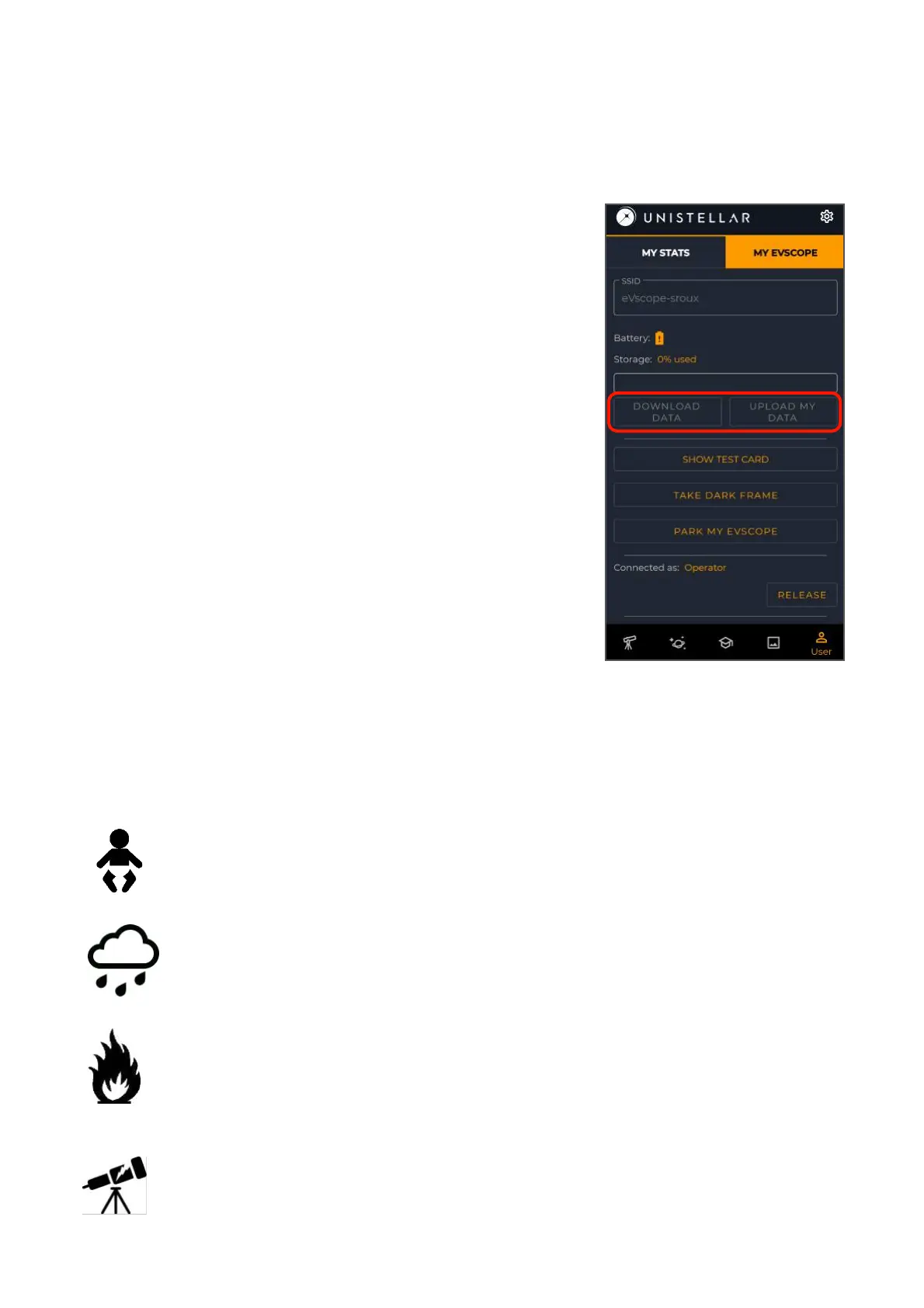
To empty the SD card storage, first select
Download data, then when it’s done, select Upload
my data.
Download data sends data from eVscope to your
smartphone. Upload my data send data from your
smartphone to the Unistellar servers.
You are your observations owner. By sharing
your data with us, you allow Unistellar to provide its
users with continuous improvement of their
observation experience.
It also makes scientific discoveries possible,
for which your contribution will be mentioned if you
wish. As usual in these cases, the results of
analyzes will be the property of those who analyzed it :
Unistellar and its scientific partners.
Your eVscope and its accessories are not toys. Do not allow small children to play with
them because children could hurt themselves or others or damage your device. Keep
Your eVscope is not meant to be used in wet environment. As every electronics
object (as exception of the waterproof ones), if water or another liquid enters into
the eVscope it can be definitively damaged. You should immediately turn off the
power and dry it.
Do not look at the Sun without an adapted filter. You eVscope can be definitively
damaged also after a short exposure. There is also an important fire hazard.
Furthermore, do not expose your eVscope at temperatures above 50°C or below
-20°C, the performances can be compromised by extreme temperatures.



 To Next Page