Installing and turning on the
telescope
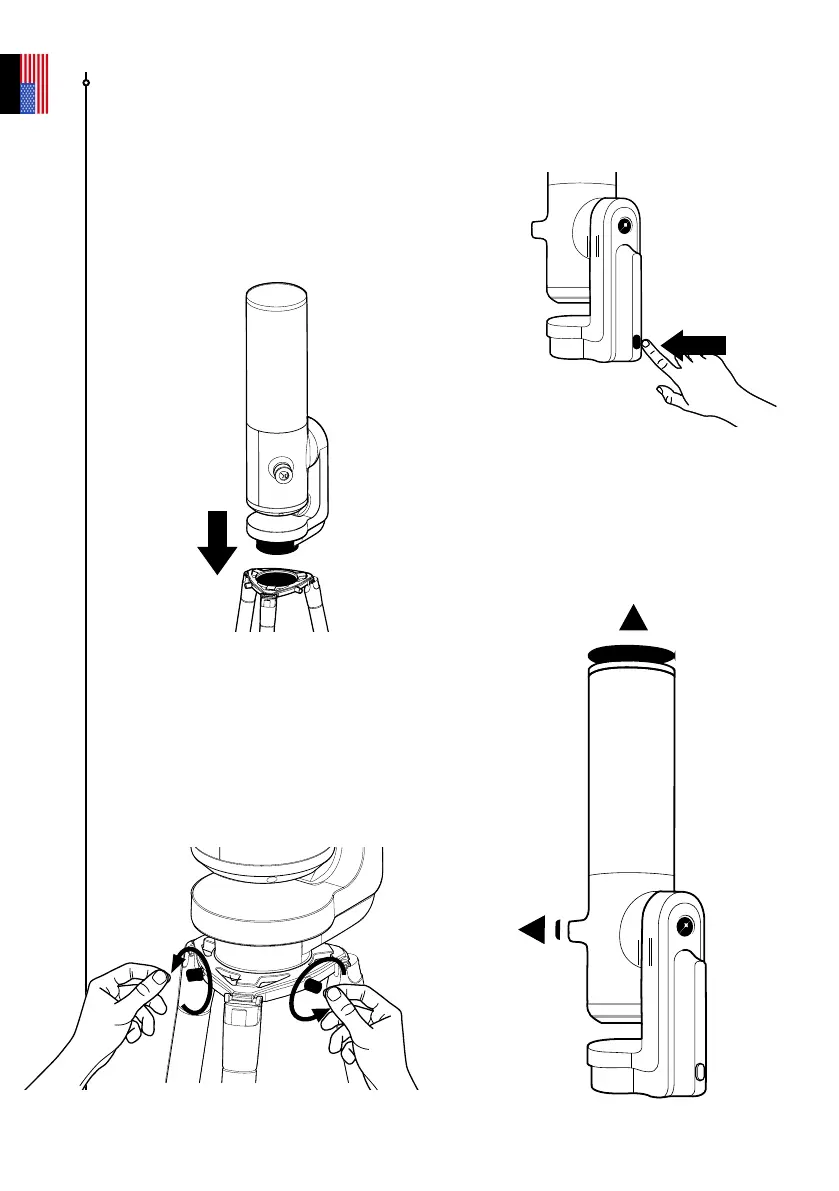
A - Install your telescope vertically on the
tripod. Check that the tripod base is properly
inserted and ts snugly into the tripod crown.
It should be stable—not loose or wobbly.
C - Turn the telescope on by pressing
the ON button for 2 seconds. The LED
turns purple, then red.
(You may not see the button light up when
using your telescope in daylight because
it is not very bright.)
D - Remove the caps from the
telescope’s optical tube and its
eyepiece.
B - Tighten the screws in the crown of
the tripod to secure your telescope. Be
careful not to overtighten the screws,
which can damage the threading.
PRESS
ON
2 sec
User guide | 13
English



 To Next Page