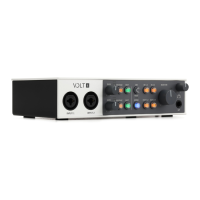
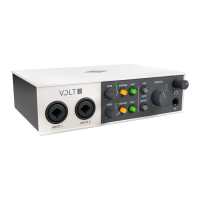
(2) Gain Knobs
These knobs adjust the preamp gain for the microphones, instruments, or line level devices attached to the
associated inputs. For optimum gain, rotate the gain knob to adjust the input signal level while monitoring the
source that is connected, so the input meters (3) show signal but do not light red.
(3) Input Meters
The Input Meters show the signal level of the input, which is controlled by the Gain knob. The red input LED
lights when the input signal is near 0 dB. Tip: Clipping occurs when the signal is overloaded. When clipping
occurs, the top of the waveform is squared off, creating distortion that may be unpleasant. Clipping has creative
uses, but is usually avoided. To prevent clipping, adjust the gain so only green and yellow meters light, and the
red LED doesn't light.
Tip: Clipping occurs when the signal is overloaded. When clipping happens, the top of the waveform is squared
off, creating distortion that may be unpleasant. Clipping has creative uses, but is usually avoided. To prevent
clipping, adjust the gain so only green and yellow meters light, and the red LED doesn't light.
(4) Vintage Buttons
Press these buttons to toggle the Vintage Preamps. The Vintage Preamps can be used on mic, line, and
instrument inputs.
The Vintage Preamp adds a carefully crafted analog tube preamp emulation, inspired by Universal Audio’s all-
tube 610 console preamplifier, to the sound. When the button is lit orange, the circuit is active.
(5) Instrument Buttons (INST)
Press these buttons to toggle the impedance and gain of the line inputs to accommodate Hi-Z instruments, such
as electric guitar or bass. These buttons are lit green when the Hi-Z inputs are enabled.
Tip: Generally speaking, the INST button should be off when connecting a line-level source such as a keyboard
or sound module, unless you need more gain.
(6) 48V Phantom Power Button
Press this button to toggle 48V phantom power at the XLR microphone inputs. The LED blinks red while
phantom power is activating or powering off. The LED is lit solid red when phantom power is active. Both XLR
inputs receive phantom power when enabled.
Phantom power is required by most condenser microphones, but is usually not required with dynamic
microphones or ribbon microphones (phantom power can damage some ribbon microphones).
Note: Disable phantom power before you connect or disconnect the microphone.













 To Next Page