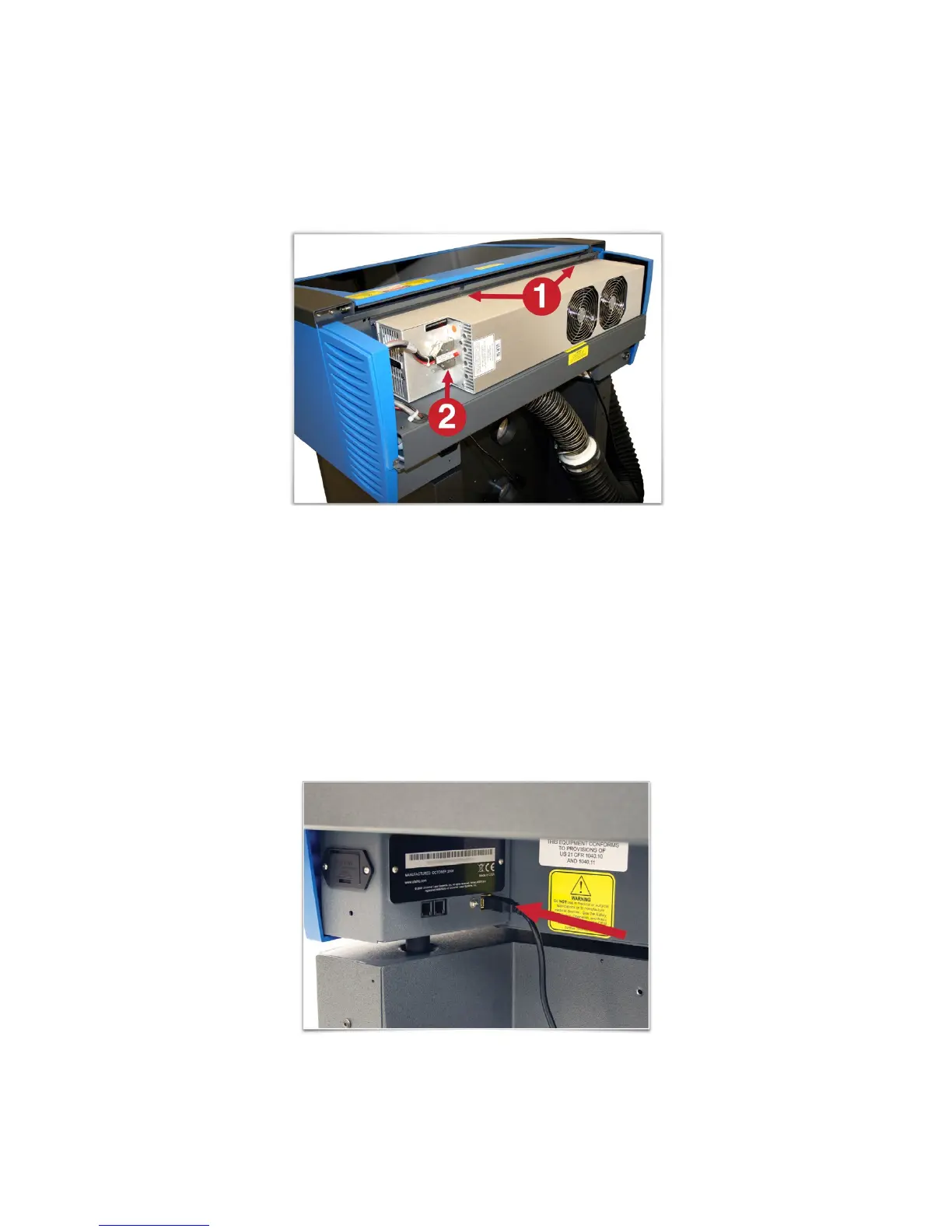
d. Pick up the laser cartridge by the ends and mount the cartridge onto the mounting blocks shown
in step b by placing the upper “V” groove on top of the mounting blocks. Slide the cartridge to the
right or left as necessary until the mounting holes in the top of the laser line up with the mounting
holes in the top of the laser mounting block.
e. Attach the two supplied mounting screws marked 1 above and the laser connector marked 2.
f. Replace the back cover.
5. Plug the laser system an optional exhaust air filtration unit, if present, into appropriate power outlets.
6. Connect the USB cable provided with the laser system between the USB port of the computer and the
USB port on the back of the laser system.
CAUTION: The laser system is USB 2.0 Hi-Speed (only). The laser system comes equipped with a high
quality, 6-ft (2.0 meter) USB 2.0 certified cable. We recommend you use this provided cable. Do not use
any adapters, extension cables, USB cables longer than 6 ft (2.0 meters) or other devices between the
computer’s USB port and the port on the laser system; sporadic or unpredictable behavior may result.
30


 To Next Page