20
4.1 Unpacking
4.2 Assembly
Unpack the F20 smart sintering furnace to check whether the
components are complete and whether they are damaged due to
transportation; if there are incomplete components or damage
due to transportation, please contact technical support of
UP3D TECH for solutions; Note: It is recommended to keep the
package for future transportation;
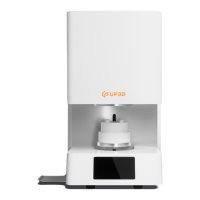
Step 1: Place the main body of the F20 sintering furnace on the
workbench surface specified in 1.2 Operation Precautions;
Step 2: Insert the power cord into the main body of the sintering
furnace, turn on the power, click the up button on the operation
interface, and wait for the lifting plaform to rise to a certain
level. After the height is reached, click the pause button, the
lifting platform stops lifting, and then take out the shock-
absorbing foam under the lifting platform.
Step 3: Click the down button to lower the lifting platform to the
lowest level, then place the hearth base on it, and finally place
the hearth on the hearth base. After the assembly is completed,
the F20 smart sintering furnace can be used normally.
04
Installation and use


 To Next Page