Service and Repair
3-4
0.4 BLOCKING ELEVATING ASSEMBLY
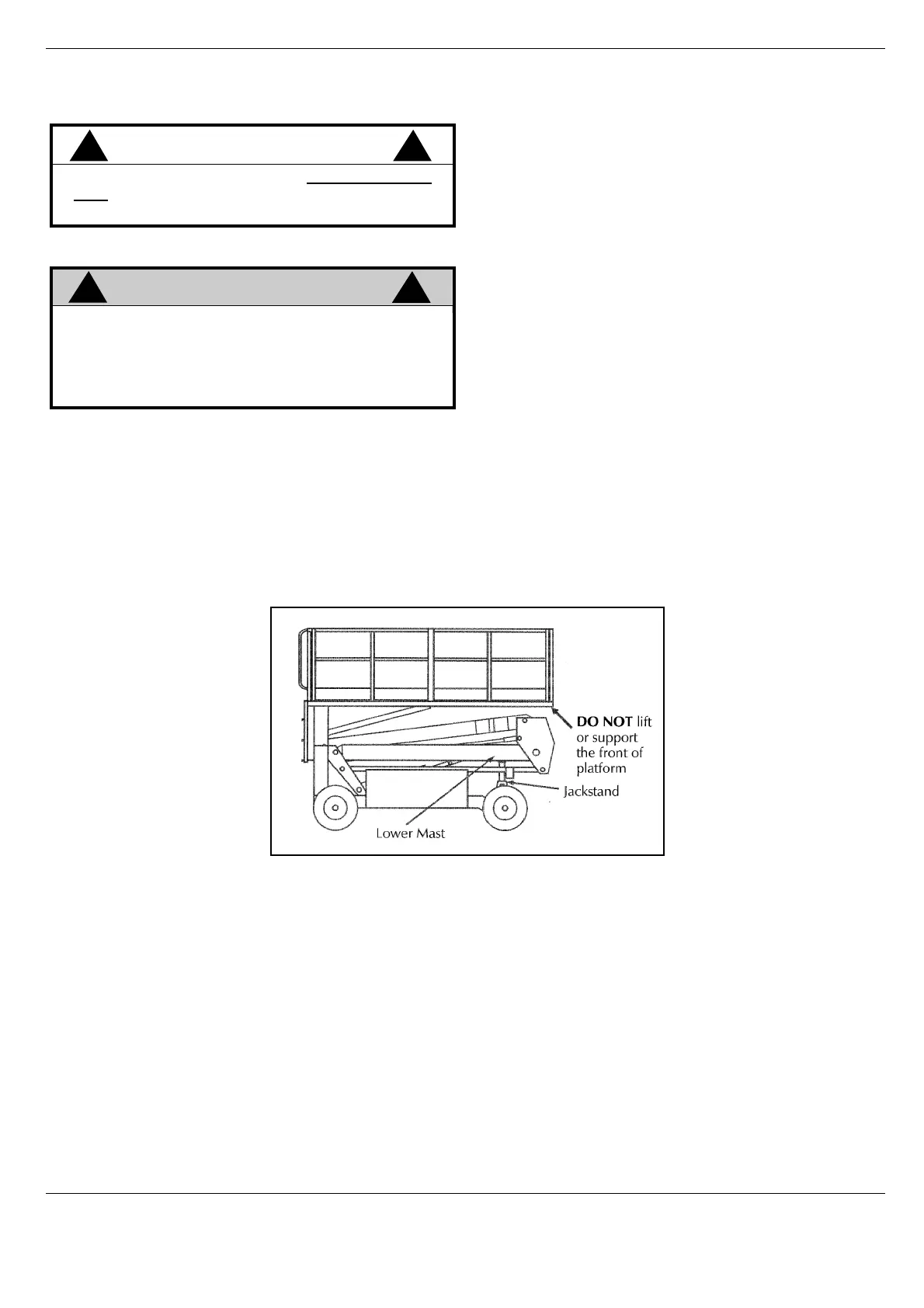
(FIGURE 0-1)
Installation
1. Park the work platform on firm, level ground and leave the engine running.
2. Select LIFT mode and use the ENABLE BUTTON to elevate platform approximately 305 mm (12 inches).
3. Place a jackstand with a minimum rating of 1814 kg (4000 lbs.) between the lower mast and chassis, just
behind the front axle.
4. Select LIFT mode and use the ENABLE BUTTON to gradually lower platform until jackstand is secured
tightly between lower mast and Chassis.
Figure 0-1: Blocking Elevating Assembly
Removal
1. Select LIFT mode and use the ENABLE BUTTON to elevate platform until jackstand can be removed.
2. Remove jackstand.
3. Select LIFT mode and use the ENABLE BUTTON to completely lower platform.
CAUTION
!!
DO NOT support or raise the front of the plat-
form during any maintenance operation as this
may result in damage to the tension members.
WARNING
!
!
BEFORE performing, maintenance on work
platform, while elevated, ensure that elevating
assembly is properly supported.
DO NOT stand in elevating assembly area
while installing or removing jackstand.



 To Next Page