8
9
Get to know your cutter Get to know your cutter
Before you start cutting, you should familiarize yourself with the
cutter along with its basic parts and functions.
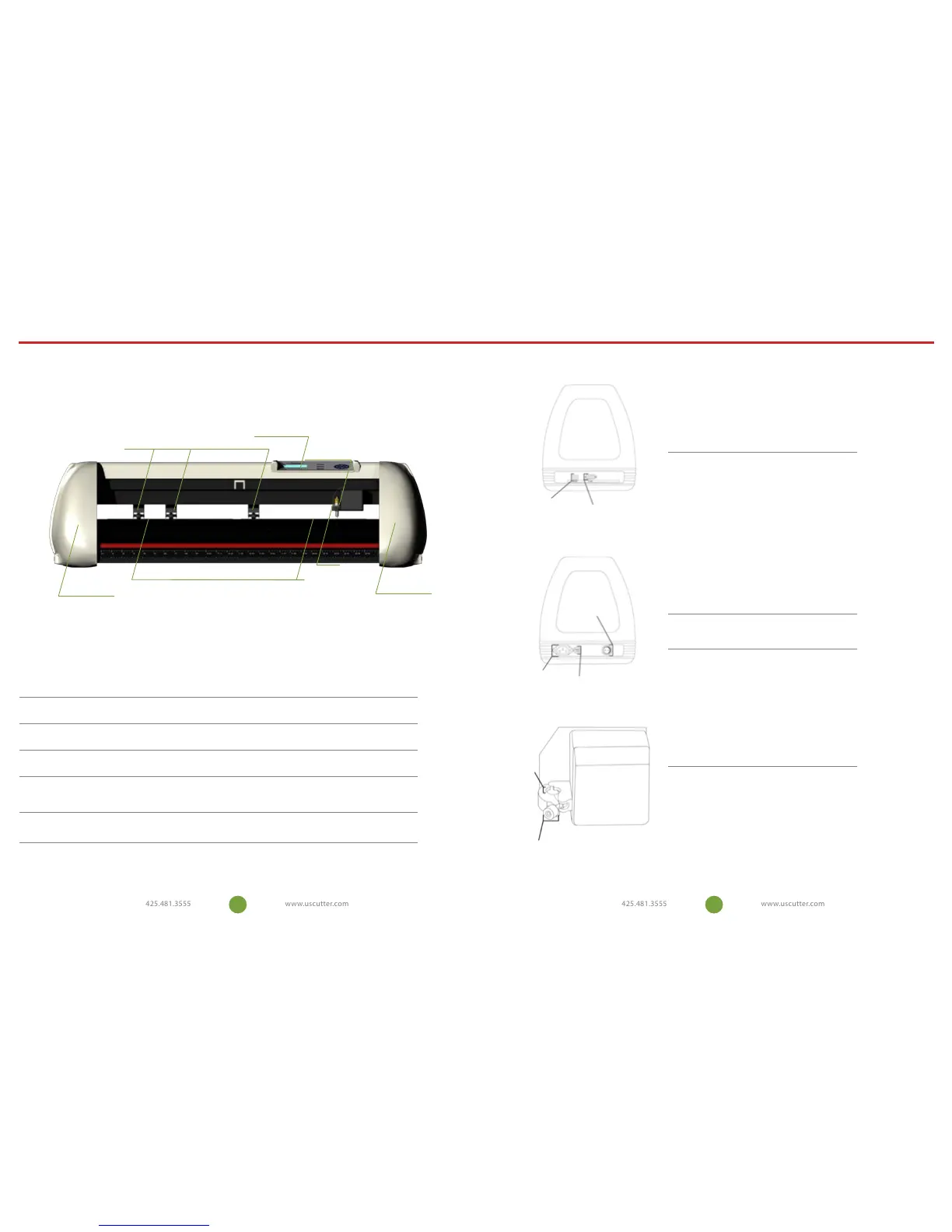
CONTROL PANEL
Used to provide input directly to the cutter. Covered in detail in the
“Control Panel” section of this manual.
CARRIAGE ARM
Holds the blade (or pen) carriage.
PINCH ROLLERS
Holds the media tightly to the feed roller below.
FEED ROLLERS
Positions the cutting material during operation.
LASER
Used by the cutter to determine the location of cut contours
LEFT SIDE COVER
Contains the power cable port, power switch, and fuse cartridge for the
cutter.
RIGHT SIDE COVER
Contains the USB and serial cable ports for the cutter.
CONTROL PANEL
CARRIAGE ARM
PINCH ROLLERS
FEED ROLLERS
RIGHT SIDE COVER
LEFT SIDE COVER
LASER
CARRIAGE SLOT
LOCKING KNOB
CARRIAGE SLOT
Holds the blade carriage in
place.
LOCKING KNOB
Allows access to the blade/pen
carriage slots for exchanging/
replacing carriages.
USB CABLE PORT
USB CABLE PORT
Used to connect a USB cable
from the cutter to a computer.
SERIAL (COM) CABLE
PORT
Used to connect a serial cable
from the cutter to a computer.
RIGHT SIDE VIEW
POWER SWITCH
FUSE CARTRIDGE
POWER CABLE PORT
POWER CABLE PORT
Used to connect a power cable
from the cutter to a wall outlet
or surge protector.
POWER SWITCH
Main power switch for turning
the power of the cutter on (1)
or o (0).
FUSE CARTRIDGE
Allows access to the fuse inside
of the cutter.
LEFT SIDE VIEW
SERIAL (COM) CABLE PORT


 To Next Page