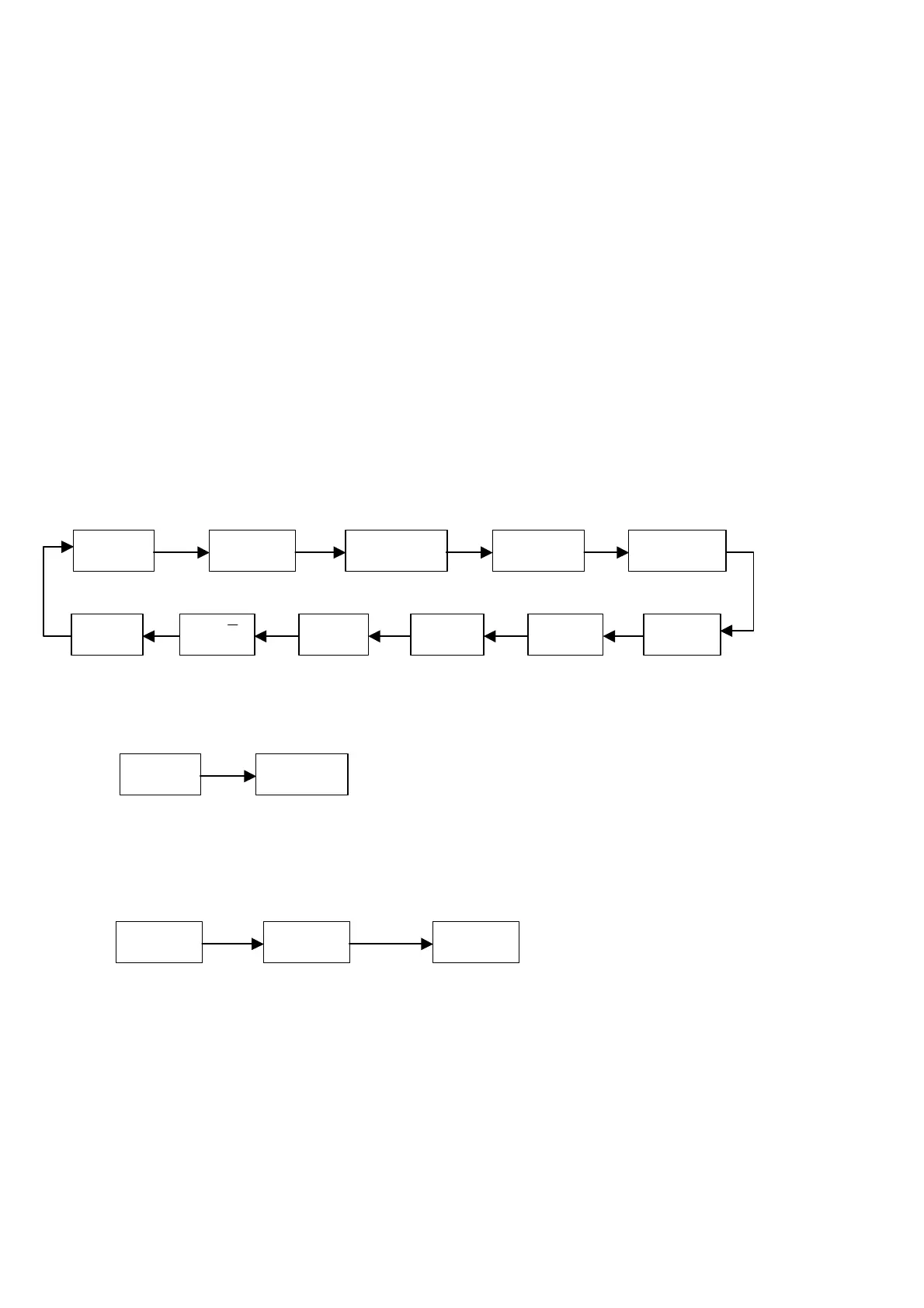
Ad
kEy tSt
dISPLA
br SEt
PArity
SEnd Unit dAtA
tESt
0.00
Ad
xxxxxx
[SET]
kEy tSt
[ZERO]
[SET]
kEy -
kEy x
press any key
4. SETTING
4.1 FUNCTION SETTING
When plug in the power, display will show “1705n.xx”. If Calibration Switch in the back
of the indicator is at ON position, then POWER signal and TARE signal will light up. Press
SET and display will show “SEt”, press TARE to enter setup menu. Utilize ZERO or TARE to
select the function that intend to set, such as Ad, kEY tSt, etc. Press SET to enter or
press STANDBY/OPERATE key to exit.
NOTE:
-When password is not required, display will show “1705n.xx” when power on the indicator.
-When password is required, please enter the correct password when display shows “P000000”
to enter function setup.
(FLOW CHART)
4.1.1
Internal resolution: this function will show the internal A/D resolution
4.1.2
Key testing: press any key and a corresponding key number will appear
1¡GZERO à 1
2¡GTARE à 2
3¡GGROSS/NET à 3
4¡GPRINT à 4
5¡GSET à 5
6¡GS= à 6
7¡GSM à 7
P_u



 To Next Page