Need help?
Do you have a question about the V-Moda HEXAMOVE LITE and is the answer not in the manual?
Instructions on fitting BLISS fittings, inserting earbuds correctly, ensuring a snug fit, and adjusting for comfort.
Guidance on storing earbuds in the charging case to prevent damage and ensure automatic charging.
Diagram and labels identifying key components of the earbuds: touch-gyro sensors, fittings, shields, and microphone.
Steps to turn on earbuds, make them discoverable, and complete pairing with a device.
Pairing earbuds with a new Bluetooth device, including deactivating previous connections and initiating pairing.
Using the right earbud's touch-gyro sensor for audio playback, call control, and track skipping.
Using the left earbud's touch-gyro sensor for audio playback and voice assistant activation.
Placing earbuds in the charging case and understanding LED indicators for battery status during charging.
Understanding audio alerts for low battery levels on the earbuds.
Interpreting LED indicators on the charging case for its battery and earbud charging status.
How to charge the charging case using USB-C and understanding its LED indicators.
Resetting earbuds and clearing paired device history for new pairings.
Information on the IPX5 rating for sweat and weather resistance, and notes on maintenance and resistance limitations.
Detailed steps for cleaning BLISS fittings, earbud nozzles, charging pins, and the charging case.
Common causes and suggestions for pairing issues, including earbuds not turning on or being in pairing mode.
Guidance on resolving issues with audio playback, including checking device connection, volume, and EQ settings.
Troubleshooting steps for latency issues where audio and video are out of sync, often due to device limitations.
Steps to diagnose and fix problems with sound from a single earbud, such as Bluetooth connection or charging issues.
Solutions for when earbuds fail to charge, checking charging cable, source, and USB connection.
Guidance on resolving unresponsive earbuds, typically by performing a hardware reset due to software errors.
Information on how to contact V-MODA support via website, email, or phone for product issues.
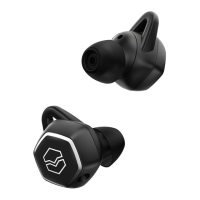
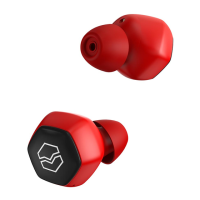
The V-MODA Hexamove Lite are true wireless earbuds designed for music lovers seeking a blend of timeless style, modern ergonomics, and advanced technology. These earbuds offer limitless movement and come in three stylish colors, ensuring comfortable wear for hours.
The Hexamove Lite earbuds provide a high-quality audio experience with V-MODA's signature sound. They are equipped with 6mm diaphragm drivers that deliver powerful bass, vivacious mids, and pristine highs. The earbuds offer 6 hours of wireless playback on a single charge, with an additional 18 hours of battery life provided by the charging carry case, allowing for all-day use.
These earbuds feature intuitive touch-gyro sensors for controlling audio playback, answering calls, and accessing voice assistants remotely. A built-in microphone ensures clear voice pickup for commands and calls. The Hexamove Lite are also IPX5 rated, making them resistant to sweat, water, and dust, suitable for various environments and activities.
To begin using the Hexamove Lite, simply remove them from their charging case. They will automatically power on. If they haven't been paired with a device before, they will enter pairing mode automatically. The earbuds will appear in your device's Bluetooth settings as "V-MODA HEXM LITE." Select this option to complete the pairing process. It is recommended to fully charge the battery before the first use.
To turn the earbuds on, remove them from their case. To turn them off, place them back in the case.
The Hexamove Lite earbuds feature an auto-power off function. After 10 minutes of inactivity, they will automatically power off to conserve battery. To reactivate them after auto-powering off, simply tap either earbud.
Remove the Hexamove Lite from their case to automatically turn them on. If they haven't been paired with an active device previously, they will automatically enter pairing mode. When "V-MODA HEXM LITE" appears in the "new Bluetooth devices" section on your phone, select it to begin pairing.
To connect to a new device, first deactivate Bluetooth on any previously paired device. Then, remove the Hexamove Lite from their case to automatically turn them on. If they have not been paired with an active device previously, they will automatically enter pairing mode. When "V-MODA HEXM LITE" appears in the "new Bluetooth devices" section on your phone, select it to begin pairing.
Insert the earbuds into the charging case to charge.
The earbuds provide audio warnings for low battery levels:
The charging case has LED indicators to show its battery status and the charging status of the earbuds:
Connect the USB-C charging cable to the charging case input. Ensure the USB-C cable is connected to a power source to enable charging. The charging case indicates its battery level with three green LEDs:
The earbud will automatically detect the closest earbud and pair with it when a pair is removed from the charging case.
To clear the paired device history and reset the Hexamove Lite:
Store the earbuds in the charging case to prevent damage when not in use or during transport. The earbuds automatically charge when in the charging case, ensuring they are always ready for use.
The Hexamove Lite are rated IPX5, meaning they are sweat and weather resistant. However, they are not designed to be submerged under water.
Periodic cleaning of the headphones and charging case is recommended.
 General
| Type | In-ear |
|---|---|
| Wireless | Yes |
| Bluetooth | Bluetooth 5.0 |
| Water Resistance | IPX5 |
| Driver Type | Dynamic |
| Driver Size | 6mm |
| Frequency Response | 20Hz - 20kHz |
| Impedance | 16 ohms |

 To Next Page