USBVideoGrabberAVC05EN
EzcapVideoCaptureOperation–MacOSX®
1.ConnecttheUSBtypeAconnector(host)intoan
availableUSB2.0portonyourcomputersystem.
2.Connectyouranalogvideosource(DVD,DVR,VCR,
Etc.)tothecompositeorS‐VideoinputontheAVC05
AVCable.
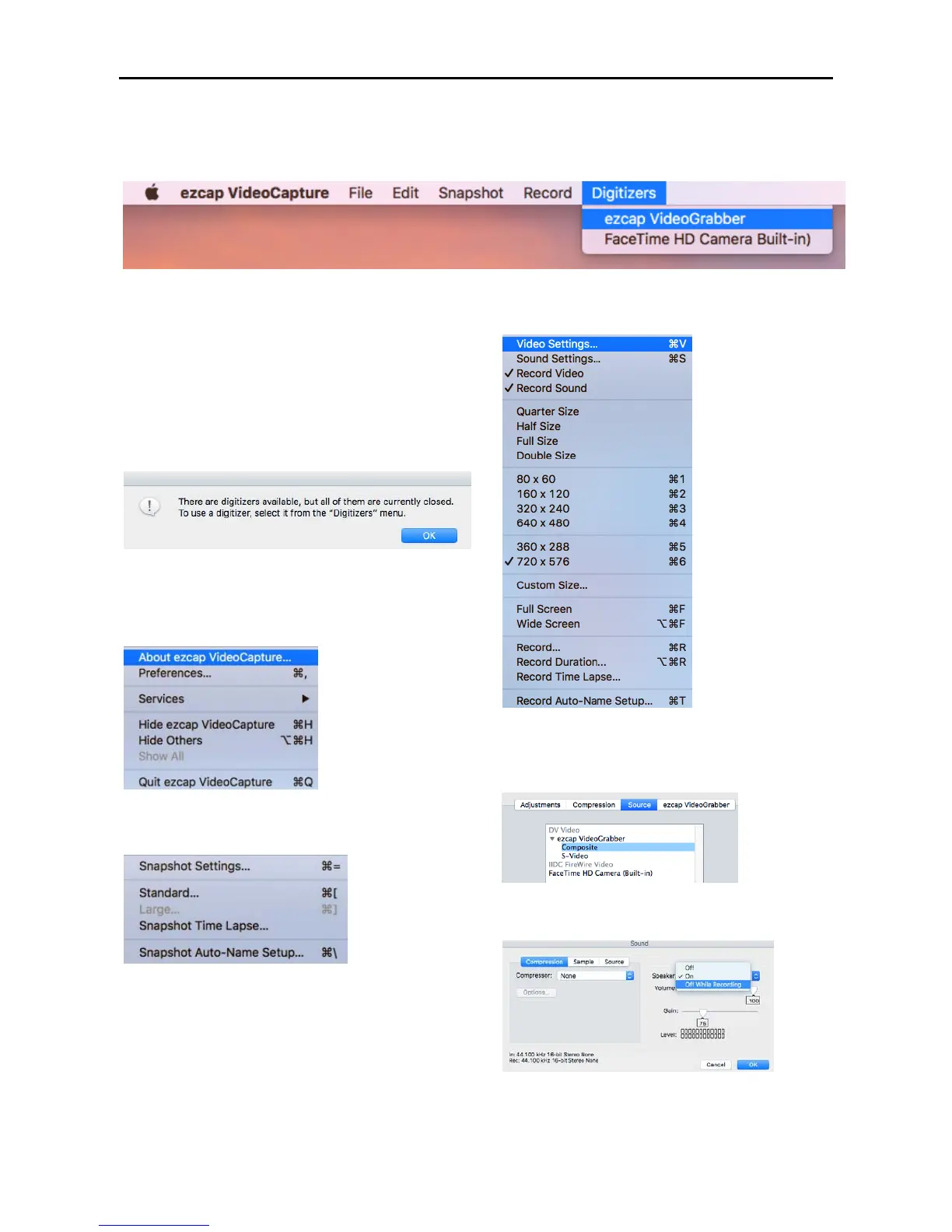
3.Choose“ezcapVideoGrabber”toenterintothe
moviepreview
model.
Note:Ifyoucannotfindthe“ezcapVideoGrabber”,
thenpleasecheckalloftheconnection.
4.EzcapVideoCapture
5.Snapshot
SettingupOne‐ButtonSnapparameters.
6.Record
Setting“Video”,“Sound”,“Record”parameters.
6–1:VideoSettings:
SettingupVideoinputsource:Compositeor
S‐Video.
6–2:AudioSettings:
SettingupAudioon/offduringrecording.


 To Next Page