ENGLISH
- 42 -
9 - INSTALLATION MENÙ (SEt)
Thismenuallowsyoutoperformthemovementsofthegate
neededduringinstallation.
Theautomaticlearningprocedureenablestosaverunlimitsbased
ondatacollectedbytheencoder.
Themanualhandlingprocedureallowstocontrolthegateinhold
torunmodeinspecialcasessuchasduringinstallation/
maintenanceoramalfunctionofthephotocellsoredges.
m ATTENTION: before proceeding, make sure to position
the mechanical stops and the limit sensors correctly.
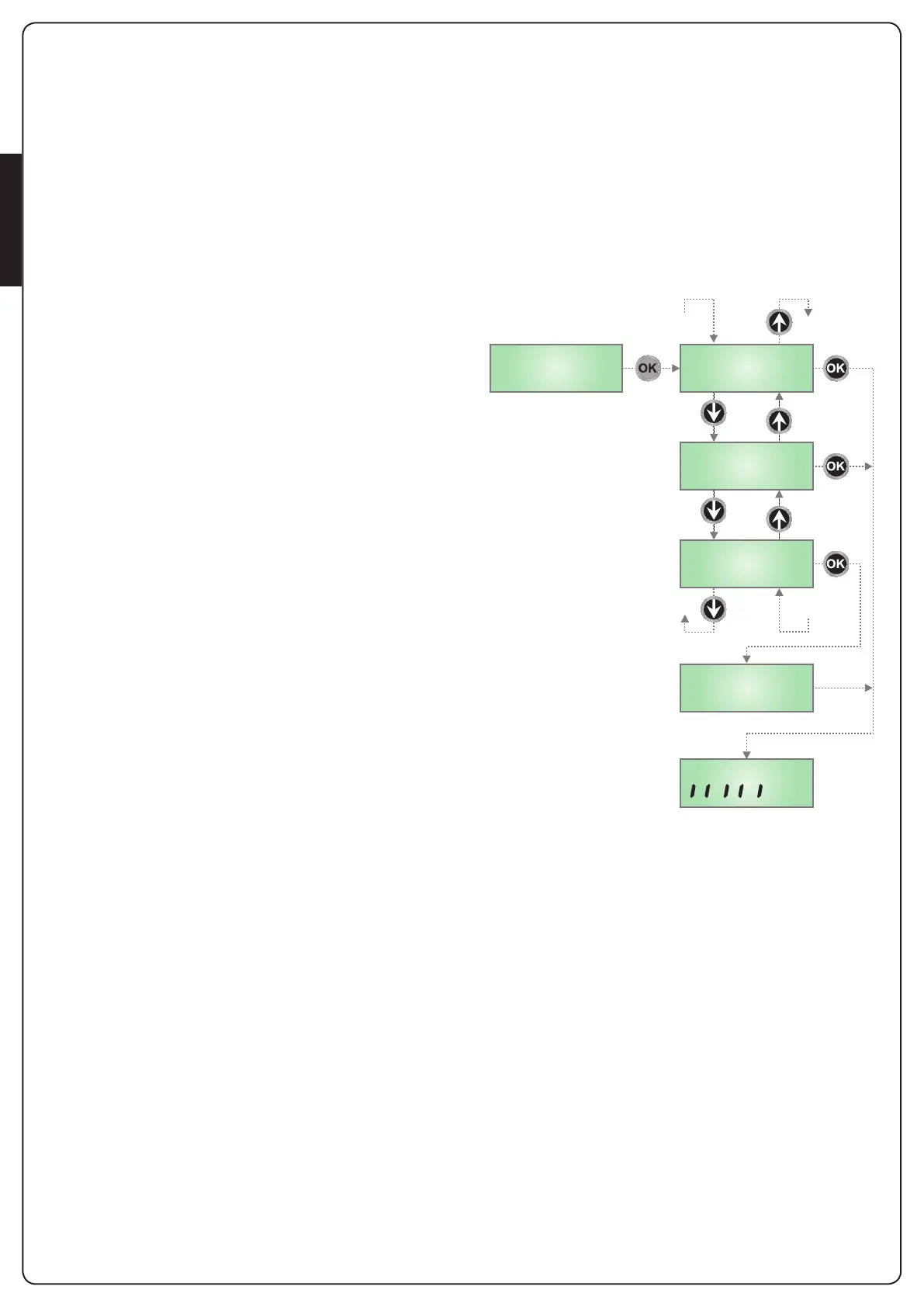
1. PressandholdtheOKkeyuntilthedisplayshows-SEt
2. ReleasetheOK key:thedisplayshowsESC (onlypresstheOK
keyifitisdesiredtoexitthismenu)
3. UsethekeyshanditoselectthemenuMov toactivate
manualhandlingorAPPr tostarttheautomaticlearning
procedureoftherunlimits
4. PressOK tostarttheselectedprocedure
9.1 - AUTOMATIC LEARNING OF THE RUN
LIMITS
m CAUTION: to perform the self-learning procedure it
is necessary to disable the ADI interface by means of the
menu i.Adi . If some safeties are controlled by means of the
ADI module, they will not be active during the self-learning
NOTE: during the self-learning the slowdown in the limit
switch area is not active.
To store the precise position of the range limit it is
recommended to activate the slow speed near to the limit.
The position at which the slow speed is activated is stored
as the starting point for slowing down.
5. Thedisplayshowsthecontrolpanelandtheautomaticlearning
procedureoftherunlimitsstarts.
5.1 Ifthegateisnotattheclosedlimit,themotorwill
activatetocloseattheslowspeeduntilitreachesthe
rangelimit.
5.2 Gateopeningisactivateduntiltheopeninglimitswitchis
reached.
NOTE:Toslowdownthemotorpressthecontrolunit
buttonioractivatetheSTARTP.command(wiredor
wireless)whenthegatecomesclosetotherangelimit.
5.3 Gateclosingisactivateduntiltheclosinglimitswitchis
reached.
NOTE:Toslowdownthemotorpressthecontrolunit
buttonioractivatetheSTARTP.command(wiredor
wireless)whenthegatecomesclosetotherangelimit.
6. Attheendoftheautomaticlearningprocedure,thecontrol
unitautomaticallyexitsthismenuandreturnstonormal
operation.
9.2 - MANUAL HANDLING
m WARNING: when this procedure is activated the
safeties are not active.
5. ThedisplayshowsMAn
6. Pressandholdthehkeytoopenthegateortheibuttonto
closethegate
7. Releasethebuttontostopthegate
8. Toexitthismenu,pressOK
NOTE: If the motor is inactive for more than one minute
the procedure terminates automatically.
APPr
ESC
Mov
MAn
-SEt


 To Next Page