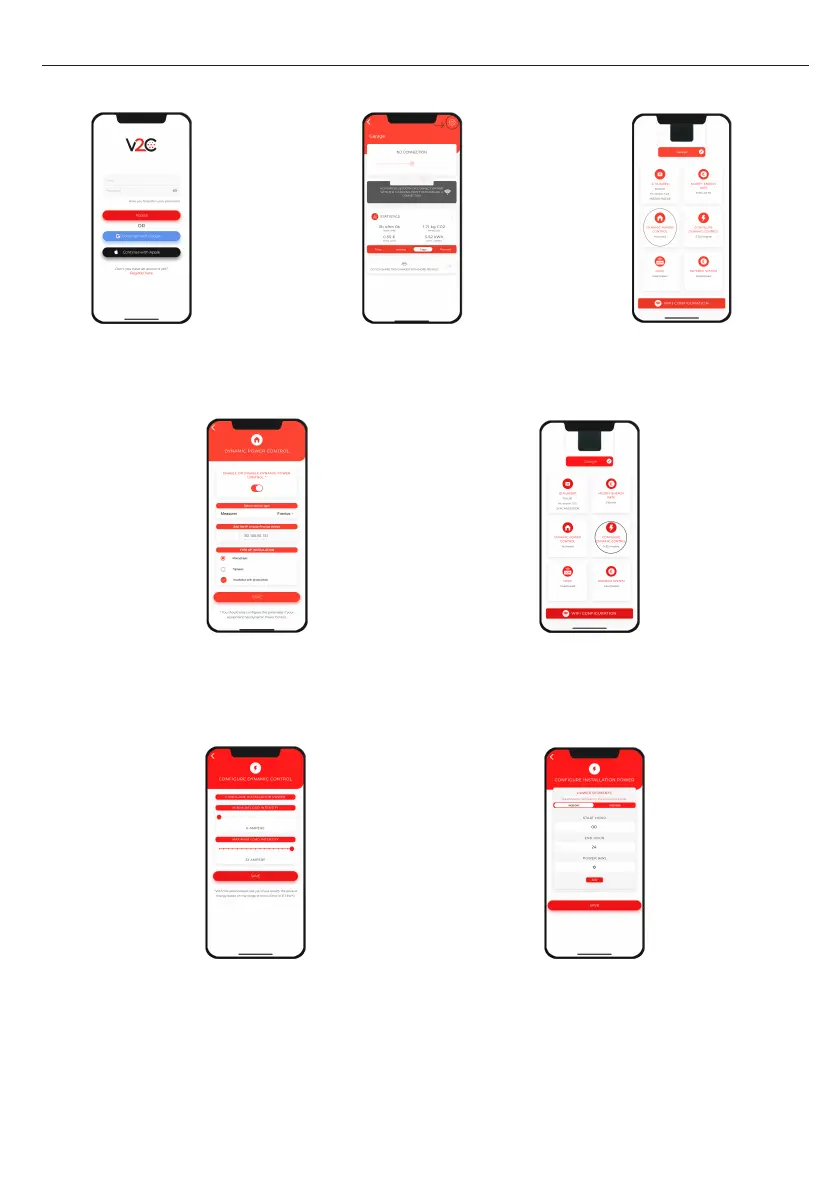
6. DYNAMIC POWER CONTROL
7
1. Log in to the V2C
Cloud application.
2. Select the e-Charger and
access its configuration.
4. Activate dynamic power
control and select the meter
and type of installation.
5. Go back to the configuration
screen and access 'Configure
dynamic control'.
3. Click on 'Dynamic
power control'.
7.
Establish different time slots and the
maximum contracted power. In the case of
having a single power range, add the timeta-
ble from 00:00 to 24:00 both daily and at
weekends. If it is a photovoltaic installation,
indicate the operating mode in each time slot
(PV + Minimum power, Exclusive PV or Grid +
Photovoltaic).
6. Specify the minimum
recharge current (> 6 Amps)
and maximum current
(< 32 Amps). After select
‘Configure installation power’.


 To Next Page