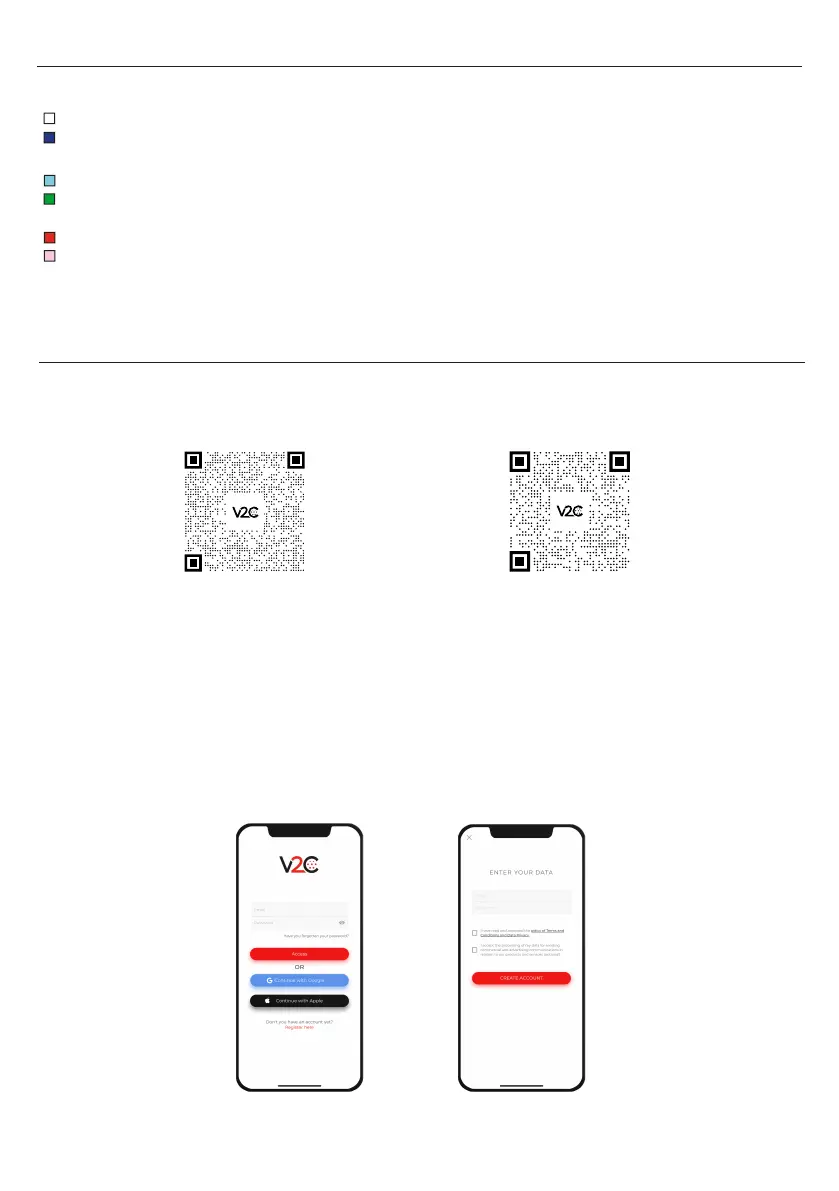
4. V2C LED LIGHTING INDICATIONS.
5. V2C CLOUD
The V2C logo on the front of the e-Charger lights up according to the charging status:
White: the vehicle is not connected. White flashing: e-Charger disabled.
Blue flashing: Vehicle is charging. The speed of the flashing is directly related to the
directly related to the intensity of the charge.
Light blue: Timer activated. Charging is scheduled.
Green: Vehicle charging is complete. Green flashing: After configuring the internet, it reports
that it is connected to V2C Cloud via WiFi.
Red: Error 1 (Communication) or Error 2 (Message).
Pink: the e-Charger is being updated.
Download the App
Create an account
1. On the 'Login' screen click on "Sign up here". (You can also log in to the app using your Google
or Apple account).
2. Enter your email and password and tap on 'Create account'.
3. Access the email address provided above and verify your account by clicking on the link.
4. Your account is now created. You can log in to the app with your email and password.
From Android.
From iOS.
4


 To Next Page