
 Need help?
Do you have a question about the V2C TRYDAN and is the answer not in the manual?
Details the structure and meaning of the product identification number.
Instructions on how to add your e-Charger to the V2C Cloud app.
Steps to schedule charging sessions using the V2C Cloud app.
How to access and view charging statistics within the V2C Cloud app.
Guide on how to update the e-Charger firmware via the V2C Cloud app.
Enables dynamic control based on consumption and selects installation type.
Details different charging modes like Maximum power, Minimum power, and Exclusive PV.
Selects the data source for consumption and photovoltaic generation.
Sets the maximum limit of total consumption for load current adjustment.
Sets the maximum intensity for dynamic control during charging.
Sets the minimum current for dynamic control operation.
Displays device ID, date, time, and communication status.
Allows deactivation of the V2C logo illumination.
Permanently disables or enables the buttons on the left side of the e-Charger.
Enables timer for cars that do not charge instantly or have scheduled charges.
Configures three-phase charging or converts to single-phase for low contracted power.
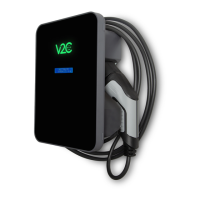
The V2C e-Charger, specifically the Trydan model, is an advanced electric vehicle charging point designed for both indoor and outdoor use. It integrates smart technology for efficient and controlled charging, emphasizing user convenience and energy management.
The primary function of the V2C e-Charger is to provide a reliable and efficient charging solution for electric vehicles. It operates as a mode 3 charging point, connecting to an AC mains supply. The e-Charger is designed to be either a plug-and-cord system or permanently connected, offering flexibility in installation. A key feature is its ability to communicate with the V2C Cloud application, allowing users to manage and monitor their charging sessions remotely via Bluetooth or WiFi.
The device incorporates dynamic power control, which is crucial for optimizing energy consumption. When connected to a consumption meter, the e-Charger can adjust the charging intensity based on the current total household consumption, ensuring the load is as efficient as possible. This feature is particularly beneficial for installations with photovoltaic systems, as it can manage the surplus energy generated. Users can select from various operating modes, including "Maximum power (Grid + Photovoltaic)" for fast charging, "Minimum power (PV + Minimum power)" which prioritizes household consumption and uses a minimum from the grid plus PV generation, and "Exclusive photovoltaic (Exclusive PV)" where charging relies solely on the self-consumption PV system.
The e-Charger also supports programmed charging, allowing users to set specific days and times for charging sessions using two independent timers. This enables users to take advantage of off-peak electricity tariffs or align charging with PV generation. The device provides visual feedback through its LED lighting system, indicating various statuses such as vehicle connection, charging in progress, scheduled charging, completion, and error states.
Furthermore, the V2C e-Charger offers integration with Alexa, enabling voice-controlled charging management for a more immersive user experience. This allows users to start, stop, or check the status of their charging sessions using voice commands.
The V2C e-Charger is designed for user-friendly operation, both through its physical interface and the V2C Cloud application. The physical interface includes two buttons on the top left side, which allow users to navigate the configuration menu. Long presses on these buttons enable parameter changes, while short presses advance to the next parameter. The upper button is assigned to forward (+) and the lower to backward (-). To access the configuration menu, both buttons must be held down for 2 seconds, provided the charger is not locked.
Through the menu, users can configure various settings such as language (Portuguese, English, Spanish), dynamic control activation, type of installation (Single-phase, Three-phase, Single-phase-Photovoltaic, Three-phase-Photovoltaic), and charging mode (Power Boost, ECO: PHU-ONLY, ECO: PHU+MIN POW). Users can also specify the slave model for data acquisition from inverters (V2C_1.0, V2C_2.0, Huawei, Solax, Kostal, Fronius, Shelly), set the contracted power, and define maximum and minimum charging intensities. The device also displays its identification number, current date and time, communication status (WiFi and programming), and local IP address.
The V2C Cloud application enhances usability by providing remote control and monitoring capabilities. Users can download the app on Android or iOS devices, create an account, and add their e-Charger by manually entering its ID or scanning a QR code. Within the app, users can program charging schedules, view detailed statistics of their charging sessions (total time, cost, CO2 saving, energy consumed), and update the e-Charger's firmware. The app also allows for modification of energy rates, dynamic power control settings, and payment system configurations.
Additional usage features include an "Enable shortcut" option to permanently disable the physical buttons, providing a layer of security or convenience. A "Timer mode" can be activated for specific electric vehicle models that do not initiate charging instantly or when a scheduled charge is in place. For three-phase installations, there's an option to convert the charger to single-phase operation, which is recommended for low power contracts.
Maintenance of the V2C e-Charger primarily involves ensuring its physical integrity and keeping its software updated. Users are advised to regularly check the charging plug or connector (including the cable) and the charging station housing for any damage through visual inspection. In case of any defect, the charging station must be disconnected and replaced, as repairs by unauthorized personnel are prohibited.
The manual explicitly states that no unauthorized changes or modifications should be made to the charging station. The use of adapters, converters, or prolongers is not permitted. It is also crucial not to remove any identification such as safety symbols, warning signs, type plates, nameplates, or line markings.
For cleaning, users are warned against using high-pressure water jets (hoses, high-pressure cleaners, etc.) to prevent damage to the unit. The hose itself has a specific fitting and removal mechanism designed to prevent damage. To position the hose, it should be inserted into the holder with a small gap at the bottom to avoid collision with the integrated locking clip, then slid down to snap into place. For removal, the hose is slid upwards to release it from the locking clip and then pulled outwards from the holder.
Software maintenance is facilitated through the V2C Cloud app. Users receive notifications when their charger needs updating, and they can initiate firmware updates directly from the app, provided there is a stable WiFi connection. If the 'Update firmware' option is not visible, it indicates that the device already has the latest version.
The V2C team also provides support resources, including a technical support center accessible via a web link or through the V2C Cloud app. Users can find FAQs, report incidents, or seek technical assistance for installation, configuration, or troubleshooting. This comprehensive support system ensures that users can address any issues that may arise during the device's lifespan.
 General
| Connector Type | Type 2 |
|---|---|
| Protection | IP54 |
| Compatibility | Electric vehicles with Type 2 connector |
| Charging Time | Varies depending on battery capacity |
| Protection Features | Overvoltage, overcurrent, short circuit |
| Input Voltage | 100-240V AC |

 To Next Page

