USB PORT AND OPERATIONUSB PORT AND OPERATION
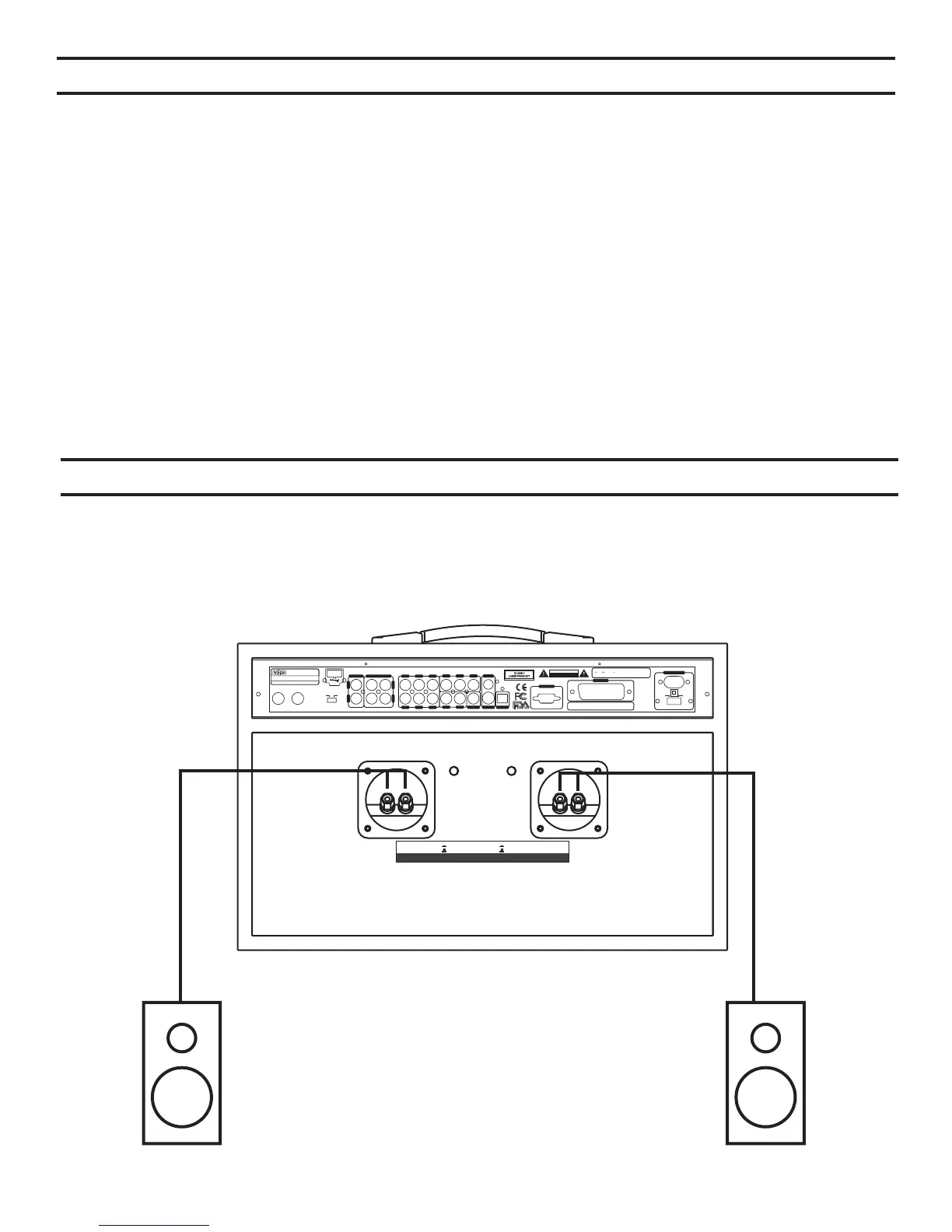
AUX SPEAKER CONNECTIONAUX SPEAKER CONNECTION
Right speakerRight speaker Left speakerLeft speaker
Right AUX SpeakerRight AUX Speaker
AUX ON
AUX OFF
AUX ON
AUX
OFF
AUX ON
AUX OFF
AUX ON
AUX
OFF
Left AUX SpeakerLeft AUX Speaker
AUX Speaker Impedance: 6-16 OHMS ; AUX Speaker Power Consumption: > 80 WAUX Speaker Impedance: 6-16 OHMS ;AUXSpeaker Power Consumption: > 80 W
- + - +
INPUT:~110V/230V 50/60HzINPUT: ~110V/230V 50/60Hz
Serial Number:SerialNumber:
1.Manufactured underlicense from DolbyLaboratories.
2. Dolby, Pro Logic and thedouble-D symbol are
trademarks ofDolby Laboratories.
1.Manufactured underlicense from DolbyLaboratories.
2.
Dolby , Pro Logic and thedouble-D symbol are
trademarks
of DolbyLaboratories.
RISK OF ELECTRIC SHOCK
DO NOT OPEN
RISK OF ELECTRIC SHOCK
DO
NOT OPEN
CAUTION
SWFL FR
SL SR
CEN
COAXIAL
Y/R PB/G PR/B
ML MR
VIDEO
S-VIDEO OPTICAL
VGA
SCART
POWER INPUTPOWER INPUT
POWER SELECTPOWER SELECT
~110V
~230V
Karaoke DVDPlayerKaraoke DVD Player
MODEL NO.:GO-210MODEL NO.:GO-210
LA CALIFORNIAU.S.A
Made inChinaMade inChina
USB
KARAOKE OUTPUTKARAOKEOUTPUTAUX INPUTAUX INPUT
L
R R
L
AUX DVD
MIC 1
MIC 1 MIC 2MIC 2
The USB port on the back of your GO-210 provides the option to play files recorded on a USB flash
drive or hard drive in Mp3, WMA, JPEG, AVI and VCD formats.
If no disc is in the disc tray, the GO-210 automatically loads data from the USB device.
If the player is playing a disc, press the STOP (#30, pg.7) button to stop playing before connecting
a USB flash drive or hard drive. Once the USB flash drive or hard drive is connected, press the
USB/DISC button. The root directory of the connected USB device will display on the connected
television after a few seconds. Use the remote control's directional buttons (24) to select the file
you want to play. Press the ENTER (25) button to start playing from the attached USB device.
Your GO-210 allows you the option to connect a pair of independent speakers to
the Auxiliary speaker connectors (#15 and #17, pg. 9) located on the back of the unit.
The Auxiliary speaker switch buttons (#16 and #17, pg 9) control the output from your GO-210.
When switched OFF, output is directed to the unit's internal speakers, and
When switched ON, output is directed to external speakers (if connected).
18


 To Next Page