MIC knob
To raise or lower the volume of MIC 1 and MIC 2.
MIC knob
To
raise or lower the volume of MIC 1 and MIC 2.
ECHO knob
To raise or lower the reverb level of microphones.
ECHO knob
To
raise or lower the reverb level of microphones.
Karaoke Tune UpKaraoke Tune Up
18
&
19
SETUP
General SetupGeneral Setup
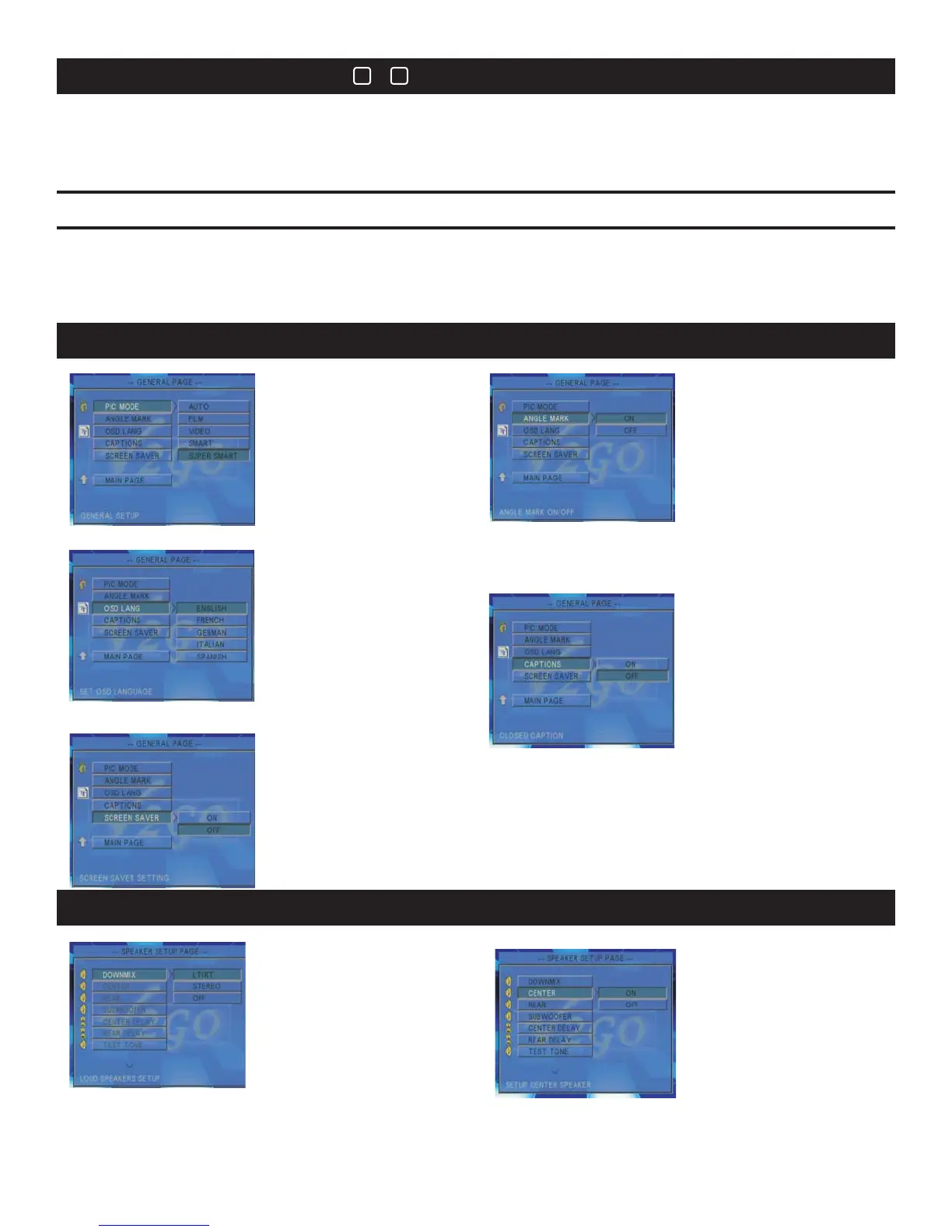
2.ANGLE MARK2.ANGLE MARK
4.CAPTIONS
3.OSD LANGUAGE
3.OSD LANGUAGE
1.PIC MODE1.PIC MODE
2.CENTER
1.DOWNMIX
Speaker SetupSpeaker Setup
5.SCREEN SAVER5.SCREEN SAVER
Stop any playback. Press Setup button (23) to enter the Setup menu.
Use the Directional Arrow buttons (24) and Enter (25) button to select the desired operation.
To exit Setup, press Setup button or choose the Exit Setup option on the attached video display.
Use to set the picture mode.
Use to display the
multi-angel mark when
playing multi-angle
DVD discs.
When set to ON, the
Angel Mark will display
when multi-angels are
available. When set to
OFF, no multi-angel
mark will be displayed.
Use to select your screen
display language.
SettoONtoshow
captions and OFF to hide
them.
UsetosettheScreenSaverOnorOFF. When
set to ON the screen saver will start if theGO-210
has been inactive for an extended period of time.
The screen saver will not automatically start if
OFF has been selected.
Two audio channels will be
available when LT/RT or
STEREO is selected. When
set to 5.1 CH mode, 6 audio
channels (surround sound)
will be available.
Select ON to enable
output from center
speaker. Select OFF
when standard stereo has
been selected.
26


 To Next Page