POWER On Off
L/R
VOCAL
CANCEL
VOCAL
CANCEL
1
2
3
4
5
6
7
8
9 0
DIRECT SEARCH SYSTEMDIRECT SEARCH SYSTEM
Professional Karaoke DVD PlayerProfessional Karaoke DVD Player
GO-210
DOLBY
DIGITAL
DIGITAL AUDIO
MIC 1 VOLMIC 1 VOLMIC 1 VOLMIC 1 VOL MIC1VOLMIC 1 VOL
MIC2VOLMIC 2 VOL
ECHOMIC 1MIC 1 MIC 2MIC 2 HEADPHONE BBE SOUNDBBE SOUND On
MUSIC VOLMUSIC VOL
1
LED Display WindowLED Display Window
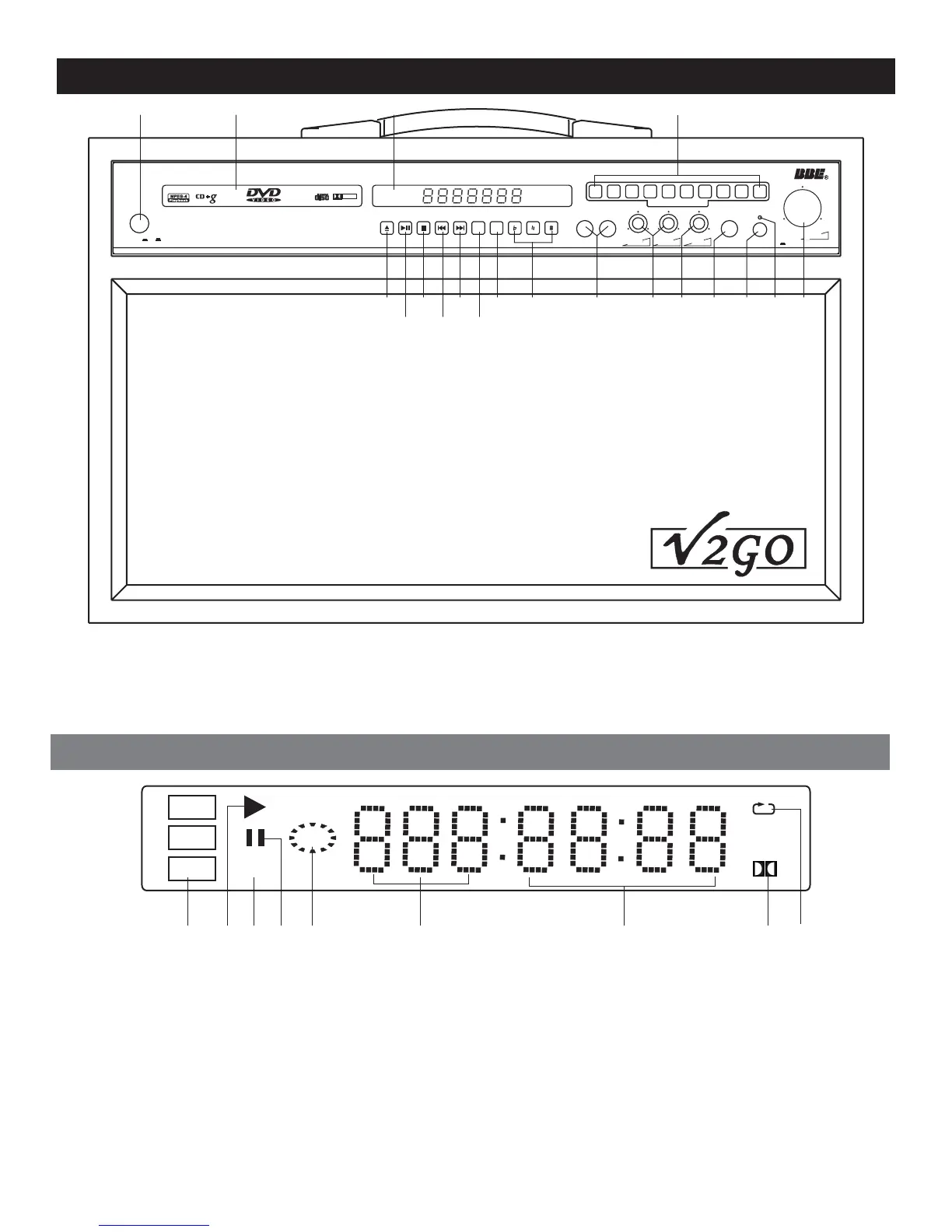
Front Panel FunctionsFront Panel Functions
45 46 12
52 5351504948474338
113428/29
35303
1.Power On/Off
3.Eject button
11.L/R button
12.Numeric keys 0-9
28/29.Play/Pause button
1.Power On/Off
3.Eject
button
11.L/R
button
12.Numeric
keys 0-9
28/29.Play/Pause
button
45.Tray door
46.LED display window
47.Microphone jacks
48.MIC1/2 volume
49.Echo button
45.Tray door
46.LED
display window
47.Microphone
jacks
48.MIC1/2
volume
49.Echo
button
30.Stop button
34.Previous button
35.Next button
38.Vocal cancel
43.Key control buttons
30.Stop button
34.Previous
button
35.Next
button
38.Vocal
cancel
43.Key
control buttons
50.Headphone jack
51.BBE sound ON
52.BBE sound indicator
53.Music volume
50.Headphone jack
51.BBE
sound ON
52.BBE
sound indicator
53.Music
volume
DVD
VCD
Mp3
PBC
D
1 42 3 5 6 7 8
9
1.Disc type
2.In PLAY status
3.PBC on
4.In Pause status
5.Playback
6.Tray information
7.Time information
8.Dolby on
9.In Repeat status
1.Disc type
2.In
PLAY status
3.PBC
on
4.In
Pause status
5.Playback
6.Tray
information
7.Time
information
8.Dolby
on
9.In
Repeat status
8


 To Next Page