6 Operating instructions for the electronicVED exclusive electric instantaneous water heater 0020176440_00
a
Functions and operation
a
3
3 Functions and operation
If you turn on the hot water at a draw-off point (mixer or
separate tap), your electronicVED exclusive will automati-
cally heat up the drinking water.
a
Danger!
Risk of being scalded by hot water.
The water temperature at the draw-off
points can reach up to 60 °C.
> When using an electronicVED exclusive
electric instantaneous water heater, be
aware of the risk of scalding from high
outlet temperatures.
> Set your electronicVED exclusive to a
maximum of 43 °C if you want to be pro-
tected from scalding.
> Section 3.2.7 "Setting the maximum tem-
perature" contains all relevant informa-
tion on the "scald protection" function,
which can be configured on your elec-
tronicVED exclusive.
-
+
Memo eco
°C38,5
-
+
2
1
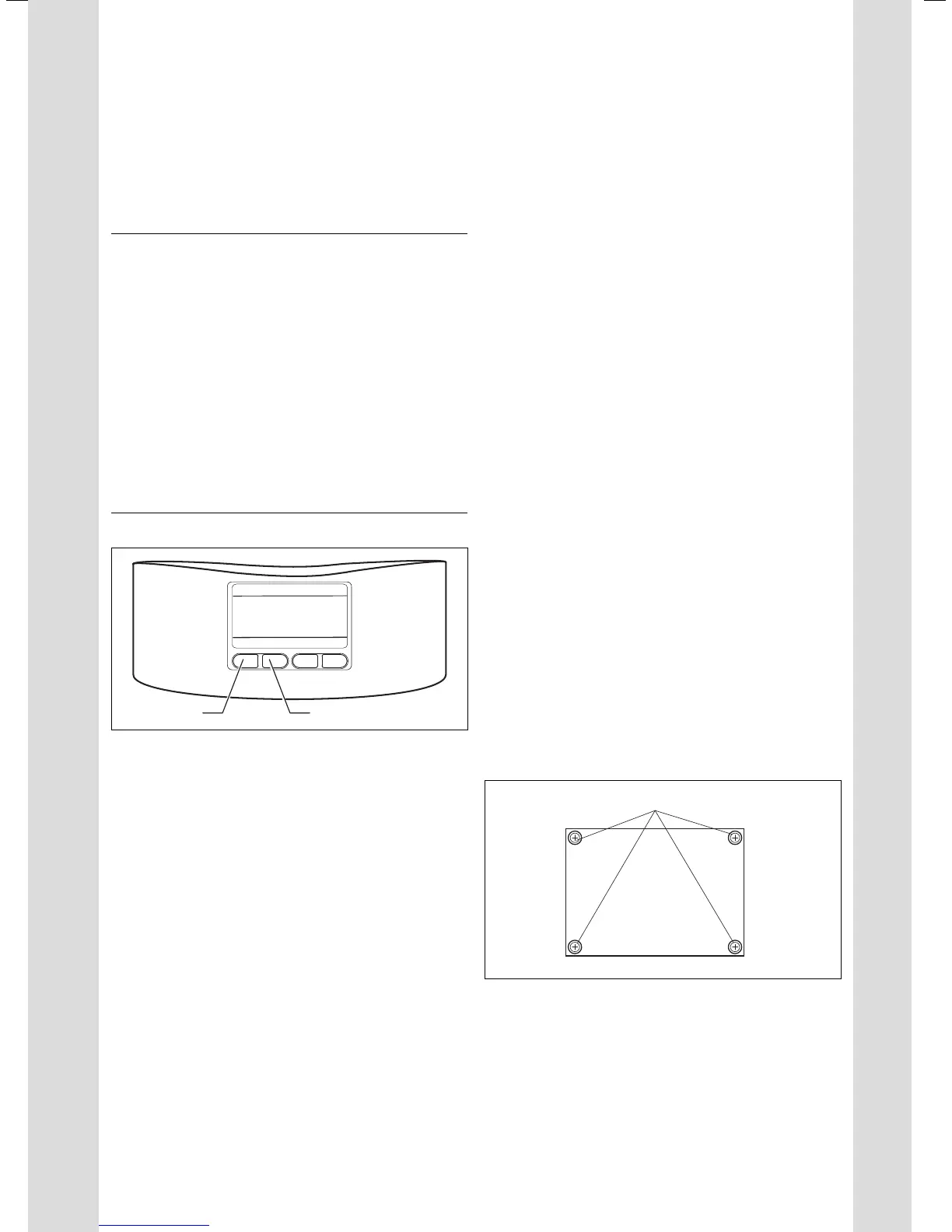
3.1 Display
> Press the + button (1) until the desired temperature is
reached. The hot water that you can now take from the
draw-off point will be at the desired temperature.
> If the temperature is too high, press the — button (2).
The water drawn will be cooler.
> Choose a temperature of between 20 °C and 60 °C to see
what suits you best.
i
All important display set-up options for your
electronicVED exclusive are described in
section 3.2.
3.1 When using the remote control
i
When controlling your electronicVED exclusive
using the remote control (article number:
0020084761), ensure that all functions are acti-
vated, called up and configured exactly as on
your electronicVED exclusive's built-in display.
> If you want to start up the remote control, remove it
from the packaging.
– Batteries are already inserted. The remote control is
synchronised with its electronicVED exclusive ex
works.
> Press any button on the remote control to set parameters.
– Section 3.2 describes how to configure the functions on
the display.
> Configure the desired parameters either directly in the
VED's display or using the remote control.
– When changing temperatures, the settings from the
respective other unit are adopted and displayed.
– Other settings, e.g. the display language or the
energy-consumption display, are not adopted from the
respective other unit. For example, you can set the
language to English for the remote control and set
your own language on your VED's display.
3.1.1 Changing the batteries
Your remote control (article number: 0020084761) is ready
for operation when purchased; two batteries are inserted.
When the batteries are flat, a battery symbol appears in the
remote-control display. The batteries should be replaced
with new ones immediately.
> Use AA batteries only. You can also use rechargeable
NiCd or NiMH batteries (likewise AA size).
1
3.2 Changing the batteries in the remote control



 To Next Page