Val Controls A/S • Sallingsundvej 5 • DK-6715 Esbjerg N • Tel. +45 7547 0600
vc@valcontrols.com • www.valcontrols.com
2 End point calibration of the controller
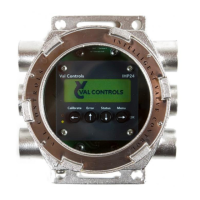
For end point calibration use the push buttons on the front.
1. Press CALIBRATE (left arrow)
2. Select MANUAL (down arrow)
3. Press OK (right arrow)
4. Press and hold STATUS (down arrow) valve moves to close position
5. When the valve no longer moves press OK (right arrow)
6. Now the 0% point is measured
7. Then press and hold ERROR (up arrow) valve moves to open position.
8. When the valve no longer moves press OK (right arrow)
9. Now the 100% point is measured
10. Calibration is now complete
Note: If you are using ValConnect also, it is important to press READ when end point calibration is
finished to make sure the values are updated.




 To Next Page