12
5
. Menstruation
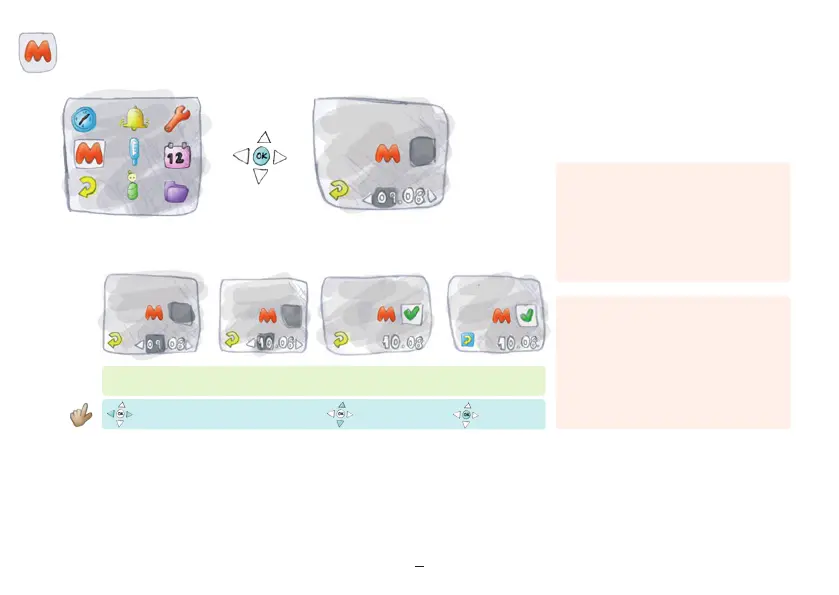
“Return” illuminated
Select date
Press “ok”
“Return”
“M” Yes
“M” No
Activate “M” or edit “M”
Past menstruation data
If you have records of past menstruations,
you can enter this data into the device prior
to the first temperature measurement.
Activate “M” as described above.
Enter “M” retrospectively
If you have not taken a temperature for an
extended time and had your period during
that time, you can enter it retrospectively.
Please input carefully, as incorrect entries
Important:
Only the first “M” day has to be activated for
each cycle when entering “M” data retroac-
tively. The device automatically stores three
“M” days. Start with the input of the furthest
menstruation back in time.
Important:
“M” entry after stopping hormonal contra-
ception: The first bleeding after stopping
hormonal contraception is not a men-
struation but a hormone – conditioned
withdrawal bleeding. Do not enter “M” for
this bleeding.
can be corrected only for the previous 3 days.
Start with the first day of menstruation.



 To Next Page