36
Mini USB cable
The mini USB cable is not included, but it can be
purchased from us. Use the mini USB cable to
upload your data to your PC. You, as well as your
distributor or Valley Electronics GmbH, can ana-
lyze and evaluate your cycle data. This can be
done through our website or per email.
Upgrades: Micro SD card
If you wish to get a software update and/or an
upgrade for more functions at a later date, we will
send you an SD card.
– Open the unit as described on page 6.
– Remove batteries.
– Insert the SD card.
– After successful completion of updates/
upgrades, we recommend that you remove
the SD card again to avoid unnecessary
power consumption.
AAA battery charger
The corresponding battery charger can be ordered
from us. Insert 2 AAA batteries into the charger.
The charging status is displayed on the charger.
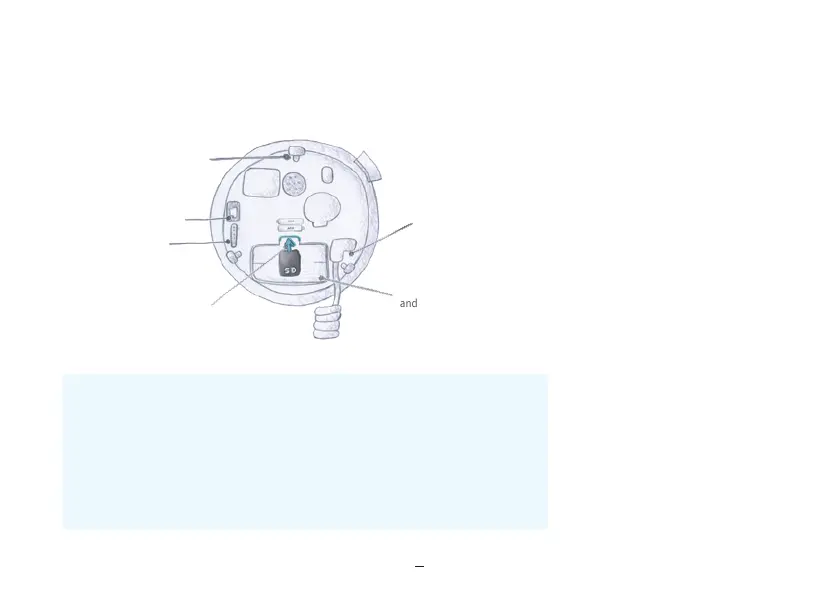
Insert SD card
11. Important notes:
Notch to close the device
Mini USB connector
Serial port (for
servicing only)
SD card slot
Temperature sensor
connection port
Battery compartment
and serial number
Analysis of your fertility data / data read out:
Log on to the website: www.lady-comp.com. You will receive your personal access code when
purchasing your cycle computer. Via a mini USB cable you can view your data on your computer.
If you have any questions about your cycle please don't hesitate to contact us.
Please send us an email: info@lady-comp.com or call us.


 To Next Page