8
8I VCWS08 SPEED CONTROL REPLACEMENT
MODELS BUILT FROM MARCH 15, 2003 TO PRESENT
Step 1: Unplug the VCWS08.
Step 2: Open the VCWS08 lid. Locate speed control in right corner of
VCWS08. Remove the two screws from the speed control. Gently
remove speed control to access wire connections on rear of unit.
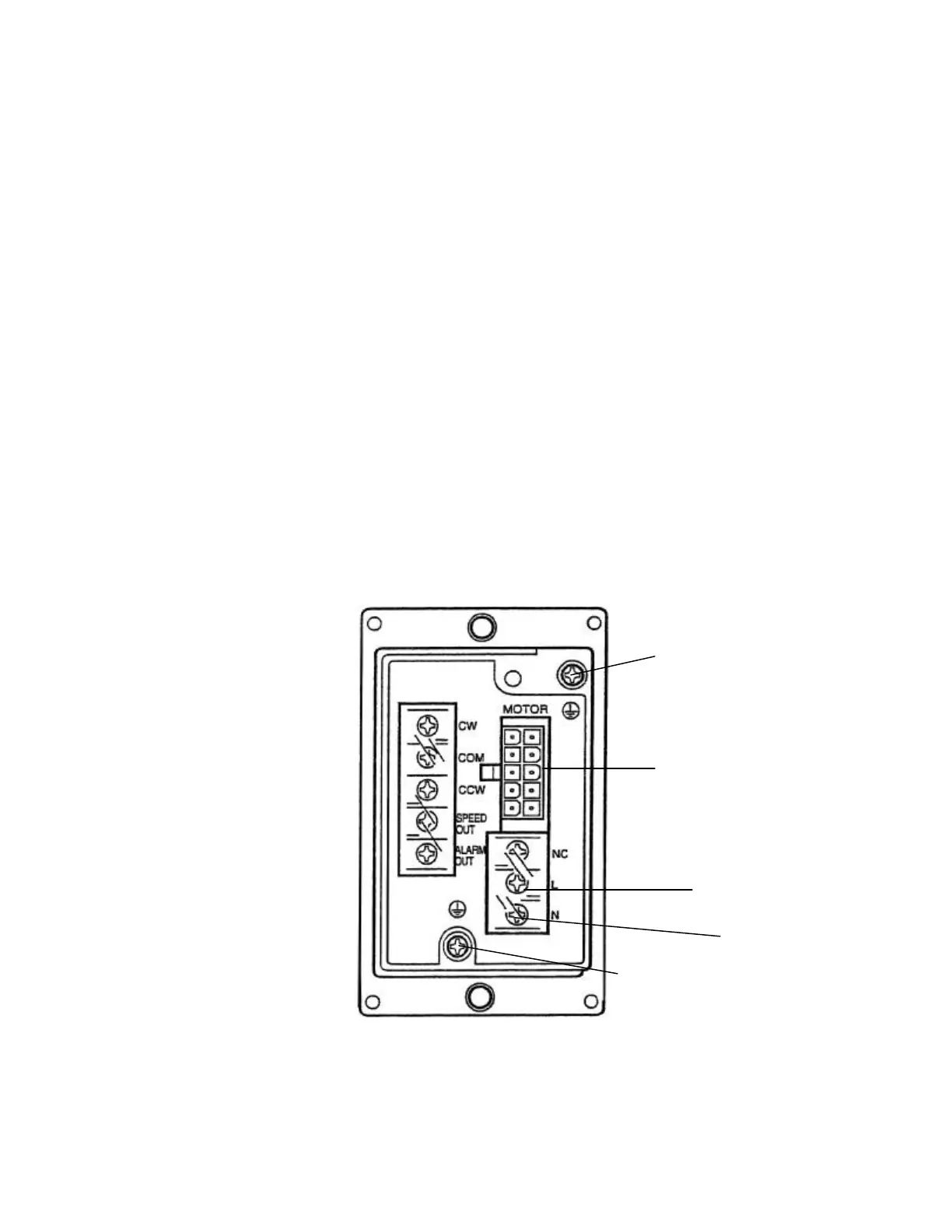
Note: Refer to the speed control diagram below when removing and
reconnecting wires to speed control.
Step 3: Remove the motor ground wire (green w/ yellow stripe) that is
connected with the motor harness cable. Next, unplug the motor
harness connector from speed control. Remove the AC 100-115V-
ground wire (green w/ yellow stripe) that is connected with the AC
power cable. Next, remove the plastic terminal cover from the AC
power connection terminal. Remove the black wire from the “L”
terminal and the red wire from the “N” terminal.
Step 4: Reverse steps 2 and 3 to install new speed control.
MOTOR GROUND
GREEN W/ YELLOW
STRIPE
MOTOR HARNESS
CONNECTION
BLACK WIRE
RED WIRE
AC 100-115V GROUND
GREEN W/ YELLOW
STRIPE



 To Next Page