Rev: 06.28.18 Page 2
CCD-0001519
TABLE OF CONTENTS
System Information 3
Safety Information 3
Touch Pad Diagram - Auto Leveling Control Touch Pad 3
Operation - Auto Leveling Control Touch Pad 4
Unhitching Instructions 4
Auto Level 4
Auto Level Sequence 4
Hitch Recognition 4
Touch Panel Diagram - OneControl Touch Panel 5
Operation - OneControl Touch Panel 6
Standard Mode and Menu 6
Basic Jack Operation 6
Unhitching Instructions 7
Auto Level 7
Auto Level Sequence 7
Hitch Recognition 7
Touch Panel Diagram - OneControl App From MyRV 8
Operation - OneControl App 9
Accessing the OneControl App 9
Standard Mode and Menu 9
Basic Jack Operation 9
Unhitching Instructions 10
Auto Level 10
Auto Level Sequence 10
Hitch Recognition 10
Touch Panel Diagram - Linc Remote Control - Optional 11
Conguring Linc Remote to Sync to The One Control Touch Panel 11
Basic Jack Operation 12
Unhitching Instructions 12
Auto Level 12
Auto Level Sequence 12
Troubleshooting 13
Red/Green LED Indicator on Auto Leveling Control Touch Pad (Rev. A) 13
Red/Green LED Indicator on Auto Leveling Control Touch Pad (Rev. B) 13
OneControl Touch Panel or OneControl App Error Codes (Rev. A) 14
OneControl Touch Panel or OneControl App Error Codes (Rev. B) 14
Special Jack Error Codes on OneControl Touch Panel or OneControl App (Rev. A) 15
Special Jack Error Codes on OneControl Touch Panel or OneControl App (Rev. B) 15
Clearing Faults From Auto Leveling Control Touch Pad (Rev. B) 15
Manual Override 16
Zero Point Calibration 17
To Set the Zero Point 17
Preventive Maintenance 18
Ground Control 3.0 4 Point Assembly 19
Ground Control
®
3.0 4 Point AFTERMARKET Assembly 20
Ground Control 3.0 6 Point Assembly 21
Ground Control
®
3.0 6 Point AFTERMARKET Assembly 22
Ground Control 3.0 Components 23
Ground Control 3.0 Components 24
Ground Control 3.0 Components 25
Rev: 06.28.18 Page 3
CCD-0001519
System Information
Ground Control 3.0 is an automatic leveling system for 5th wheel applications. The system utilizes one main control
board and a separate waterproof remote level sensor to measure and manage level point, and can be operated from
several user interface devices, including:
Safety Information
Be sure to park the trailer on solid, level ground. Ensure all jack landing locations are cleared of debris and
obstructions and also free of depressions. People and pets should be clear of trailer while operating the
leveling system. Ensure the battery of the trailer is fully charged or that the trailer is plugged into shore
power prior to attempting to operate the system. Ground Control 3.0 requires a minimum of 12.75V DC from
the battery for proper operation.
Lippert Components Inc. recommends that a trained professional be employed to change the tires on the trailer.
Ensure that the trailer is properly supported with jack stands or other adequate devices under the frame of the
trailer prior to commencing any service or repair procedure. Any attempts to change the tires or perform other
service while trailer is supported solely by the Ground Control 3.0 jacks could
result in death, serious injury, trailer or property damage.
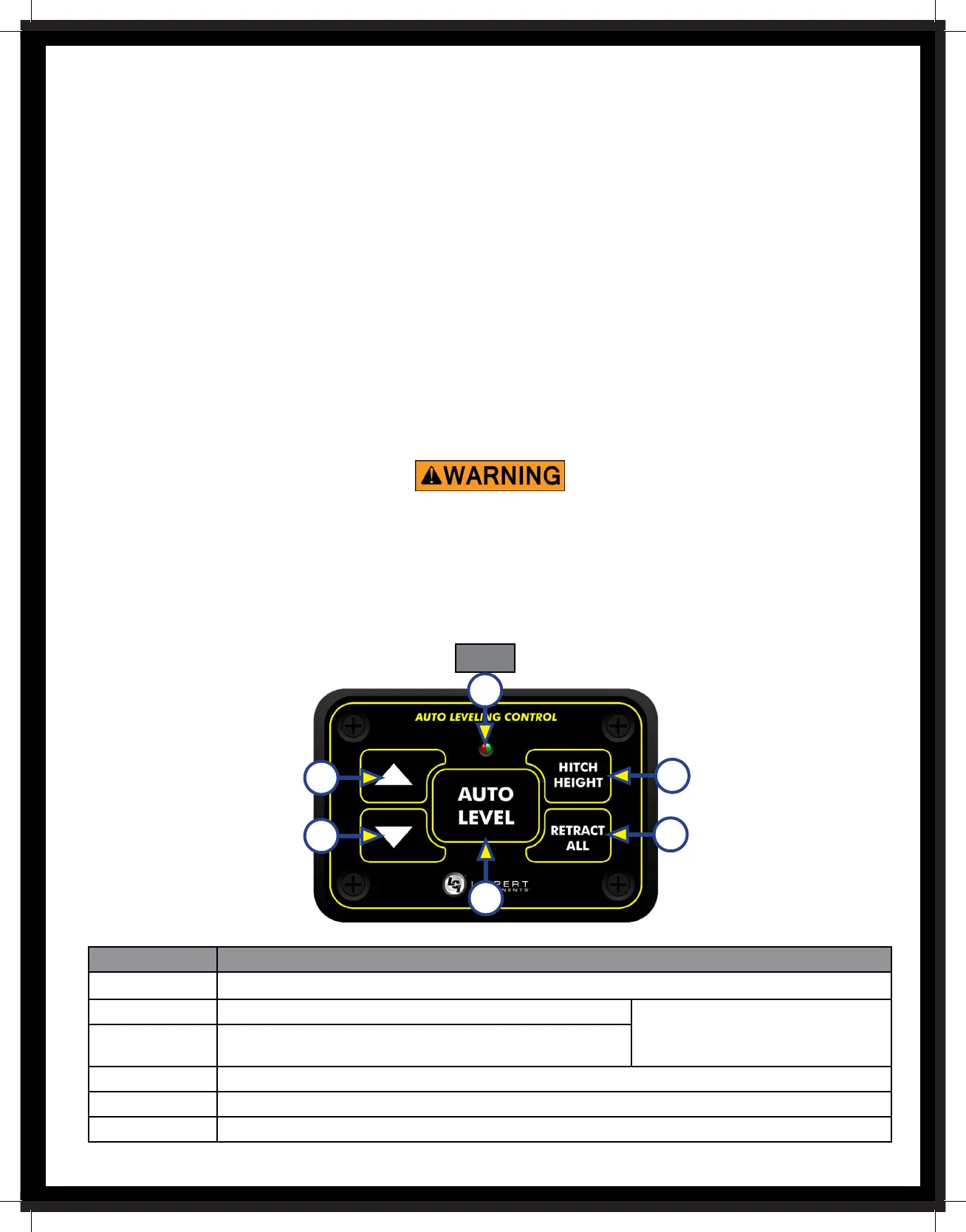
Touch Pad Diagram - Auto Leveling Control Touch Pad
Fig. 1
Auto Leveling Control Touch Pad - Mounted outside the trailer within view of the hitch.
MyRV® OneControl™ Touch Panel (OCTP) - Mounted on a wall inside the living space of the trailer.
MyRV® OneControl™ Leveling App - The app is available on iTunes® for iPhone® and iPad® and also on Google Play™ for
Android™ users. iTunes®, iPhone® and iPad® are registered trademarks of Apple Inc. Google Play™ and Android™ are trade-
marks of Google Inc.
Linc® Remote Control - Optional.
NOTE: Ground Control 3.0 IS FOR 5TH WHEEL APPLICATIONS ONLY.
A
B
C
E
F
D
Callout Description
A Red/Green LED - Indicates the status of the system.
B Up Arrow - Extends front jacks (landing gear). To turn on the touch pad,
press the Up and Down arrow
buttons at the same time.
C Down Arrow - Retracts front jacks (landing gear).
D Auto Level Button - Places leveling system into auto level mode.
E Hitch Height Button - Initiates the Hitch Recognition feature.
F Retract All Button - Places leveling system into full retract mode.
61



 To Next Page