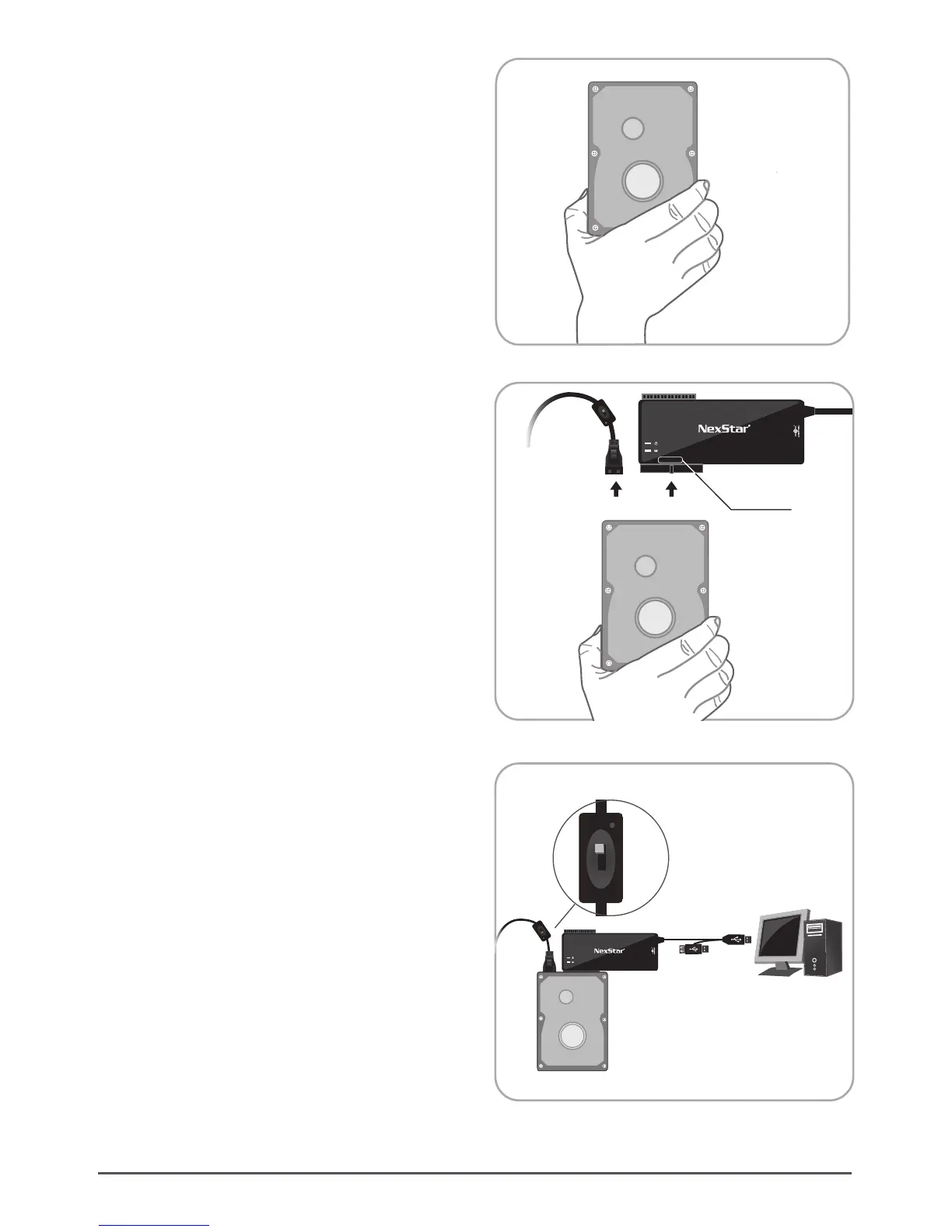
(1) Insert 3.5” IDE hard drive into the slot. Turn the
front side upward. (Set the HDD to MASTER if
needed.) ( Figure 5.3-A )
IDE 3.5”
Hard Drive
5.3. 3.5” IDE Hard Drive Installation:
Installation
8
(2) Connect the larger 40-pin IDE connector of
NexStar – Universal Storage Adapter to the hard
drive. ( Figure 5.3-B1 )
(3) Connect a 4-pin power connector from power
supply to hard drive. ( Figure 5.3-B2 )
(4) Turn on the device power. ( Figure 5.3-C1 )
(5) Connect the USB cable to the USB port on the PC.
Once connected properly, the HDD should be
automatically detected and be ready for use.
( Figure 5.3-C2)
( Figure 5.3-B1 5.3-B2 )
( Figure 5.3-C1 5.3-C2 )
IDE 3.5” Hard Drive
( Figure 5.3-A )
OFF
ON
2.5”
SATA
SDXD
CFMS
3.5”/5.25”
2.5”
SATA
SDXD
CFMS
3.5”/5.25”
3.5”/ 5.25”
Universal Storage Adapter
(B2) (B1)
(C2)
(C1)
IDE 3.5” Hard Drive






 To Next Page