Need help?
Do you have a question about the VARSITY Scoreboards 3388 and is the answer not in the manual?
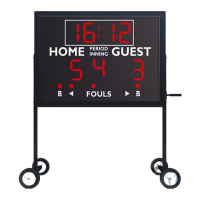
Details the main scoreboard unit shipped in two sections.
Lists the angle irons and hardware required for mounting.
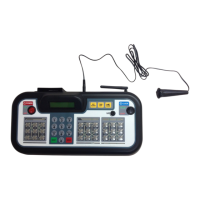
The wireless controller for operating the scoreboard.
Power adapter for the wireless controller.
Interchangeable inserts for different sports.
Specifies the size, depth, and weight of the scoreboard.
Describes the materials and finish of the scoreboard cabinet.
Guidance on suitable mounting structures and hardware.
Details electrical needs, including voltage, amperage, and connections.
Considerations for maximizing visibility and avoiding sunlight glare.
Suggests placement on the South or West side of the field in the US.
Provides dimensions and placement advice for mounting poles or I-beams.
Instructions for adapting existing columns for scoreboard mounting.
Specifies lifting capacity needed and how to arrange panels.
Instructions on connecting scoreboard sections using mounting angles.
Crucial step for connecting cabinets; failure voids warranty.
Ensures proper connection of all ribbon and power cables between cabinets.
Procedure for raising the scoreboard and temporarily securing it.
Finalizing the attachment of mounting brackets to poles/I-beams.
Refer to specific instructions for any additional purchased options.
Lists the panels, brackets, bolts, nuts, screws, and washers needed.
Securing brackets to the sponsor panel edge before lifting.
Placing the panel and attaching it to the scoreboard flange.
Fastening the sponsor panel face to the scoreboard flange.
Initiating the diagnostic mode using the wireless controller.
Checking if all display segments and digits function correctly.
Successful test indicates proper installation and function.
 General
| Model Number | 3388 |
|---|---|
| Display Type | LED |
| Sport | Basketball, Volleyball |
| Power Source | AC |
| Mounting Type | Wall mount |


 To Next Page