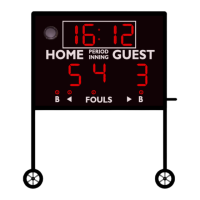
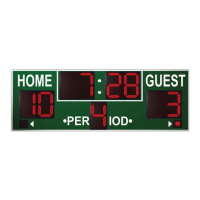
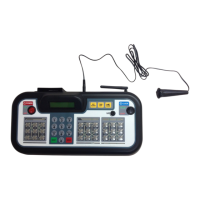
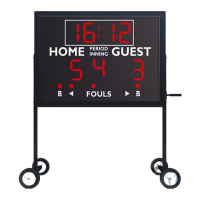
The Varsity Scoreboards Model 2240 is a basketball scoreboard designed for indoor use, providing clear and comprehensive game information. This installation manual outlines the steps for setting up the scoreboard, ensuring proper functionality and longevity.
Function Description:
The Model 2240 scoreboard displays essential game statistics for basketball, including:
- Home and Guest Scores: Large, clear digits for easy viewing of team scores.
- Period: Indicates the current game period.
- Possession: Lights to show which team has possession of the ball.
- Bonus: Lights to indicate when a team is in the bonus free-throw situation.
- Fouls: Displays the number of fouls for both Home and Guest teams.
- Player Fouls: Dedicated sections for tracking individual player fouls.
- Time Outs Left (T.O.L.): Shows the remaining timeouts for each team.
- Game Won: Indicates which team won the game.
- Game Clock: A central clock for tracking game time.
The scoreboard is controlled wirelessly via an LCD Wireless Keyboard Controller, which allows operators to manage all displayed information. Sport inserts are provided for customization.
Important Technical Specifications:
- Overall Dimensions: 8 feet (L) x 7 feet (W) x 8 inches (D).
- Shipping Configuration: Shipped in one (1) section.
- Weight:
- Hanging weight: Approximately 240 lbs.
- Shipping weight: Approximately 275 lbs.
- Construction: 22-gauge galvanneal steel cabinet with a powder coat finish, ensuring strength, durability, and a lasting appearance.
- Power Requirements: The scoreboard requires a dedicated 120V/20A circuit. It is recommended to install a power switch or circuit breaker in an easily accessible location to turn off power after each use. The location of the disconnect switch must comply with Article 600 of the National Electric Code.
- Installation Hardware: Installation hardware (anchors, bolts, chains, cables, etc.) is not supplied. Installers must check local codes for requirements and ensure all hardware meets minimum weight requirements for the scoreboard.
Usage Features:
- Wireless Control: The LCD Wireless Keyboard Controller provides convenient and flexible operation of the scoreboard from a distance.
- Sport Inserts: Customizable inserts allow the scoreboard to be adapted for different sports or display needs.
- Clear Display: Large, high-visibility digits and indicators ensure that game information is easily readable by players, coaches, and spectators.
- Comprehensive Information: Displays all critical basketball statistics, making it a complete solution for game management.
Maintenance Features:
- Durable Construction: The galvanneal steel cabinet and powder coat finish are designed for long-term durability and resistance to wear, reducing the need for frequent repairs.
- Easy Access for Wiring: The scoreboard features power/signal access doors on the top, allowing for straightforward connection and maintenance of electrical wiring.
- Modular Design: The scoreboard is shipped in a single section, simplifying initial assembly and potentially future servicing.
- Installation Support: Varsity Scoreboards offers 24/7 technical support via phone (1-800-411-3136) and an online support request form, providing assistance for installation and any operational issues.
- Warranty: The product is warranted against defects in materials and workmanship for a specified period from the date of invoice, offering peace of mind regarding product quality.
- Shipping Damage Reporting: Detailed instructions are provided for reporting shipping damage, ensuring that any issues during transit are properly documented and addressed. This includes noting damage on the delivery receipt, contacting the local terminal, and immediately informing Varsity Scoreboards.
Installation Recommendations:
The Model 2240 can be installed by mounting it to a wall or suspending it from the ceiling.
- Wall Mounting: The scoreboard has pre-drilled mounting flanges on the top and bottom for direct attachment to a wall. All four mounting holes must be used. Hardware should be appropriate for the wall type and capable of supporting the scoreboard's weight.
- Ceiling Suspension: For ceiling suspension, cables or chains should be connected to hanging brackets on top of the scoreboard cabinet. It is recommended to attach cables to the ceiling structure first, then to the scoreboard's hanging brackets after lifting it into position.
- Sponsor Panels: The manual also details the installation of optional sponsor panels, which attach to the scoreboard's front flange using mounting brackets, bolts, nuts, self-tapping screws, and flat washers. Care should be taken to drill approximately 1 inch from the edge of the scoreboard's flange to avoid damaging border striping.
The installation process involves carefully unpacking the scoreboard, connecting internal wiring (if applicable for multi-section models, though this model is one section), lifting it into place, securing it, running and connecting electrical service, and finally testing the installed system using the wireless controller's diagnostic mode to ensure all digits and segments function correctly.

 Need help?
 General

 To Next Page