Need help?
Do you have a question about the VARSITY Scoreboards Baseball and is the answer not in the manual?
Provides information on the scope and content of the operation manual.
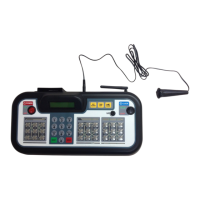
Provides an overview of the controller's front panel, detailing its layout and key components.
Explains the operation of the power switch, clock controls, and the start/stop game clock switch.
Details the function of the numeric, home score, guest score, and game keypads for data entry.
Covers the use of reset, undo, option, and enter keys for system navigation and menu access.
Describes the rear panel ports, including DIN socket, power jack, card holder, and the charging process.
Guides on correctly placing game inserts into the wireless scoreboard controller for proper operation.
Step-by-step process for setting up scoreboards, linking them to a controller, and creating presets.
Instructions on choosing the appropriate sport for the scoreboard from the available options.
Procedures for naming a network and saving the configuration after setting up scoreboards.
How to enter the System Settings menu to manage scoreboard configurations and networks.
Explains how to set default options for individual devices and manage network modes.
Steps for creating new networks or modifying existing network configurations on the controller.
Process for removing previously saved network configurations from the system.
Guides on changing electronic team names displayed on the scoreboard, if available.
How to adjust the brightness of the scoreboard's digits for optimal visibility.
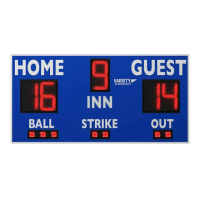
Options to enable or disable the display of the time of day on the baseball scoreboard.
Settings for using scoreboard digits for pitch count or as a clock display.
Describes functions for adding/subtracting points and pitch counts for the home team.
Details how to manage points and pitch counts for the guest team using specific keys.
Explains keys for adding balls, strikes, outs, seconds, innings, and navigation.
Covers the numeric keypad for input and the power/clock switches for control.
Details how to set, edit, and display game times or time of day on the scoreboard.
Explains the functionality of the horn and the timeout feature.
Procedures for resetting the scoreboard for a new game and proper shutdown.
Guidance on battery maintenance and important power considerations for longevity.
 General
| Brand | VARSITY Scoreboards |
|---|---|
| Model | Baseball |
| Category | Sports & Outdoors |
| Language | English |

 To Next Page