11
POWER
HOME SCORE
GUEST SCOREBASEBALL / SOFTBALL
ENTER
BALL
STRIKE INNING
EDIT
.,!? A B CD E F
G H I
RESETUNDO
J K LM N O
P Q R ST U V
_
W X Y Z
PC1PC1
1 1
ERRORHIT
OPTION
1
SECOND
PC
RESET
NEW BAT.
AT BAT
EDIT
PC1PC1
1 1
ERRORHIT
PC
RESET
NEW BAT.
AT BAT
OUT
ON
123
456
78
0
9
OFF
CLOCK
START
LCD
HOLD
TIME
OUT
SET
CLOCK
CONTRAST
STOP
HOME MENU
Network Setup
1 /
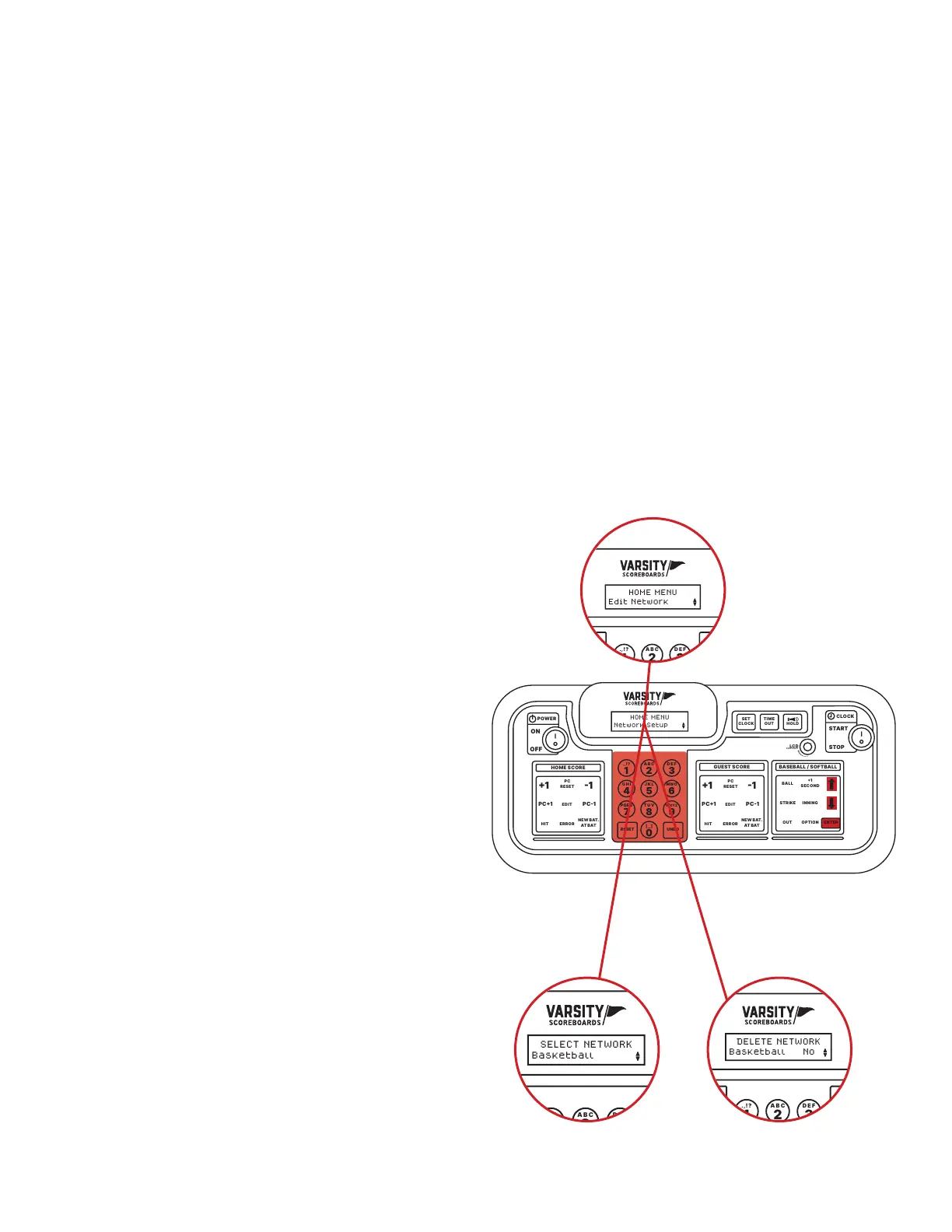
Use the Up and Down arrows to select the network you would
like to delete. Press Enter.
2 /
You will be given a conrmation screen that says Delete Network
with the option to select Yes or No.
3 /
Select No to return to the previous screen. Select Yes to delete
the network and return to the previous screen.
If all available networks are deleted, the device
will display No Networks and automatically
prompt you to begin the Network Wizard
process on STEP 3.
DELETE NETWORK
This option allows you to delete any
saved networks.
POWER
HOME SCORE
GUEST SCORE BASEBALL / SOFTBALL
ENTER
BALL
STRIKE INNING
EDIT
.,!? A B CD E F
G H I
RESETUNDO
J K LM N O
P Q R ST U V
_
W X Y Z
PC1PC1
1 1
ERRORHIT
OPTION
1
SECOND
PC
RESET
NEW BAT.
AT BAT
EDIT
PC1PC1
1 1
ERRORHIT
PC
RESET
NEW BAT.
AT BAT
OUT
ON
123
456
78
0
9
OFF
CLOCK
START
LCD
HOLD
TIME
OUT
SET
CLOCK
CONTRAST
STOP
HOME MENU
Edit Network
POWER
HOME SCORE
GUEST SCOREBASEBALL / SOFTBALL
ENTER
BALL
STRIKE INNING
EDIT
.,!? A B CD E F
G H I
RESETUNDO
J K LM N O
P Q R ST U V
_
W X Y Z
PC1PC1
1 1
ERRORHIT
OPTION
1
SECOND
PC
RESET
NEW BAT.
AT BAT
EDIT
PC1PC1
1 1
ERRORHIT
PC
RESET
NEW BAT.
AT BAT
OUT
ON
123
456
78
0
9
OFF
CLOCK
START
LCD
HOLD
TIME
OUT
SET
CLOCK
CONTRAST
STOP
DELETE NETWORK
Basketball No
POWER
HOME SCORE
GUEST SCOREBASEBALL / SOFTBALL
ENTER
BALL
STRIKE INNING
EDIT
.,!? A B CD E F
G H I
RESETUNDO
J K LM N O
P Q R ST U V
_
W X Y Z
PC1PC1
1 1
ERRORHIT
OPTION
1
SECOND
PC
RESET
NEW BAT.
AT BAT
EDIT
PC1PC1
1 1
ERRORHIT
PC
RESET
NEW BAT.
AT BAT
OUT
ON
123
456
78
0
9
OFF
CLOCK
START
LCD
HOLD
TIME
OUT
SET
CLOCK
CONTRAST
STOP
SELECT NETWORK
Basketball
1 2
NETWORK SETUP
The second option will display as Network Setup. To change any of the networks on your devices,
press Enter.
ADD A NEW NETWORK
This option allows you to create a new network. To begin press Enter and then refer to STEP 3
of the Network Wizard section of the manual.
EDIT NETWORK
Select Edit Network to display the Device Discover screen as the LCD wireless Controller looks for
all powered-on devices.
Using the Up and Down arrows, select the network you
would like to edit. Press Enter. To edit the network, refer
to STEP 3 of the Network Wizard section of the manual.


 To Next Page