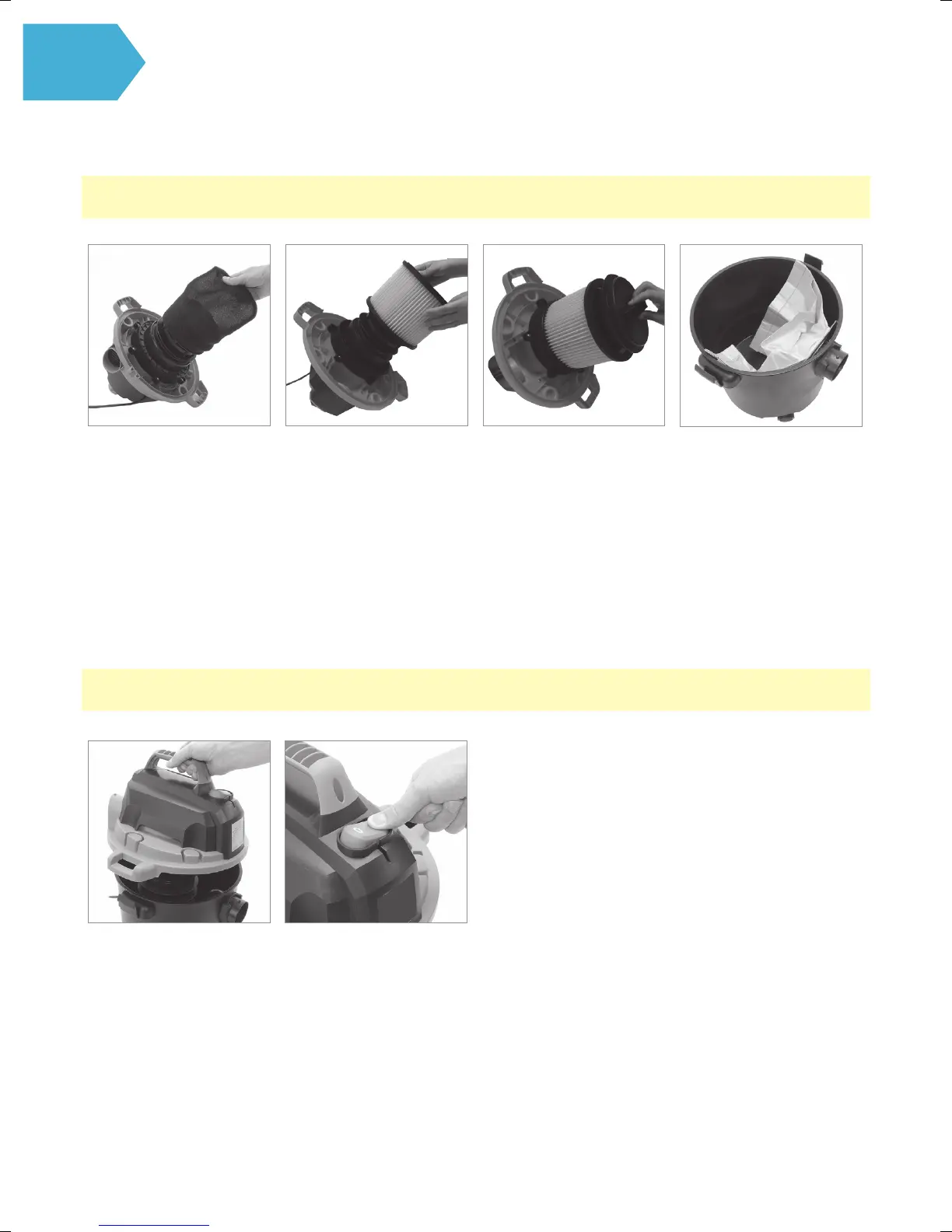
SETUP the Cleaner from WET to DRY Vacuuming
NOTE: Empty the tank and dispose of any liquid which may have been picked up in wet mode.
NOTE: as the suction power decreases, this may indicate that the paper dust bag is full and needs replacing.
Remove the foam lter.
Dry o any excess moisture
from the oat cage.
Place the top motor housing
cover onto the main tank
and secure
into position with the
two retaining clips.
Attach the dry lter
beneath the motor housing
by pushing it on.
(This dry lter must
ALWAYS be used in dry
vacuuming mode to help
provide protection and
avoid motor damage).
Connect the vacuum
cleaner to the power supply
and switch ON
by pushing the on/o
switch “I”.
Once the dry lter has been
pushed onto the oat cage
- align the lter retainer cap
onto the base of lter and
turn clockwise to lock into
place.
Attach the paper dust
bag to the inner side
of the hose connector
on the inside of the tank
as shown.
Push the bag on to
the hose connector.
Using your machine



 To Next Page