Emptying the dirt container
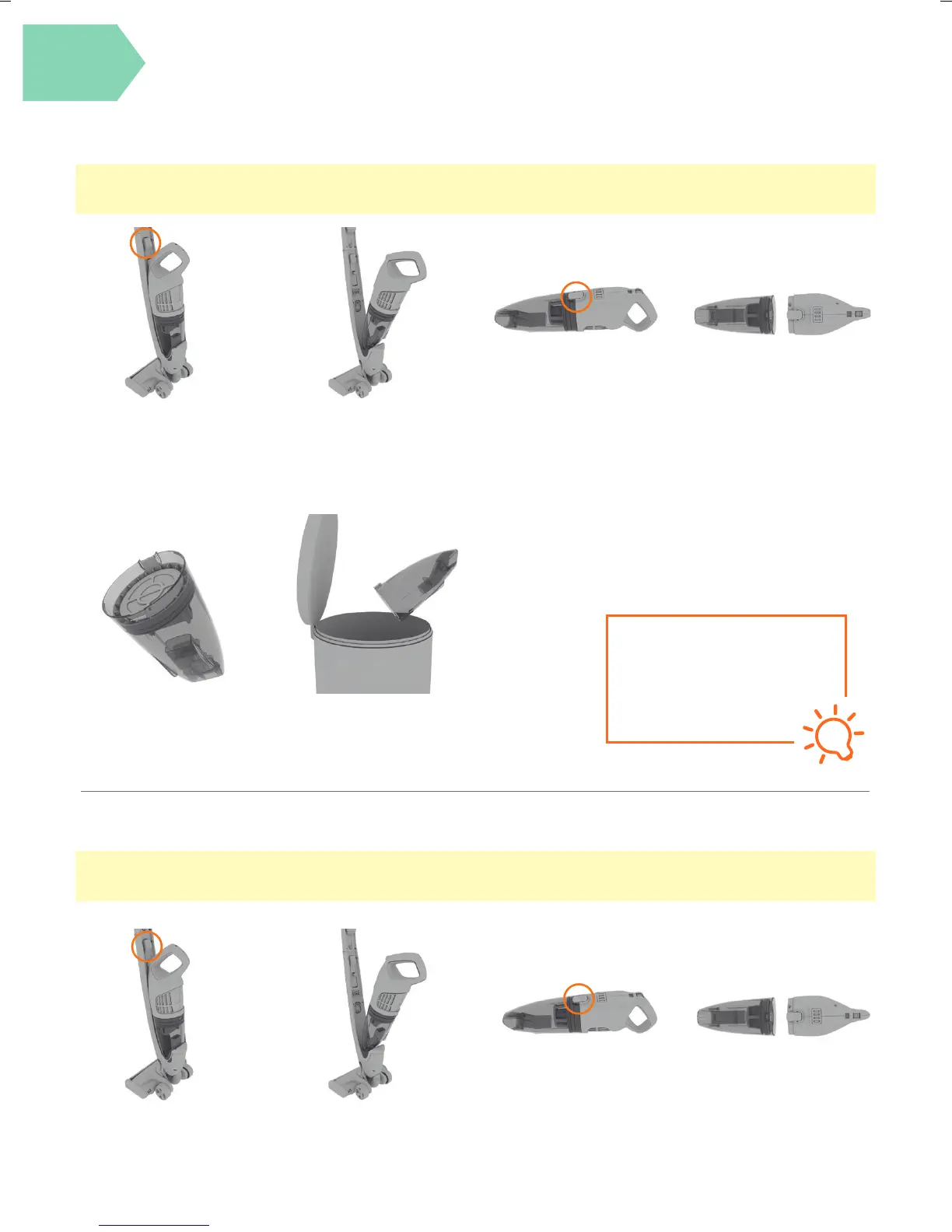
Press the handheld
release button.
Lift to remove the
handheld from the
main body.
Press the dirt container
release button to remove
the dirt container.
CAUTION: Always switch o the vacuum cleaner before carrying out any maintenance or troubleshooting. Do not use
your vacuum cleaner without the lters in place.
Pull to remove the
pre-motor lter out of
the dirt container.
Pull to separate the dirt
container from
the handheld.
Hold dirt container over a
bin allowing dirt/debris to
fall out.
TIP
Don’t over ll the dirt
container to avoid blocking
the air ow through the
vacuum cleaner and replace
lters every 6-9 months.
Taking care of your machine
Cleaning the fi lter
Press the handheld
release button.
Lift to remove the
handheld from the
main body.
Press the dirt container
release button to remove
the dirt container.
Pull to separate the dirt
container from
the handheld.
CAUTION: For best cleaning results lters require cleaning every 4-6 uses or as needed depending upon use.
Do not use your vacuum cleaner without the lter in place.



 To Next Page