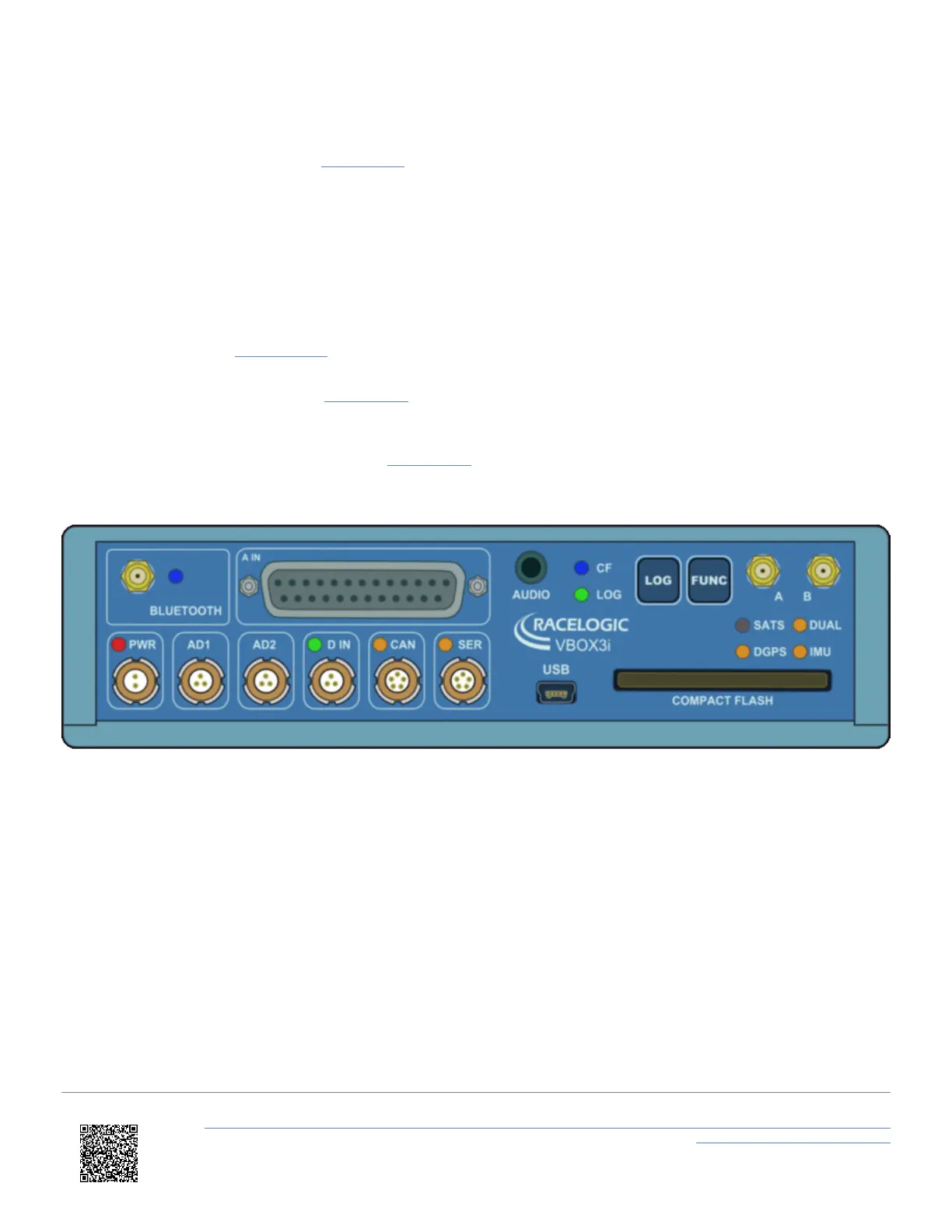
After performing a GNSS coldstart leave the VBOX 3i powered up in a static location where the antenna has an
unobstructed view of the sky until the ‘SATS’ LED becomes solid green.
Once the VBOX3i has downloaded the new almanac it will reacquire satellites in noisy situations (such as near trees,
buildings and under bridges) much quicker. It will also acquire satellite much quicker on power-up.
To perform a GNSS coldstart on the VBOX3i perform the following actions:
1. Press and hold the ‘LOG’ button on the front of the VBOX 3i for five seconds until a long beep is sounded.
2. When the button is released the ‘SATS’ LED will start to flash red showing that the coldstart has been performed
and the GNSS engine is now not locked onto any satellites.
3. After approximately 30 – 45 seconds, the ‘SATS’ LED will start to flash green / orange indicating that satellite lock
has been achieved and indicating the number of satellites that it is locked onto.
Important notes
When a GNSS coldstart is carried out, please note that this resets the DGPS and RTK mode to 'None'. Also, if using a
dual antenna system, the VBOX 3iD/3iDR will reset dual antenna separation to default settings (1 m).
https://en.racelogic.support//Product_Info/VBOX_Data_Loggers/VBOX_3i_Range/VBOX_3i_User_Guide_(All_Variants)/02_-
_VB3i_GNSS_Antenna_Placement
14


 To Next Page