Disc formats
Supported formats
The following 8 cm and 12 cm discs are
supported:
❏
DVD video 5 and 9
❏
DVD video 10 and 18
(must be turned over)
❏
Video CD
❏
Super Video CD
❏
CD Audio
❏
MP3 (CD-ROM)
❏
JPEG image CD
Formats which are not supported
❏
DVD-ROM
❏
DVD-RW/ DVD-RAM
❏
CDV
❏
CD-G
❏
Kodak Photo CD (previously CDI format)
❏ DVDs with a Region code other than “2”
and “0”
Note: As a rule, even self-burned CDs are
supported. However, depending on the
blank disc and burning program used,
playback difficulties may arise.
Handling and cleaning
DVDs and CDs
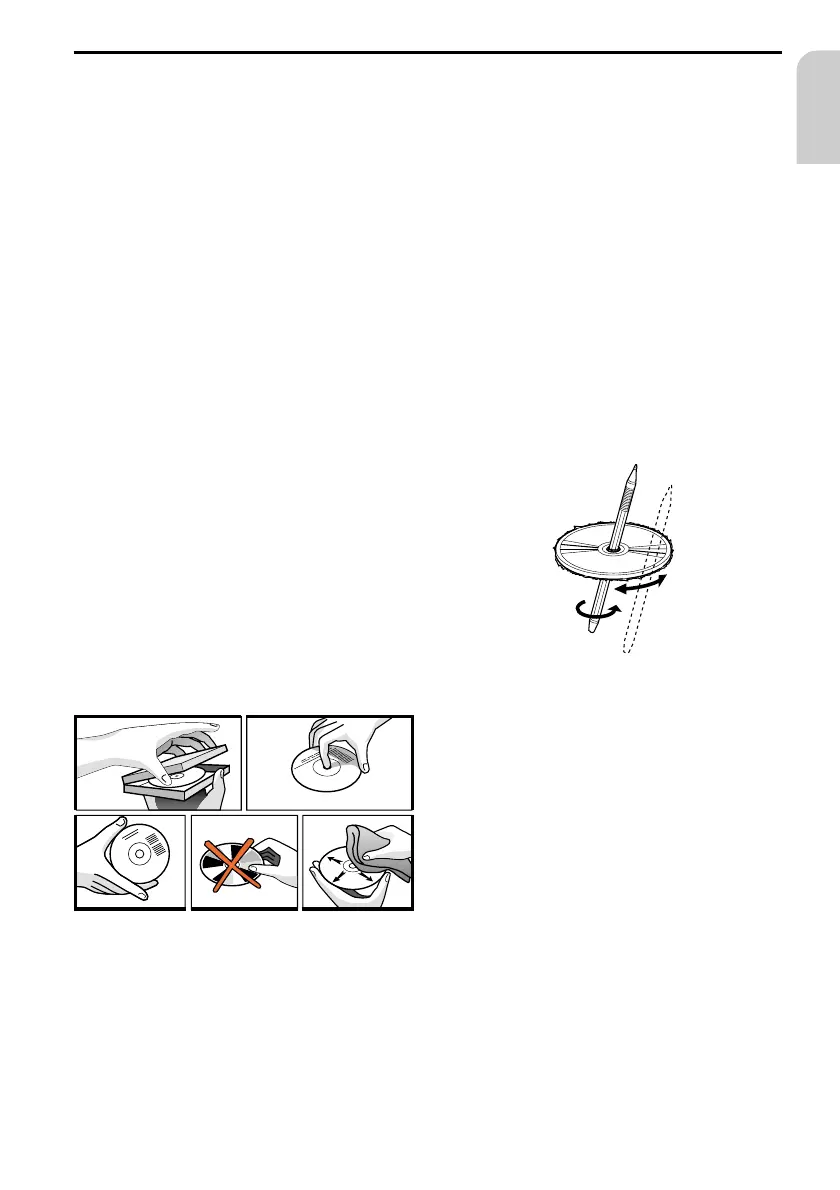
❏
Avoid leaving fingerprints on the disc
when removing it.
❏
Always store discs in their protective
covers.
❏
Always ensure that discs are clean and
dry before inserting.
❏
Protect discs from heat and direct
sunlight.
❏
Dirt, dust, scratches and warping discs
will cause malfunction.
❏
Do not place stickers or make scratches
on discs.
❏
Do not warp discs.
Disc cleaning
Use a dry soft cloth to wipe the surface.
If the disc is quite dirty, use a soft cloth
slightly moistured with isopropyl (rubbing)
alcohol.
Never use solvents such as benzine, thinner
or conventional record cleaners as they may
mar the surface of the disc.
Preparing new discs with rough
spots
New discs may have some roughness around
the edge. The DVD Player may not work
properly or the video/sound reproduction
may skip if such discs are used.
☞
Use a ballpoint pen, etc., to remove
roughness from the edge of the disc.
DISC NOTES
15
English
Rolf Egon Füchtenschnieder
and Band



 To Next Page