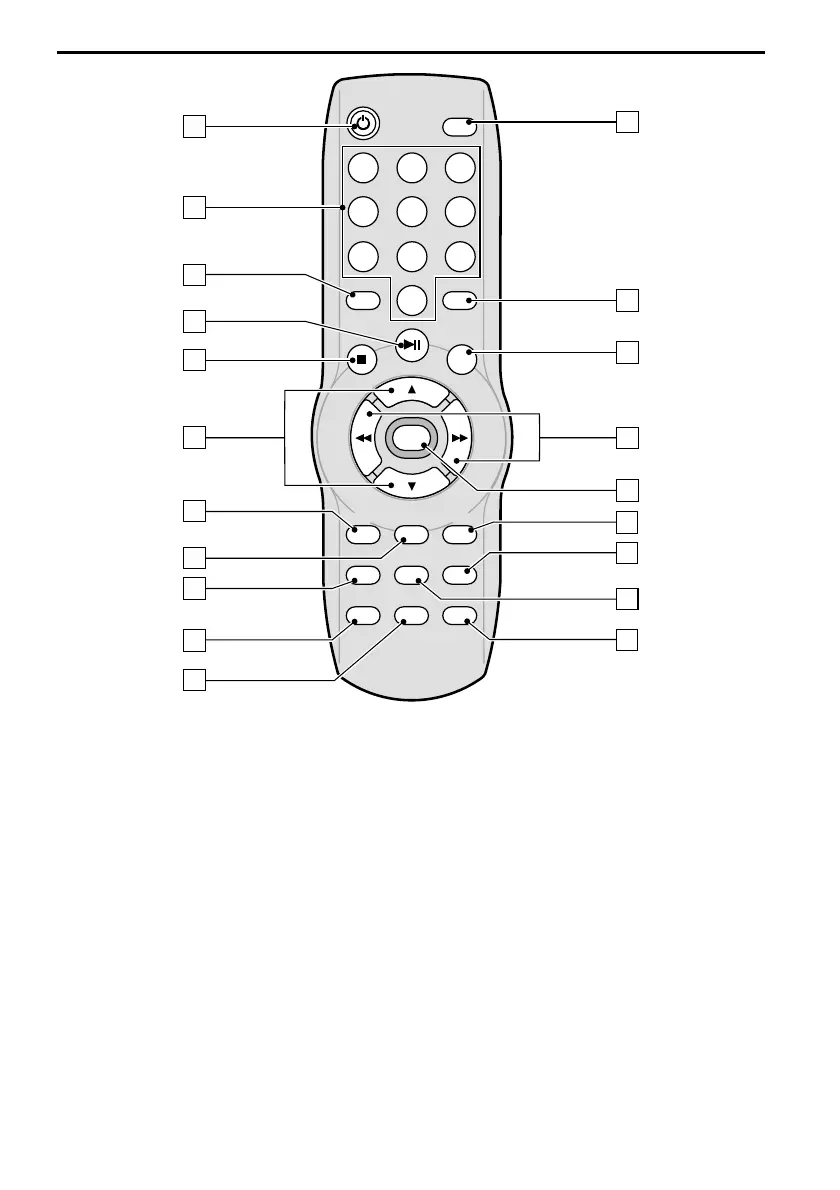
1 O POWER . . . Turn multimedia system on / off
2 0 - 9 . . . . . . . . Numeric key buttons
3 SMART . . . . . . Turn SMART mode on / off
4 P . . . . . . . . . Start playback, Pause (still picture)
5 S . . . . . . . . . . Stop playback
6 8 / 2. . . . . . . DVD: Next / previous chapter
. . . . . . . . . . . . VCD/CD/MP3: Next / previous track
. . . . . . . . . . . . In MENU mode: move the cursor up/down
7 SUB-T . . . . . . Select the SUBTITLE language (depending on the DVD disc)
8 AUDIO . . . . . . Select the audio soundtrack (depending on the DVD disc)
9 SETUP . . . . . . Display the SETUP menu of the DVD player
0 MODE . . . . . . . Selects AV source for TFT display (DVD, AV1 or AV2) or AV1/AV2 for
. . . . . . . . . . . . AV output in SMART mode
q MENU . . . . . . Display the DVD root menu of the DVD disc
18
REMOTE CONTROL
POWER
1
4
7
2
5
8
0
3
6
9
REPEAT
ZOOM
AUDIOSUB-T VOL +
ENTER
SMART
DISP
1
20
19
18
17
16
2
5
7
9
6
3
4
8
11
12
13
10
15
14
TITLESETUP
MENUMODE VOL –
SEL
ANGLE



 To Next Page