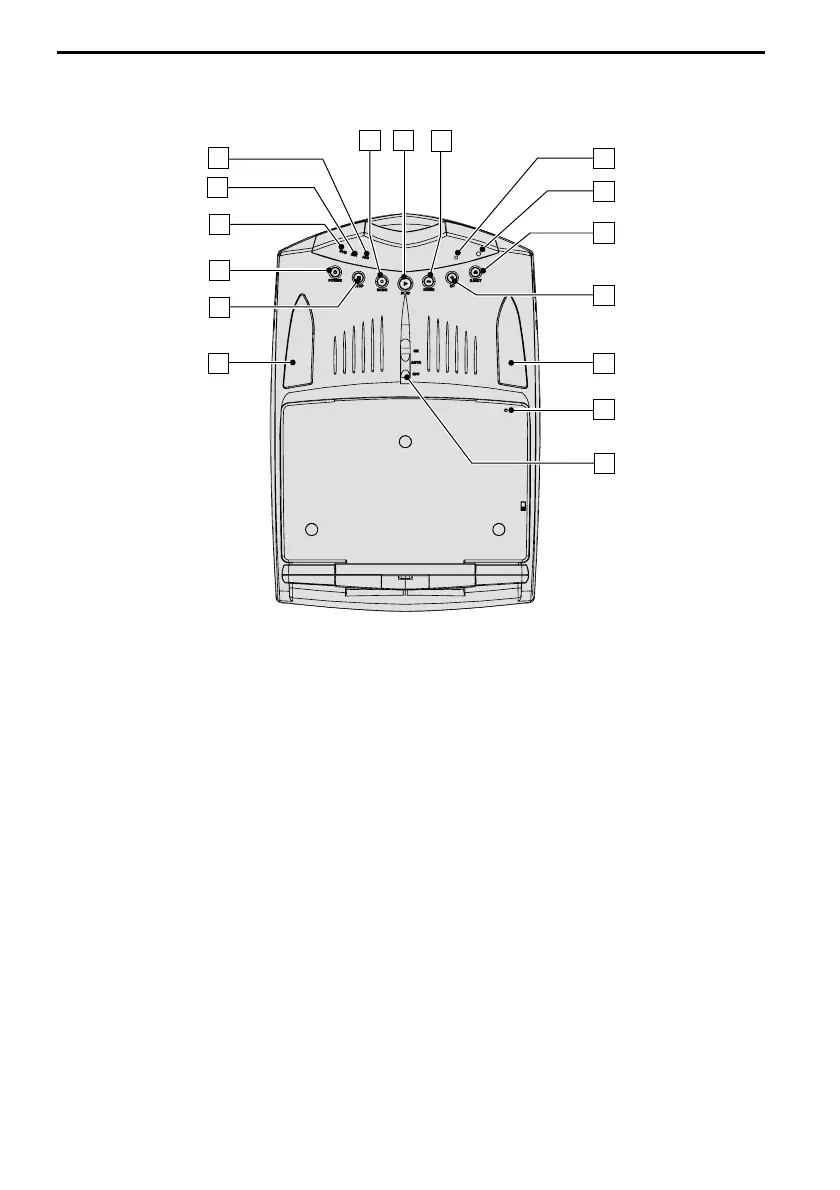
1 . . . . . . . . . . . . Switch for interior lighting
2 . . . . . . . . . . . . Reset button
3 . . . . . . . . . . . . Interior lighting
4 V UP . . . . . . . DVD: next chapter;
. . . . . . . . . . . . VCD/CD/MP3: next track
. . . . . . . . . . . . In menus: move cursor upwards
5 EJECT . . . . . . . Eject disc
6 SMART Mode . “SMART mode” is activated
7 DISC IN. . . . . . A disc is inserted
8 W DOWN . . . . DVD: previous chapter;
. . . . . . . . . . . . VCD/CD/MP3: previous track
. . . . . . . . . . . . In menus: move cursor downwards
9 L PLAY. . . . . . Play the disc, pause (freeze frame)
0 • MODE . . . . . Select A/V source (DVD, AV1, AV2)
q AV2 . . . . . . . . AV 2 input selected
w AV1 . . . . . . . . AV 1 input selected
e DVD . . . . . . . . Displays the video signal from the DVD player
r O POWER. . . . Turns multimedia system on / off
t S STOP . . . . . Stop playing the disc
16
CONTROLS
7
5
2
15
13
14
12
11
10
9
6
1
4
3
8
3



 To Next Page