EasyManua.ls Logo

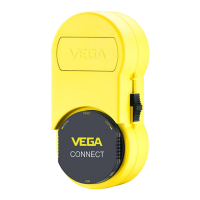
Vega VEGACONNECT - User Manual

Vega VEGACONNECT
24 pages
Print Icon
To Next Page IconTo Next Page
Loading...
Operating Instructions
Interface adapter between PC and
communication-capable VEGA
instruments
VEGACONNECT
Wired interface adapter with connection box
USB - HART/I²C
Document ID: 66081
Question and Answer IconNeed help?

Do you have a question about the Vega VEGACONNECT and is the answer not in the manual?

Summary

1 About this document

1.1 Function

Details the manual's purpose for mounting, connection, setup, maintenance, and user safety.

1.2 Target group

Identifies the intended audience as trained personnel and emphasizes making contents available to qualified staff.

1.3 Symbols used

Explains various symbols used in the manual for warnings, notes, and specific instructions.

2 For your safety

2.1 Authorised personnel

Specifies that operations must be performed by trained, qualified, and authorized personnel only.

2.2 Appropriate use

Defines the instrument's intended use as a PC interface adapter and stresses operational reliability through proper use.

2.3 Warning about incorrect use

Highlights hazards from improper use, including application-specific risks, damage, and environmental contamination.

2.4 General safety instructions

Ensures the instrument operates flawlessly and the user is responsible for safety measures and compliance with regulations.

2.5 Safety instructions for Ex areas

Mandates the use of only Ex-approved devices in explosion-proof areas and observance of Ex-specific instructions.

3 Product description

3.1 Configuration

Lists the components included in the scope of delivery for the VEGACONNECT interface adapter.

3.2 Principle of operation

Explains how the VEGACONNECT functions as a wired interface adapter for PC and HART modem connections.

3.3 Adjustment

States that adjustment is performed via PC software, as the instrument has no physical adjustment elements.

3.4 Packaging, transport and storage

Covers packaging standards, transport precautions to prevent damage, and storage conditions.

4 Connection

4.1 Connection to the PC

Details connecting the VEGACONNECT to a Windows PC via USB, requiring DTM Collection software installation.

4.2 Connection of the sensor;controller

Describes how the VEGACONNECT connects to various communication-capable VEGA instruments.

Connection by insertion into the sensor

Explains direct insertion of the VEGACONNECT into plics® series instruments, replacing the display module.

Connection via HART

Covers HART connection via sensor cable, noting the potential need for an additional HART resistor.

Connection via I²C bus

Details connecting the VEGACONNECT to the I²C bus interface of series 600 controllers.

5 Connection examples

5.1 Connection by insertion into the device

Illustrates examples of connecting VEGACONNECT by inserting it into plics® sensors and VEGADIS 81.

5.2 Connection via HART interface

Provides examples of HART connections, including requirements for processing systems with low impedance.

5.3 Connection via I²C interface

Shows an example of connecting the VEGACONNECT to series 600 controllers using the I²C interface.

6 Setup

6.1 Adjustment

Explains the adjustment process using PACTware software and locating the VEGACONNECT DTM in the device catalog.

7 Diagnostics and servicing

7.1 Maintenance

States no special maintenance is needed for normal operation; cleaning is for visibility of labels and markings.

7.2 Software update

Describes how to update the device software via USB using PACTware/DTM, emphasizing validation of approvals.

7.3 How to proceed if a repair is necessary

Outlines the procedure for instrument repair, including return forms, cleaning, packaging, and contacting the agency.

8 Recycling and disposal

8.1 Disposal

Advises disposing of the device via a specialist recycling company due to its recyclable materials, following national regulations.

9 Certificates and approvals

9.1 Approvals for Ex areas

Informs about the availability of approved versions for hazardous areas and their preparation status.

9.2 EU conformity

Confirms the device's compliance with EU directives, indicated by the CE marking, with declarations available online.

9.3 Environment management system

Details the company's ISO 14001 certified environment management system for continuous environmental protection improvement.

10 Supplement

10.1 Technical data

Presents technical specifications including materials, weights, electrical data, ambient conditions, and protective measures.

10.2 Dimensions

Provides graphical representations and specific measurements for the VEGACONNECT device.

10.3 Industrial property rights

States that VEGA product lines are globally protected by industrial property rights, with details available online.

10.4 Trademark

Clarifies that all brands and company names used are the property of their lawful originators.

Summary

1 About this document

1.1 Function

Details the manual's purpose for mounting, connection, setup, maintenance, and user safety.

1.2 Target group

Identifies the intended audience as trained personnel and emphasizes making contents available to qualified staff.

1.3 Symbols used

Explains various symbols used in the manual for warnings, notes, and specific instructions.

2 For your safety

2.1 Authorised personnel

Specifies that operations must be performed by trained, qualified, and authorized personnel only.

2.2 Appropriate use

Defines the instrument's intended use as a PC interface adapter and stresses operational reliability through proper use.

2.3 Warning about incorrect use

Highlights hazards from improper use, including application-specific risks, damage, and environmental contamination.

2.4 General safety instructions

Ensures the instrument operates flawlessly and the user is responsible for safety measures and compliance with regulations.

2.5 Safety instructions for Ex areas

Mandates the use of only Ex-approved devices in explosion-proof areas and observance of Ex-specific instructions.

3 Product description

3.1 Configuration

Lists the components included in the scope of delivery for the VEGACONNECT interface adapter.

3.2 Principle of operation

Explains how the VEGACONNECT functions as a wired interface adapter for PC and HART modem connections.

3.3 Adjustment

States that adjustment is performed via PC software, as the instrument has no physical adjustment elements.

3.4 Packaging, transport and storage

Covers packaging standards, transport precautions to prevent damage, and storage conditions.

4 Connection

4.1 Connection to the PC

Details connecting the VEGACONNECT to a Windows PC via USB, requiring DTM Collection software installation.

4.2 Connection of the sensor;controller

Describes how the VEGACONNECT connects to various communication-capable VEGA instruments.

Connection by insertion into the sensor

Explains direct insertion of the VEGACONNECT into plics® series instruments, replacing the display module.

Connection via HART

Covers HART connection via sensor cable, noting the potential need for an additional HART resistor.

Connection via I²C bus

Details connecting the VEGACONNECT to the I²C bus interface of series 600 controllers.

5 Connection examples

5.1 Connection by insertion into the device

Illustrates examples of connecting VEGACONNECT by inserting it into plics® sensors and VEGADIS 81.

5.2 Connection via HART interface

Provides examples of HART connections, including requirements for processing systems with low impedance.

5.3 Connection via I²C interface

Shows an example of connecting the VEGACONNECT to series 600 controllers using the I²C interface.

6 Setup

6.1 Adjustment

Explains the adjustment process using PACTware software and locating the VEGACONNECT DTM in the device catalog.

7 Diagnostics and servicing

7.1 Maintenance

States no special maintenance is needed for normal operation; cleaning is for visibility of labels and markings.

7.2 Software update

Describes how to update the device software via USB using PACTware/DTM, emphasizing validation of approvals.

7.3 How to proceed if a repair is necessary

Outlines the procedure for instrument repair, including return forms, cleaning, packaging, and contacting the agency.

8 Recycling and disposal

8.1 Disposal

Advises disposing of the device via a specialist recycling company due to its recyclable materials, following national regulations.

9 Certificates and approvals

9.1 Approvals for Ex areas

Informs about the availability of approved versions for hazardous areas and their preparation status.

9.2 EU conformity

Confirms the device's compliance with EU directives, indicated by the CE marking, with declarations available online.

9.3 Environment management system

Details the company's ISO 14001 certified environment management system for continuous environmental protection improvement.

10 Supplement

10.1 Technical data

Presents technical specifications including materials, weights, electrical data, ambient conditions, and protective measures.

10.2 Dimensions

Provides graphical representations and specific measurements for the VEGACONNECT device.

10.3 Industrial property rights

States that VEGA product lines are globally protected by industrial property rights, with details available online.

10.4 Trademark

Clarifies that all brands and company names used are the property of their lawful originators.

Vega VEGACONNECT Specifications

General IconGeneral
ConnectivityWired
Input Voltage100-240V AC
Frequency50/60Hz
Efficiency85%
Protection FeaturesOver-voltage, Over-current, Short-circuit protection
CompatibilityVEGA devices

Related product manuals