10
4 Connection
VEGACONNECT • Wired interface adapter with connection box
66081-EN-211221
4 Connection
4.1 Connection to the PC
Note:
First install the software package " DTM Collection" before connecting
the VEGACONNECT to the PC.
An USB interface (1.1/2.0/3.0) is compulsory for connection of
VEGACONNECT to a Windows PC. The connection is provided with
the supplied USB cable. Voltage supply of VEGACONNECT is pro-
vided via the USB interface.
To operate the VEGACONNECT, a suitable Windows driver is re-
quired, which is included in our software package " DTM Collection".
This software package can be downloaded free of charge from our
homepage. To ensure the support of all device functions, you should
always use the latest version.
When installing the driver package " VEGA-DTM for Communication",
the suitable instrument driver is installed automatically. When con-
nectingVEGACONNECT,thedriverinstallationisnishedautomati-
cally and is ready for operation without a restart.
OPEN
TWIST
USB
LOCK
CONNECT
2
1
3
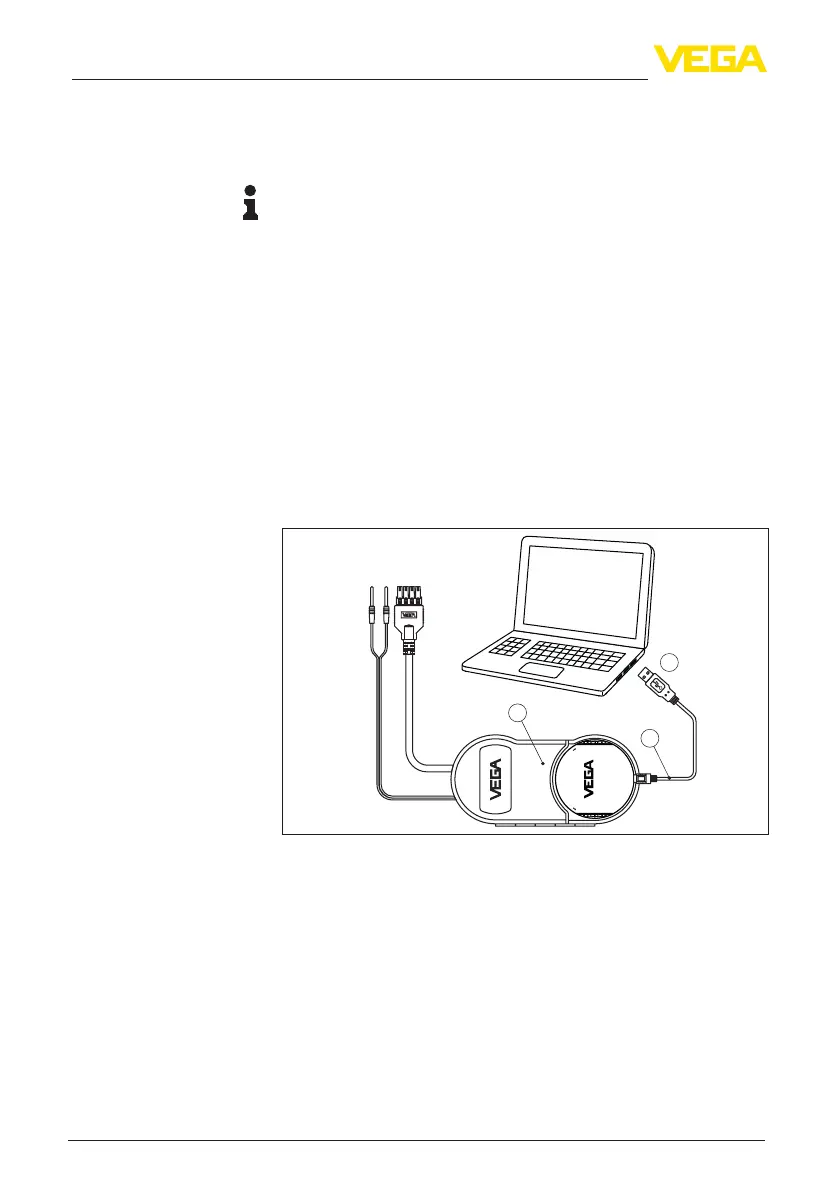
Fig. 3: Electrical connection
1 USB connection of the PC
2 USB cable type A to type C
3 Connection box with VEGACONNECT 4
4.2 Connection of the sensor/controller
The VEGACONNECT can be connected to almost any communica-
tion-capableVEGAinstrumentviadierentways.
Connection
DTM Collection


 To Next Page