10
4 Mounting
VEGATOR 636 Ex • Signal conditioning instrument
23446-EN-130627
4 Mounting
4.1 General instructions
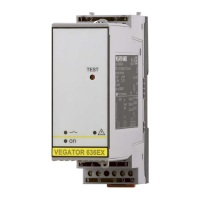
VEGATOR 636 Ex signal conditioning instrument with plug-in socket
for mounting on carrier rail according to EN 50022.
The front plate of VEGATOR 636 Ex can be provided with a lead-seal-
able transparent cover to protect the instrument against unauthorised
orinadvertentadjustment.Seethefollowinggureonhowtoremove
the transparent cover.
Fig. 2: Removing the transparent cover
For moisture-protected mounting outside the switching cabinet, we
oeraninsulatedprotectivehousingwithtransparentcover(IP65)for
surface mounting.
In this housing you can mount a maximum of 3 instruments of 36 mm
width.
4.2 Mounting instructions
The plug-in socket is constructed for carrier rail mounting according
to EN 50022. Operating voltage is connected to terminals 9 and 10.
For neighbouring signal conditioning instruments, it is possible to
continue connection L1 and N directly via the supplied bridges.
Danger:
The bridges must never be used with single instruments or at the end
of a row of instruments. If this rule is not heeded, there is a danger
of coming into contact with the operating voltage or causing a short
circuit.
A VEGATOR 636 Ex in Ex version is an auxiliary, intrinsically safe
instrument and may not be installed in explosion-endangered areas.
Installation place
Transparent cover
Housing IP 65
Installation


 To Next Page
 Loading...