EasyManua.ls Logo

Veho VMS-005-LCD - User Manual

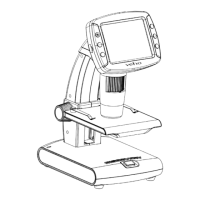
Veho VMS-005-LCD
52 pages
Print Icon
To Next Page IconTo Next Page
Loading...

Questions and Answers

  • S
    Scott MarquezAug 3, 2025
    What to do if my Veho VMS-005-LCD Microscope is connected to a television, but no image appears?
    • A
      Anthony MataAug 3, 2025
      If no image appears on the television screen when your Veho Microscope is connected, please ensure that the television is turned on and switched to the appropriate video input channel. Also, make sure the video cable is securely connected to the Microscope's Video-out port and plugged into the correct video input on your television.
  • U
    usweeneyAug 10, 2025
    Why is my Veho VMS-005-LCD battery not charging?
    • W
      Warren RobinsonAug 10, 2025
      If the battery indicator LED is not red, even when the power adapter is connected and plugged into a wall socket, or if the battery is not charging, ensure that the adapter is plugged into the Microscope’s DC-in port. Also, check that the outlet has power and is not malfunctioning. If the outlet is connected to a wall switch, make sure that the switch is turned on.
  • S
    Sally HatfieldAug 18, 2025
    What to do if the screen is blank on my Veho Microscope?
    • J
      Jose BernardAug 18, 2025
      If the screen on your Veho Microscope is blank, first ensure that the power is on. If that doesn't work, try charging the battery. Also, verify that the item you want to magnify is positioned correctly under the lens.
  • M
    matthew52Aug 25, 2025
    How to clean smudges or blemishes on Veho VMS-005-LCD screen?
    • J
      Joseph ZhangAug 26, 2025
      To remove smudges or blemishes from the screen of your Veho Microscope, carefully clean the screen and lens with a soft fabric.

Summary

Precautions and Safety

Preparation and Accessories

Microscope Parts Identification

Identifies and describes each component and its purpose on the microscope.

Using the Microscope

Battery Installation Guide

Step-by-step guide for inserting the microscope's battery.

MicroSD Card Insertion

Instructions for inserting a MicroSD card for data storage.

Powering On the Microscope

Procedure for powering on the microscope.

Powering Off the Microscope

Methods to properly power off the microscope.

Capturing Photos and Videos

Detailed steps for capturing photos and videos with the microscope.

Data Download to Computer

Guide to transferring captured data from microscope to a computer.

Battery Charging Instructions

Instructions on how to charge the microscope's internal battery.

Menu Navigation and Settings

Setting Image Resolution

Adjusting the image resolution settings on the microscope.

Configuring Capture Timer

Configuring the timer for timed photo or video capture.

Troubleshooting Guide

PortableCapture Pro Software Introduction

Software Calibration and Measurement

Procedure for calibrating and performing measurements.

Software Calibration Process

Steps to calibrate the microscope for accurate measurements.

Software Measurement Tools

How to use various tools for measuring captured images.

Veho VMS-005-LCD Specifications

General IconGeneral
Maximum magnification1200 x
Number of illumination LEDsYes
Product colorBlack, White
Microscope typeDigital microscope
InterfaceUSB
Compatible operating systemsWindows XP SP2/Vista/7/8\\r Mac 10.6-10.8

Related product manuals