STREAMING MUSIC
9
MULTIFUNCTIONAL CONTROLLER BLUETOOTH OPERATION
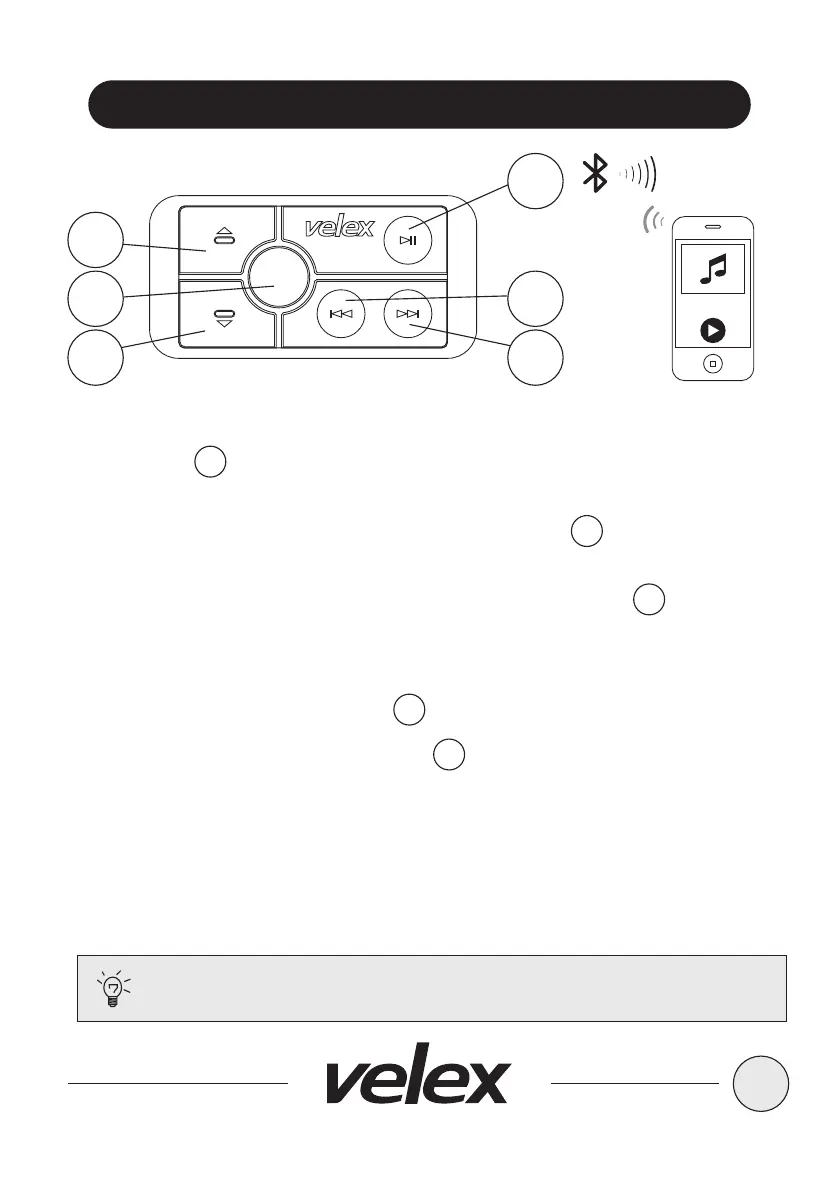
Turn the BLUETOOTH volume level on your device to its 100%
level
Tips:
1. Press the PLAY/PAUSE, once to start playing music or press the PLAY
button from your device touch screen, pressing again to PAUSE
2. To skip songs or advance, press the NEXT TRACK button, press and
hold to FAST FORWARD
3. To select the previous song, press the PREVIOUS TRACK button,
press and hold to FAST REWIND
VOLUME CONTROL
1. To raise the VOLUME press UP button
2. To lower the VOLUME press DOWN button
5
4
7
3
6
VX502
SRC
3
2
6
5
7
4



 To Next Page