DVR4MQAEE_v5 VELLEMAN
- 32 -
*Click the “Select All” to clean the previously selected detection area.
*Click the “Clear All” to activate the detection area as full area.
5. After setting, press “OK” and press “APPLY” to confirm.
NOTE: Enable the motion detection function. When the motion is triggered, the “ ” icon will appear on the screen.
The software AP will start recording automatically.
NETWORK BACKUP
Press the “ ” button to enter the system setting page.
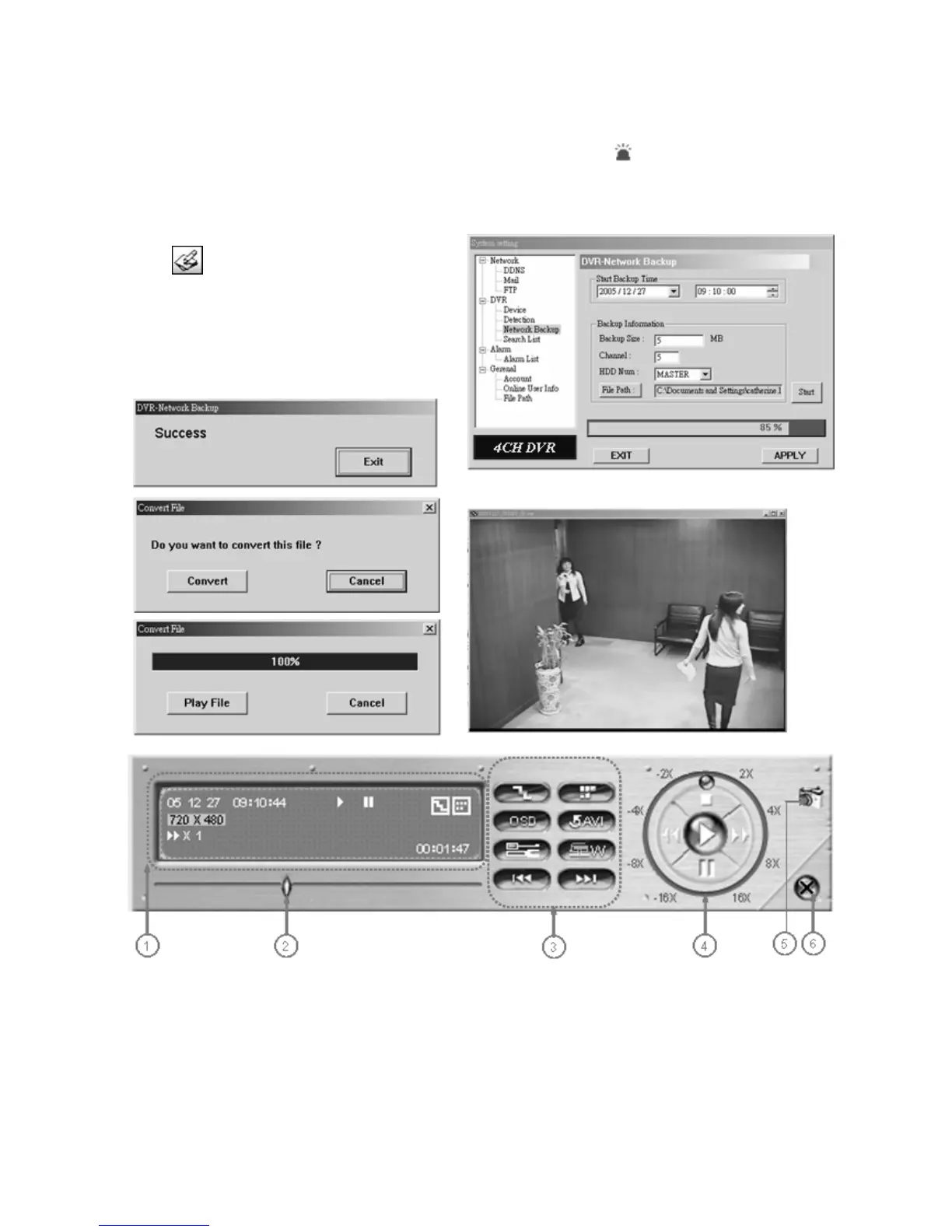
1. Backup the recorded files to the PC from DVR
via network.
2. Enter the backup information → Press “Start”
→ Success → Convert → Play File.
1. Playback Information
2. Time Progress Bar
3. Functions:
(1) De-interlace
(2) De-blocking
(3) OSD
(4) AVI Convert
(5) Config. Setting


 To Next Page