Setup of wall switch KLI 311 to operate VELUX INTEGRA
®
roof windows GGL/GGU or
roof windows GGL/GGU with VELUX INTEGRA
®
window operators
1
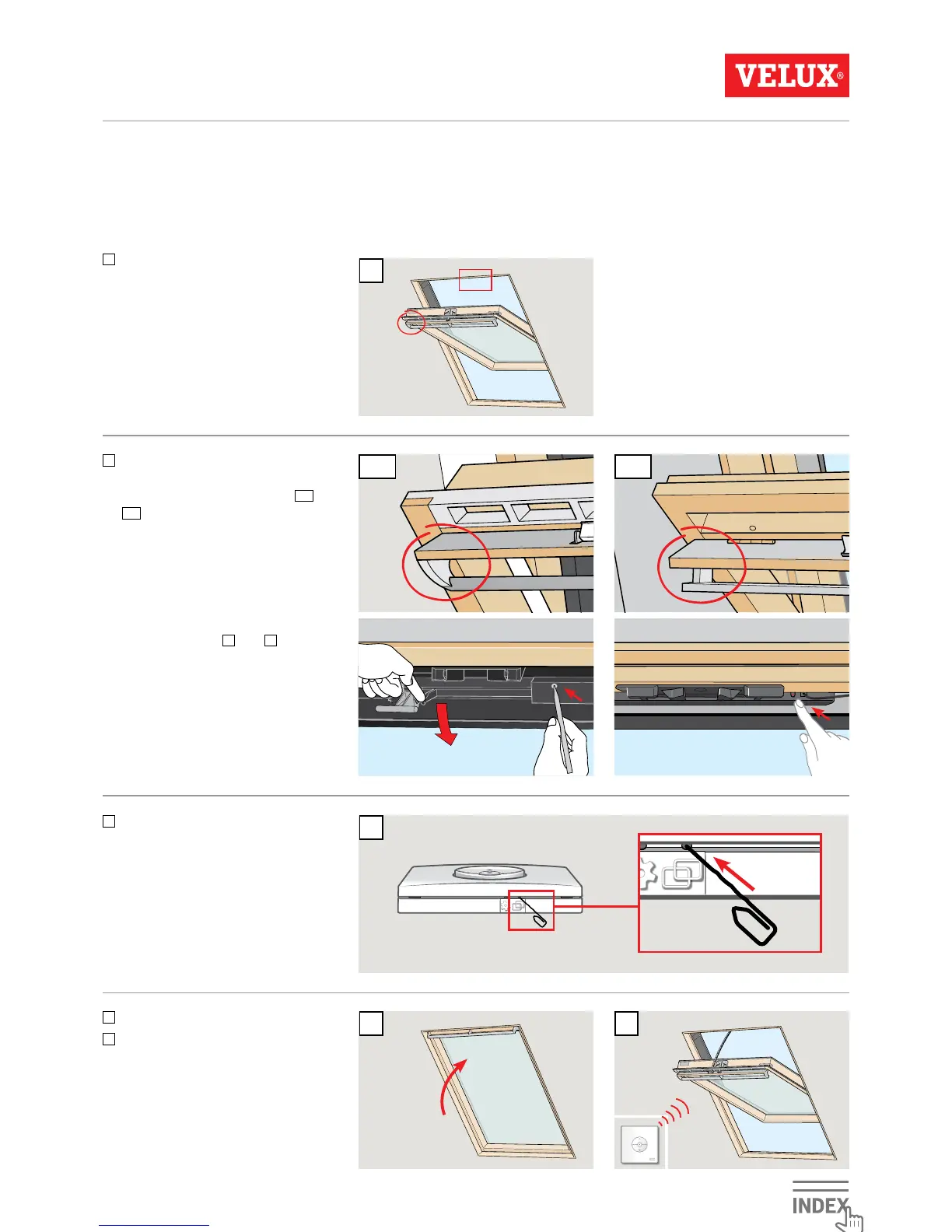
Ensure the power is turned on.
Open window manually (if the
window is open, you must close it
by pressing the test button on the
window operator).
If a non-functional wall switch must be replaced or if the wall switch cannot find certain products, the products can be
prepared for registration by resetting them manually.
Note: Reset products cannot be operated until they have been registered in the wall switch again.
Important: This only applies to KLI 311.
2A 2B
2
There are two ways of resetting
depending on window type. The
ventilation flap can look like
2A
or
2B
.
Press the test button on the
window operator for at least
10 seconds. The window operator
will run briefly back and forth.
Note: Registration (
3
and
4
) must
now be completed within the next
10 minutes.
3
Press PAIR button on the wall
switch for 1 second.
4
Close the window manually.
5
The window can now be operated
with the wall switch.



 To Next Page
 Loading...