- 18 -
Manual User ECO
English
•Press key “D” days are continuously increased from “Mon” to “Sun” (only
for weekly version). (Table 5 ex. C)
■ The chronotermostat is now already functioning with a preset
program!!!
• If no further operation is made (custom programing) the chronotermostat
will work executing every day this preset program.
It will keep “” temperature from 7:00 AM to 10:59 PM and “”
temperature from 11:00 PM to 6:59 AM
CUSTOM PROGRAMING
■ Besides “basic operation” with preset program, the chrono
termostat can operate by executing any program set by the user
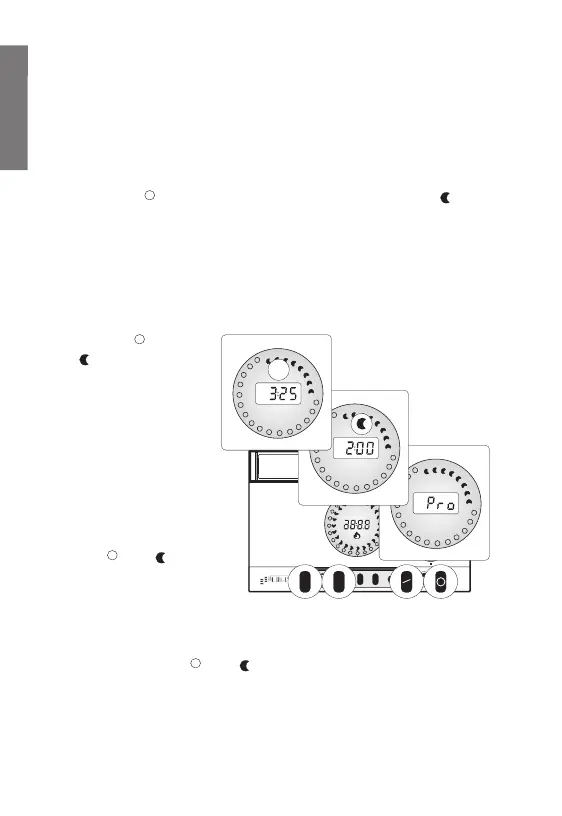
•Press key “” (or
“”) for more than 2
seconds, on numeric
field the “PRO” sign
will be displayed and
the graphic field will
flash except for the
symbol for the current
hour which the current
program state.
(Table 6 ex. A)
• In this state by pressing
keys “”or “”it is
possible to set
temperature (comfort
or saving) for current hour.
When the variation is done the next hour is displayed with the rest of the
graphic field still flashing
•Pressing again keys “” or “”setting can be changed passing then to the
next hour
• By key “H” it is possible to choose the hour to be modified, each pressure
moves the cursor one hour clockwise. (Table 6 ex. B)
• By key “D” it is possible to choose week day to be modified, each pressure



 To Next Page