- 19 -
Manual User ECO
English
moves the cursor one day clockwise (only for weekly version).
(Table 6 ex. C)
• By key “C/H” programing state is terminated to return to normal operation
■ At the end of programing, current hour is displayed on numeric filed
and set regulation is executed
* Note:
During all the time spent in set mode, chronotermostat regulation is
suspended.
If no key is pressed during setting or programing, the chronotermostat
returns to normal operation after 45 seconds
TEMPERATURE SETTING AND DISPLAY
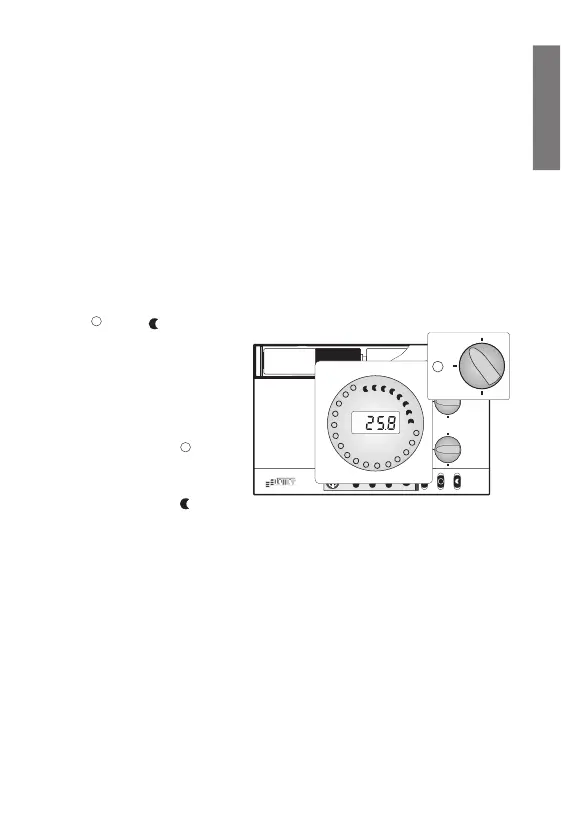
• “” and “”
temperatures are set by
the user by means of
two knobs an
temperatures are
indicated by figures
printed around them
• By pressing key “”
set temperature for this
knob is displayed
• By pressing key “”
set temperature for this knob is displayed
• By pressing key “C/H” time or current temperature is displayed again,
according to previous status. (Table 7)
ANTIFOULING
• If during all day no switching occurred, at noon the load is switched on for 2
minutes
• This to avoid fouling of any controlled valve or pump
KEYS SPEED
• During normal operation a key must be pressed for about 1 second before it is



 To Next Page