13
NOTE: It is possible to change the selection as many
times needed.
NOTE: It is possible to change the selection as many
times needed.
4. CONTROLS (CONT’D)
4.3 SPEED AND DEFROST SETTINGS FOR AVS E15 ECM ERV, AVS E15 ECM HRV, 90H-V ECM ERV AND
90H-V ECM HRV UNITS
The special design of AVS E15 ECM ERV, AVS E15 ECM HRV, 90H-V ECM ERV and 90H-V ECM HRV units offers 4 speed ranges to
better meet to different ventilation needs.
Refer to the table below to choose the right speed range
according to the size of the house:
These units are factory set to normal defrost. In cold region (outdoor
temperature -27°C [-17°F] and lower), it may be necessary to setup extended
defrost.
NOTE: These CFM values are
approximate, they may vary
according to the installation
static pressure.
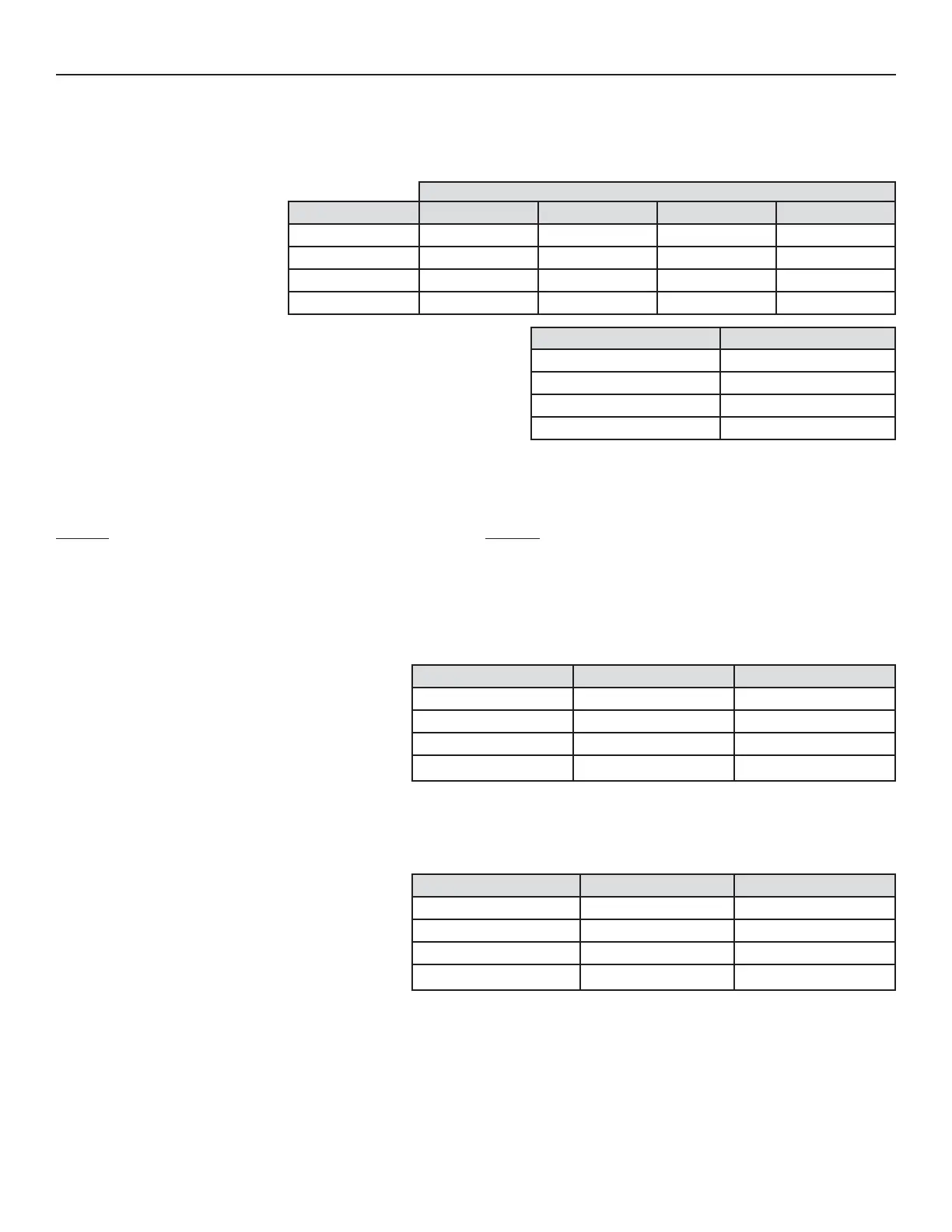
SPEED RANGE HRV MIN. SPEED HRV MAX. SPEED ERV MIN. SPEED ERV MAX. SPEED
1 HIGH (FACTORY SET) 80 CFM 157 CFM 84 CFM 140 CFM
2 MED-HIGH 66 CFM 132 CFM 67 CFM 120 CFM
3
MED-LOW 53 CFM 106 CFM 53 CFM 105 CFM
4
LOW 40 CFM 80 CFM 40 CFM 80 CFM
CFM VALUES
DEFROST TABLE DEFROST CYCLE
1 FACTORY SET (HRV UNITS) NORMAL (HRV UNITS)
2E
XTENDED (HRV UNITS)
3 F
ACTORY SET (ERV UNITS) NORMAL (ERV UNITS)
4E
XTENDED (ERV UNITS)
TO MODIFY THE FACTORY SETTINGS, PROCEED AS FOLLOW:
ACTION
During the first 7 seconds of booting sequence, while the
integrated control LED is AMBER, press on push button for about
3 seconds.
Set the speed range by presssing consecutively on push button
the number of times corresponding to the desired speed range.
See table below.
RESULT
The LED will blink RED one time every 3 seconds to indicate the
integrated control is in CFM setup mode (HIGH speed).
Every 3 seconds, the LED will blink RED the number of times
corresponding to the chosen speed range.
See table below.
NOTE: Anytime in setting process, if there is no activation on push button for 60 seconds, the unit will automatically exit setting mode, but
the settings made before this 60-second delay will remain.
SPEED RANGE PRESS ON PUSH BUTTON LED BLINKS RED
1
HIGH ONCE 1 TIME
2 MED-HIGH TWICE 2 TIMES
3 MED-LOW THREE TIMES 3 TIMES
4 LOW FOUR TIMES 4 TIMES
Press on push button for about 3 seconds to access setting
defrost mode.
Press on push button twice to set the unit in extended defrost
mode.
The LED will blink GREEN one time every 3 seconds to indicate
the unit is set in normal defrost mode.
The LED will blink GREEN twice every 3 seconds to indicate the
unit is in extended defrost mode.
DEFROST TABLE PRESS ON PUSH BUTTON LED BLINKS GREEN
1
NORMAL (HRV UNITS)ONCE 1 TIME
2 EXTENDED (HRV UNITS)TWICE 2 TIMES
3 NORMAL (ERV UNITS)THREE TIMES 3 TIMES
4 EXTENDED (ERV UNITS)FOUR TIMES 4 TIMES
Wait 60 seconds OR press 3 seconds on push button to exit
setting mode.
The LED will blink and shut off, then light RED (the unit returns
in its booting sequence).
4.4 SETTING EXTENDED DEFROST FOR AVS E15 HRV, AVS E10 HRV, 90H-V+ AND 60H-V+ UNITS
These units are factory set to normal defrost. In cold regions (outdoor temperature -27°C [-17°F] and lower), it may be necessary to setup
extended defrost. During the first 2 seconds of booting sequence, while the integrated control LED is GREEN, press on push button for
3 seconds to set the unit in extended defrost; the LED will blink AMBER to show the unit is in extended defrost mode. After that, the LED
will shut off, then light RED (the unit returns in its booting sequence).



 To Next Page