16
© Venom Group International 2013
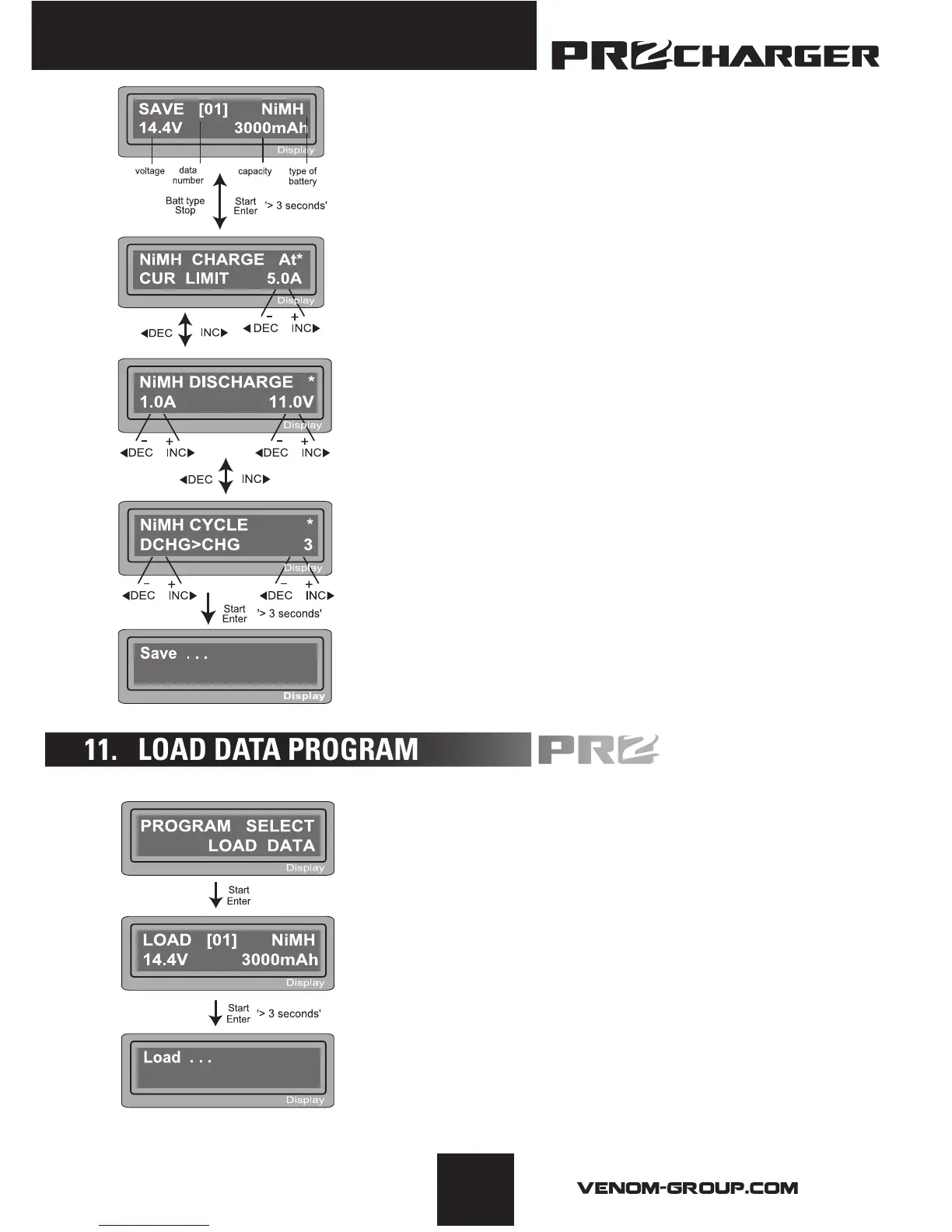
The value settings in this feature do NOT affect the
charge or discharge process, but rather allows you
to store statistics for commonly charged batteries to
speed up the charger setup time. To use this feature,
you will want to change the parameters to the exact
specifications of the batteries you wish to store. This
example shows a 12 cell, NiMH battery with a capacity
of 3000mAh.
Set up the charge current for manual charge mode, or
the current limit for automatic charge mode. Each mode
can be changed by pressing the increase/decrease
buttons at the same time when the “current” field is
blinking.
Setting up discharge current and final voltage.
Setting up the sequence of charge and discharge as
well as the amount of times to cycle.
Saving the data.
This program will call back the data that was stored
during the “Save Data” program. To load the data, press
START/ENTER once. Change the data number to the
battery you wish to recall using the increase/decrease
buttons, then press START/ENTER for 3 seconds.
Program select
Select the data number you wish to load. The data
displayed on screen is matched with the number
selected.
Loading the data.


 To Next Page