EasyManua.ls Logo

Venstar Residential T7900 - User Manual

Venstar Residential T7900
77 pages
Print Icon
To Next Page IconTo Next Page
Loading...
Owner’s Manual &
Installation Guide
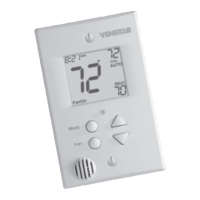
RESIDENTIAL MODEL T7900
with Humidity Control

Table of Contents

Question and Answer IconNeed help?

Do you have a question about the Venstar Residential T7900 and is the answer not in the manual?

Summary

Quick Start and Setup Guide

Selecting Temperature and Mode

How to adjust temperature setpoints and change operating modes.

Connecting to Wi-Fi (Initial Setup)

Steps for initial Wi-Fi network connection.

Connecting to Wi-Fi (From Menus)

How to connect to Wi-Fi via the settings menu.

Creating a Skyport Account

Guide to setting up an online account for remote access.

Main Menu - Schedule Configuration

Edit My Schedule

Modifying time periods and setpoints in the schedule.

Main Menu - Smart Fan Settings

Main Menu - Alerts Management

View Current Alerts

Displaying active service notifications.

Set;Edit Reminders

Configuring service alerts and reminders.

Main Menu - Humidity Control

Main Menu - Vacation;Away Mode

Main Menu - Security Features

Setpoint Limits

Restricting adjustable temperature ranges.

Main Menu - SD Card Operations

Main Menu - Installation Settings

Main Menu - Timers and Deadbands

Main Menu - Free Cooling Configuration

Free Cooling Setup

Setting up and enabling the free cooling feature.

Main Menu - Heat Pump Settings

Heat Pump Lockout Settings

Configuring heat pump lockout options.

Dual Fuel Settings

Configuring dual fuel operation.

Main Menu - AUX Output Settings

AUX Output Functionality

Defining the function and polarity of AUX outputs.

Main Menu - Fan Delay and Sensor Settings

Main Menu - Firmware and Maintenance

Firmware Upgrade Procedure

Updating the thermostat's operating software.

Main Menu - Wi-Fi and Skyport Connectivity

Wi-Fi Status and Setup

Managing network connections and status.

Skyport Services Configuration

Managing Skyport account services.

Main Menu - Emergency Heat Functionality

Initiating Emergency Heat

Steps to activate the emergency heat feature.

Emergency Heat Operation

How the system behaves during emergency heat mode.

Thermostat Installation Guide

Removing the Old Thermostat

Step-by-step guide for removing the previous unit.

Wire Connection Guide

Chart for matching old and new thermostat terminals.

Determining Existing Wiring

Assessing home HVAC wiring for compatibility.

Heat Pump Wiring Specifics

Details wiring for heat pump systems.

Wiring Configurations (Fewer Wires)

Guides for using fewer wires than required.

Backplate Installation Procedure

Details on mounting the thermostat backplate.

Thermostat Dip Switch Functions

Explanation of the purpose of dip switches.

Sample Wiring Diagrams

Visual guides for common HVAC system wiring.

Troubleshooting Common Issues

Touchscreen Responsiveness Solutions

Addressing unresponsive touch buttons.

Blank Display Troubleshooting Steps

Steps for resolving a blank screen.

HVAC Operation Problems Diagnosis

Diagnosing issues with cooling or heating activation.

Heat Pump and System Type Errors

Resolving configuration mismatches.

Sensor Wiring Issue Resolution

Addressing problems related to outdoor or other sensors.

Product Warranty Details

Summary

Quick Start and Setup Guide

Selecting Temperature and Mode

How to adjust temperature setpoints and change operating modes.

Connecting to Wi-Fi (Initial Setup)

Steps for initial Wi-Fi network connection.

Connecting to Wi-Fi (From Menus)

How to connect to Wi-Fi via the settings menu.

Creating a Skyport Account

Guide to setting up an online account for remote access.

Main Menu - Schedule Configuration

Edit My Schedule

Modifying time periods and setpoints in the schedule.

Main Menu - Smart Fan Settings

Main Menu - Alerts Management

View Current Alerts

Displaying active service notifications.

Set;Edit Reminders

Configuring service alerts and reminders.

Main Menu - Humidity Control

Main Menu - Vacation;Away Mode

Main Menu - Security Features

Setpoint Limits

Restricting adjustable temperature ranges.

Main Menu - SD Card Operations

Main Menu - Installation Settings

Main Menu - Timers and Deadbands

Main Menu - Free Cooling Configuration

Free Cooling Setup

Setting up and enabling the free cooling feature.

Main Menu - Heat Pump Settings

Heat Pump Lockout Settings

Configuring heat pump lockout options.

Dual Fuel Settings

Configuring dual fuel operation.

Main Menu - AUX Output Settings

AUX Output Functionality

Defining the function and polarity of AUX outputs.

Main Menu - Fan Delay and Sensor Settings

Main Menu - Firmware and Maintenance

Firmware Upgrade Procedure

Updating the thermostat's operating software.

Main Menu - Wi-Fi and Skyport Connectivity

Wi-Fi Status and Setup

Managing network connections and status.

Skyport Services Configuration

Managing Skyport account services.

Main Menu - Emergency Heat Functionality

Initiating Emergency Heat

Steps to activate the emergency heat feature.

Emergency Heat Operation

How the system behaves during emergency heat mode.

Thermostat Installation Guide

Removing the Old Thermostat

Step-by-step guide for removing the previous unit.

Wire Connection Guide

Chart for matching old and new thermostat terminals.

Determining Existing Wiring

Assessing home HVAC wiring for compatibility.

Heat Pump Wiring Specifics

Details wiring for heat pump systems.

Wiring Configurations (Fewer Wires)

Guides for using fewer wires than required.

Backplate Installation Procedure

Details on mounting the thermostat backplate.

Thermostat Dip Switch Functions

Explanation of the purpose of dip switches.

Sample Wiring Diagrams

Visual guides for common HVAC system wiring.

Troubleshooting Common Issues

Touchscreen Responsiveness Solutions

Addressing unresponsive touch buttons.

Blank Display Troubleshooting Steps

Steps for resolving a blank screen.

HVAC Operation Problems Diagnosis

Diagnosing issues with cooling or heating activation.

Heat Pump and System Type Errors

Resolving configuration mismatches.

Sensor Wiring Issue Resolution

Addressing problems related to outdoor or other sensors.

Product Warranty Details

Venstar Residential T7900 Specifications

General IconGeneral
Wi-FiYes
Energy SavingYes
Battery BackupYes
Programmability7-day programmable
ConnectivityWi-Fi
Remote AccessYes
Energy Star CertifiedYes
Humidity ControlYes
CompatibilityHeat Pump
Stages2 Heat / 2 Cool
Power Method24V AC
Power Source24 VAC

Related product manuals