PROG JUMPER SETTING
If the jumper for MISC1, MISC2, or MISC3 is set to PROG,
terminal on the backplate will control a pilot relay or other accessory.
the corresponding MISC screw
Page 21.3
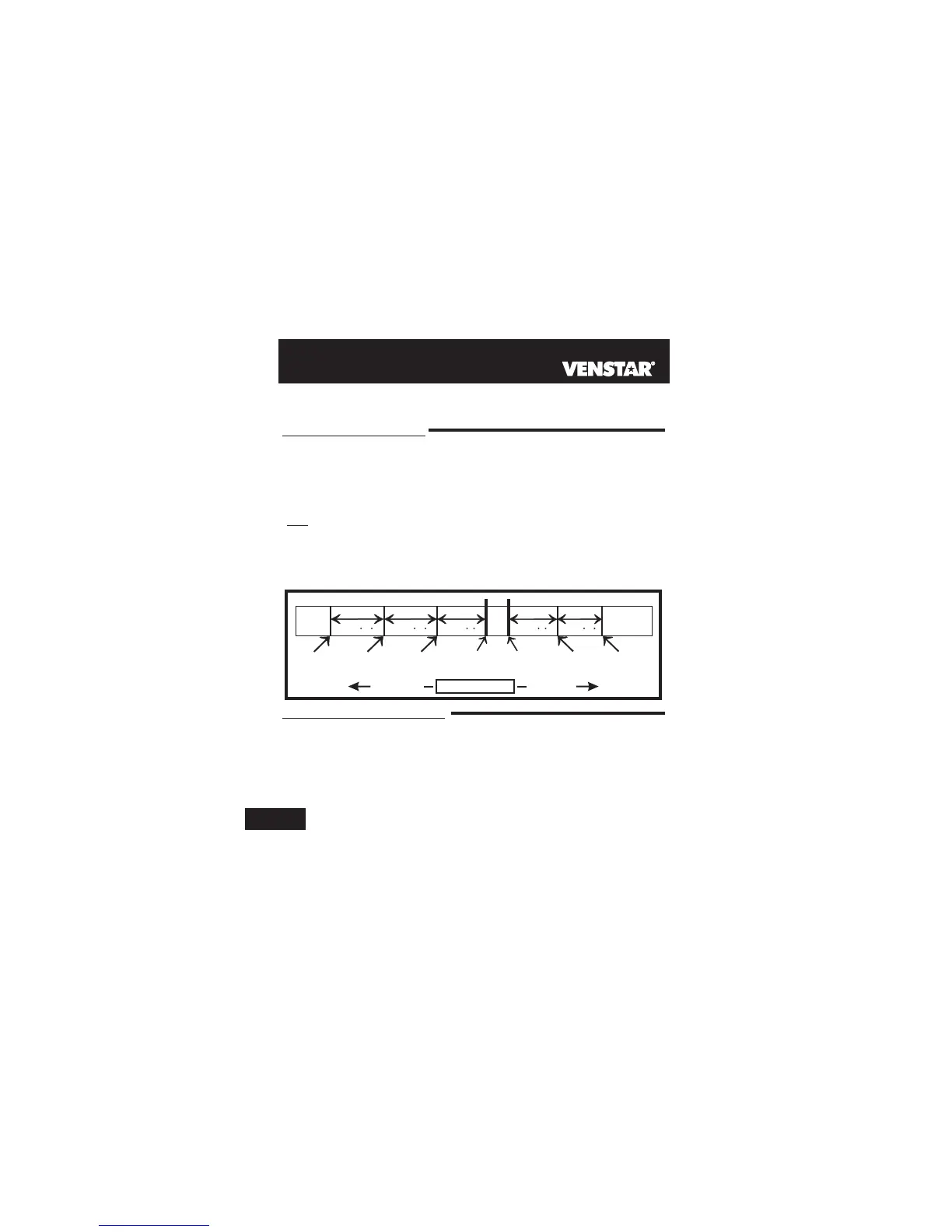
The 3rd Stage of Heat is turned on when:
W3 JUMPER SETTING
If the jumper for MISC1, MISC2, or MISC3 is set to W3, the corresponding MISC screw terminal
on the backplate will control a third stage of heat.
Explanation of Jumper Settings
And
Heat
Setpoint
Cool
Setpoint
Deadband Deadband DeadbandDeadbandDeadband
db 1 db 1db 2 db 2db 3
(adj. 1-6 )(adj. 0-10 )(adj. 0-10 ) (adj. 0-10 )(adj. 1-6 )
1st Stage
turn on
2nd Stage
turn on
3rd Stage
turn on
1st Stage
turn on
2nd Stage
turn on
Heating
Cooling
TEMPERATURE
DECREASE INCREASE
W3 MULTI-STAGE OPERATION EXPLAINED - Section 13
This jumper setting allows the MISC outputs to control a pilot relay by time,
temperature, or a signal from the Phone. The following are three possible
scenarios:
PROGRAMMABLE OUTPUT - Section 14
21
(B) The temperature from the setpoint is equal to or greater than: the set-
point plus the 1st stage deadband (step #24, 13.5), plus the 2nd stage
deadband (step #25, 13.5) plus the 3rd stage deadband (step #26,
13.5). This 3rd stage deadband is adjustable from 0-10 degrees and
the default is two degrees.
(A) The 1st and 2nd stages have been on for the time required (steps #27
and #28, page 13.6). It is adjustable from 0-60 minutes and the default
is two minutes.
By Temperature: An exhaust fan that needs to energize whenever
the temperature from RS1 rises above 90 degrees F.
By Remote: Remotely arming a security system through the phone.
By Time: A device that requires a start and stop time. For example, an
exterior lighting system that needed to be energized every day
between the hours of 8pm and 1am.



 To Next Page