11
EN
ELECTRONIC SYSTEM OPERATION ALGORITHM
The T model fans equipped with a timer are activated by control voltage application to input terminal LT by an external
switch S (e.g. indoor light switch). After the control voltage is off, the fan continues to operate within the set time period
adjustable from 2 to 30 minutes by the timer. For the VT model, the fan is turned on/off with an internal cord switch.
The fan with a timer and a humidity sensor (TH) — the fan starts after the control voltage is supplied to the input
terminal LT or if indoor humidity level H exceeds the set point adjustable from ~60 % to ~90 %. After the control voltage is
off or the humidity level H has decreased, the fan will keep running within the time, set by the turn-off delay timer, ranging
from 2 to 30 minutes.
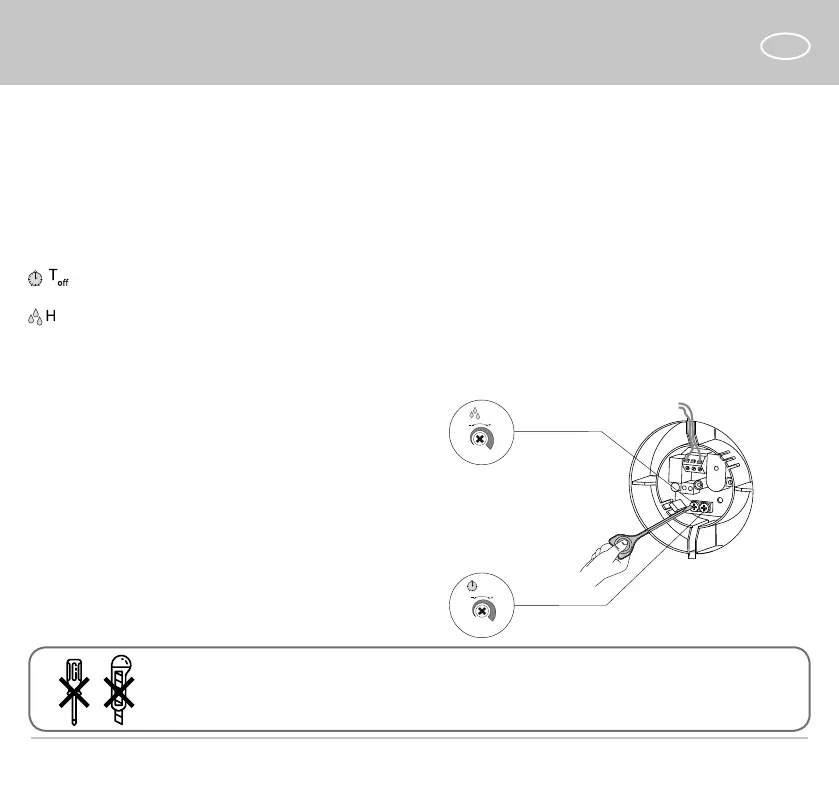
— to adjust the fan turn-off delay time, turn the control knob T
o
clockwise to increase and counter-clockwise to
decrease the turn-off delay time, adjustable from 2 up to 30 minutes.
— to adjust the humidity set point, turn the control knob H clockwise to increase and counter-clockwise to decrease the
humidity sensor set point, adjustable from 60 % up to 90 %.
The fan delivery set includes a specially designed plastic
screwdriver for fan settings adjustments.
Use it to change the turn-on and turn-off delay time and
the humidity set point.
T
o
2 min
30 min
H
60%
90%
for TH/VTH
for T/TH/VT/VTH
DO NOT USE A METAL SCREWDRIVER, KNIFE, ETC. FOR ADJUSTMENT
OPERATIONS NOT TO DAMAGE THE CIRCUIT BOARD

 To Next Page
 Loading...